


As a marketer, you might have found yourself in this scenario multiple times.
A campaign brief is still being finalized. Messaging is spread across product notes, sales feedback, and previous decks. One strong content asset gets created, but repurposing takes too long. Review cycles get stuck. Follow-up happens late. Reporting takes days. And by the time the team sees what went wrong, the next campaign has already started.
You’d want to see those bottlenecks before it’s too late, don’t you? This is where AI can create real value.
Not by replacing marketers. Not by flooding your funnel with generic content. But by reducing the operational bottlenecks that delay campaign execution.
The best AI workflows help teams move faster across planning, production, review, coordination, personalization, and reporting. They reduce handoff friction, improve visibility, and help teams execute with more consistency.
Read on further to see the seven best AI workflows for marketers. You can use these to reduce campaign bottlenecks — and what to look for if you want to operationalize them at scale.
But before that, let’s take a look at some reasons as to why the campaigns get stuck in the first place.
Why campaign bottlenecks happen in the first place
In most marketing teams, bottlenecks show up in one of these forms:
- campaign planning starts with incomplete inputs
- positioning is spread across multiple documents and teams
- content creation depends too heavily on one or two people
- approvals happen in email, chat, docs, and meetings
- webinar and lead follow-up are delayed
- status reporting is manual and disconnected from execution
- ownership is unclear across teams like content, demand gen, design, product marketing, and sales
These are not just content problems. They are workflow problems. And, this distinction matters because AI only creates leverage when it is applied to the workflow itself, not just to the writing task inside it.
If the process is broken, AI will only help you produce broken outputs faster. But if the workflow is structured, AI can meaningfully reduce campaign delays.
Now that you know the reasons, let’s get to the best AI workflows.
7 Best AI workflows for marketers
1. Automate ‘campaign brief to the execution plan’ workflow
One of the first bottlenecks presents itself even before the actual work begins!
A team knows it needs to launch a campaign, promote a webinar, support a feature release, or build a nurture sequence. But the actual execution plan is still unclear. The audience, message pillars, channels, CTA, assets, timeline, and owners all need to be aligned before the work can move.
AI can help turn rough campaign inputs into a structured first draft of execution.
What this workflow does
AI takes campaign inputs such as:
- objective
- audience
- offer or event details
- positioning notes
- product context
- sales objections
- target channels
- timeline requirements
Then it generates:
- a campaign brief
- message pillars
- CTA suggestions
- asset lists by channel
- launch timeline
- owner suggestions
- dependency mapping
Why does it reduce bottlenecks?
Instead of spending days getting from “we need a campaign” to “here is the plan,” the team starts with a working structure. That shortens kickoff time and reduces confusion across stakeholders.
An example workflow
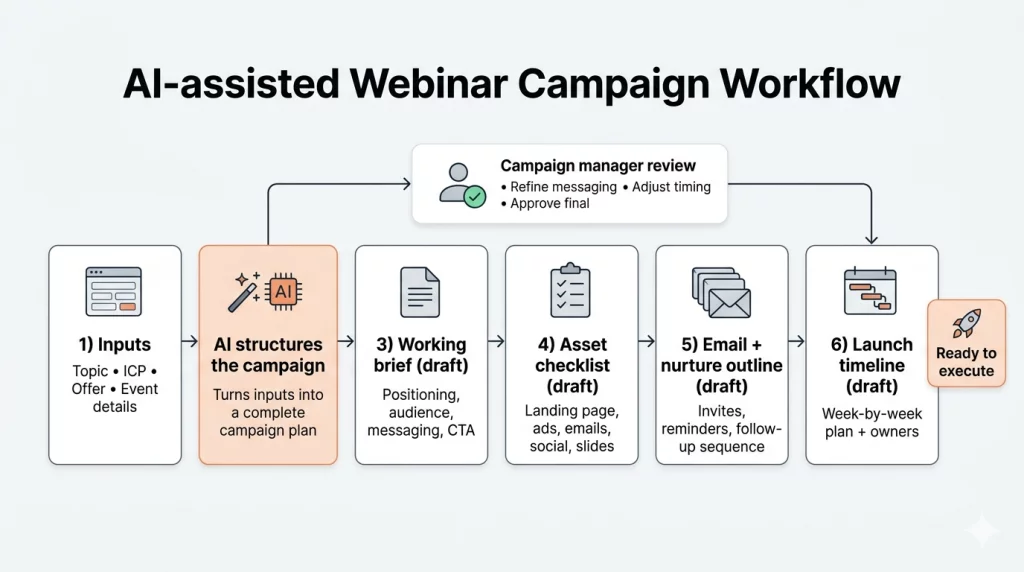
A product marketing team wants to run a webinar campaign for enterprise buyers. AI helps convert the topic, ICP, offer, and event details into a working brief, asset checklist, email sequence outline, and launch timeline. The campaign manager refines it, but the heavy lift of structuring the campaign is already done.

2. Turn scattered research into campaign messaging
Positioning rarely fails because of a lack of information. It fails because the information never gets synthesized into something usable.
Sales call notes, CRM data, webinar questions, customer interviews, competitor pages, analyst reports, and product decks all exist somewhere. But pulling them together into clear, campaign-ready messaging takes time most teams do not have.
AI can help process scattered inputs and surface what actually matters.
What this workflow does
AI reviews internal and external sources to extract:
- recurring pain points
- objections and buying hesitations
- triggers that move someone from interest to action
- language customers actually use
- competitive themes and gaps
- proof points by persona or funnel stage
- message gaps that existing content is not addressing
Why does it reduce bottlenecks?
It shortens the path from research to messaging. Instead of manually reading through notes, decks, and transcripts, marketers get a synthesized view of the themes they should actually build the campaign around. The writing starts from a stronger foundation, which means fewer revision rounds later.
An example
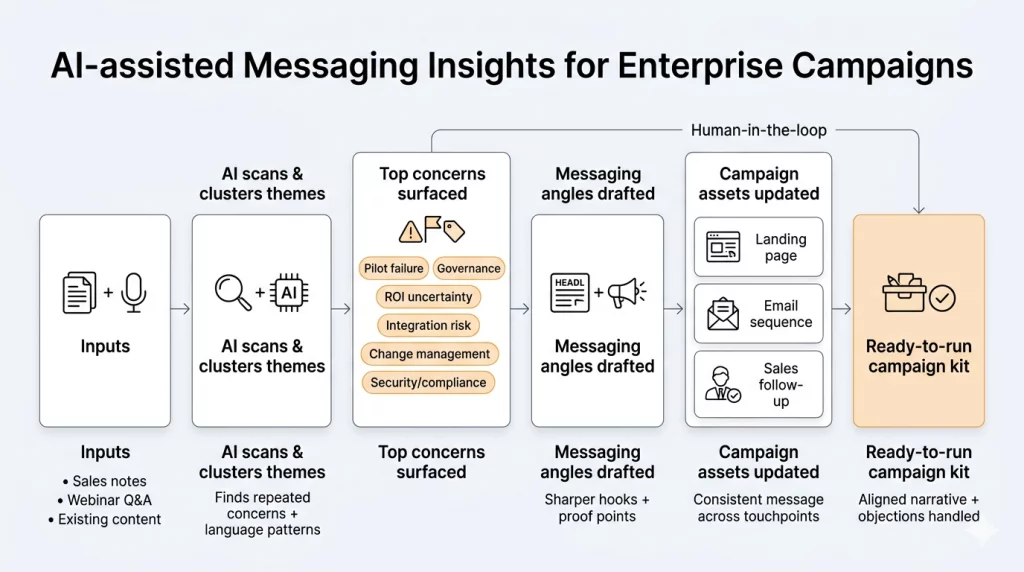
A team building a campaign around a new software capability reviews sales call notes, webinar Q&As, and support tickets. AI surfaces that the most repeated concerns are around onboarding complexity, integration risk, and proving ROI internally. That gives the team sharper messaging for the landing page, email sequence, and sales follow-up — instead of leading with feature specs nobody asked about.

3. Repurpose one core asset into a full campaign
Most campaigns start with one strong piece of work — a webinar, a research-backed guide, a customer story, a long-form blog, or an internal point-of-view document.
But one asset rarely carries a campaign on its own.
You still need landing page copy, email nurtures, social content, ad variations, short-form video scripts, newsletter blurbs, and sales enablement snippets. That is where teams slow down — not because the thinking is missing, but because the reformatting and adapting takes too long.
What this workflow does
AI takes one core source asset and repurposes it into multiple campaign-ready formats, adapting for:
- channel and format
- tone and length
- persona and funnel stage
- CTA relevance
- platform-specific conventions
Why does it reduce bottlenecks?
It removes the need to create every asset from scratch. Teams get more distribution from the same investment of thinking, without overloading writers or designers. Content velocity increases without a proportional increase in effort.
An example
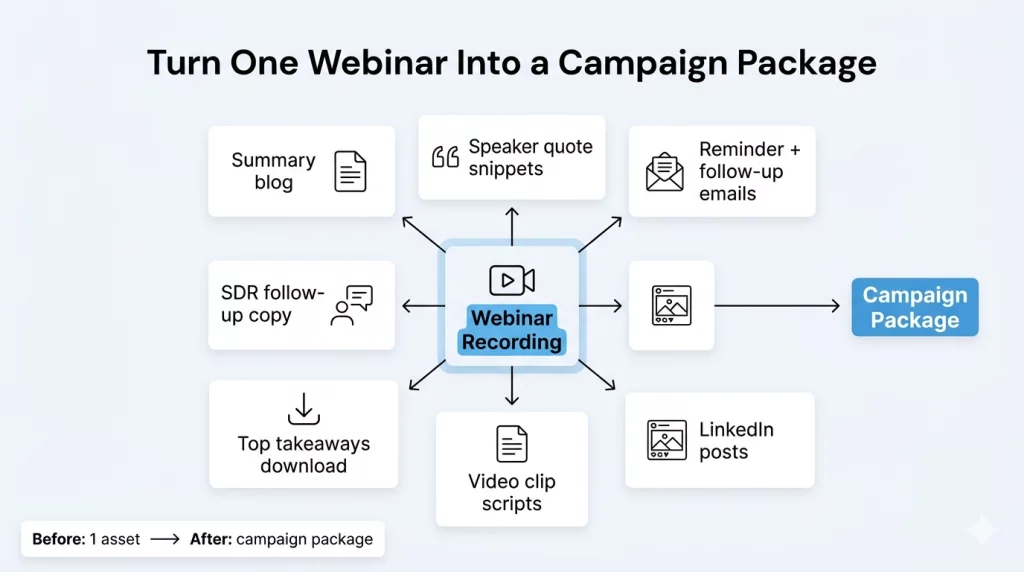
A recorded webinar becomes:
- a summary blog post
- speaker quote snippets for social
- reminder and follow-up emails
- LinkedIn posts for the week after the event
- a short video clip script
- a “top takeaways” one-pager
- outreach copy for the sales team
Instead of getting one usable asset from the webinar, the team gets a campaign package — without starting from a blank page each time.

4. Catch messaging and quality issues before the review round starts
Review cycles are one of the most consistent causes of campaign delay — not because stakeholders are slow, but because avoidable issues keep surfacing mid-review.
Tone is off. A CTA is missing. The value proposition shifts between emails. An outdated product term is still in the copy. The same feedback gets repeated across rounds because nothing caught it earlier.
AI can act as a structured first-pass review before the asset reaches anyone.
What this workflow does
AI checks drafts for:
- grammar and readability issues
- clarity and logical structure
- brand tone consistency across the asset
- missing, weak, or mismatched CTAs
- SEO fundamentals
- repetition and bloated phrasing
- outdated positioning language
- formatting inconsistencies
- compliance or risk flags where applicable
Why does it reduce bottlenecks?
Human reviewers spend less time fixing avoidable issues and more time improving the content strategically. When the draft that reaches stakeholders is already clean, the feedback is sharper and the number of rounds goes down.
An example
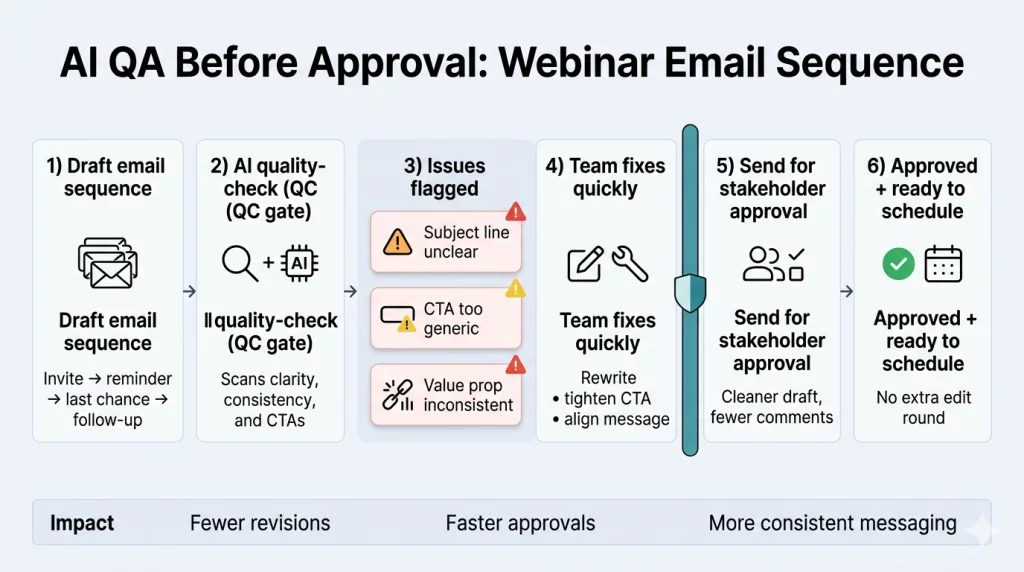
Before an email sequence goes for approval, AI flags that one subject line is unclear, one CTA is too generic to drive action, and the value proposition shifts inconsistently across the three emails. The team fixes those before sending it to stakeholders — avoiding a full extra round of edits and the back-and-forth that comes with it.

5. Turn a campaign plan into an orchestrated execution
Strong content does not guarantee a smooth campaign launch.
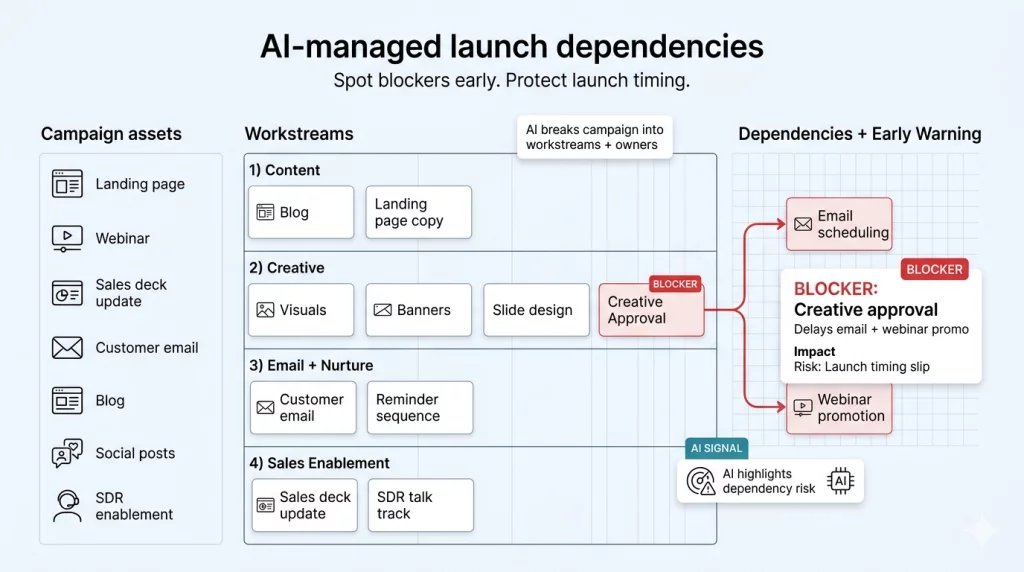
Campaigns break down in execution because the work is scattered. Design is waiting on copy. Email scheduling is waiting on landing page approval. The sales team does not have the follow-up note. One blocker delays three downstream tasks — and nobody sees it until a deadline has already slipped.
AI can help surface that operational drag before it becomes a problem.
What this workflow does
AI helps teams move from plan to execution by:
- converting campaign briefs into structured task lists
- assigning owners based on role and workstream
- suggesting realistic due dates with buffer for dependencies
- identifying which tasks are blocking others
- summarizing progress across the campaign
- flagging stalled or at-risk work
- recommending next steps when blockers appear
Why does it reduce bottlenecks?
It gives teams visibility across execution — not just into individual tasks, but into how the campaign is moving as a whole. That matters most when the work spans multiple teams and stakeholders who are not always in the same room.
An example
A product launch campaign includes a landing page, email announcement, a webinar, a sales deck update, a blog, social posts, and outreach copy. AI breaks the campaign into workstreams, maps dependencies, and flags that creative approval is now blocking both email scheduling and event promotion. The team sees the issue early — instead of discovering it the day before launch.

6. Personalize follow-up without slowing response time
A significant amount of pipeline is lost not because the campaign underperformed — but because follow-up was slow, generic, or not connected to what the lead actually engaged with.
Someone registers for an event, downloads a guide, or clicks through a campaign email. But the follow-up they receive is the same message everyone else got, sent days later.
AI can help marketing teams close that gap between signal and response.
What this workflow does
AI helps teams:
- draft personalized follow-up emails based on lead behavior or source
- segment contacts by engagement level, intent signal, or profile
- adapt nurture tracks by persona, industry, or funnel stage
- summarize lead activity for sales handoff
- recommend the next most relevant content or CTA
- trigger follow-up reminders when engagement signals appear
Why does it reduce bottlenecks?
It removes the manual effort of writing every follow-up variation while improving both response speed and message relevance. Leads get follow-up that reflects what they actually did — not a generic drip sequence that ignores context.
An example
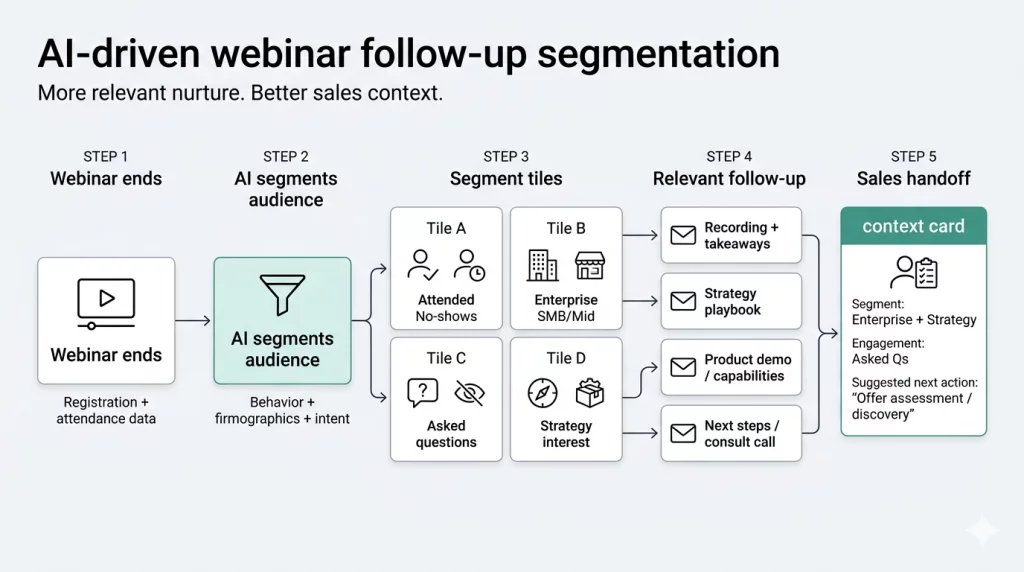
After a webinar, AI separates contacts into segments:
- people who attended versus those who registered but did not show
- contacts who asked questions during the session versus passive attendees
- profiles that match a decision-maker role versus earlier-stage researchers
- leads who engaged with product-focused content versus those interested in strategy
Each segment receives follow-up that fits where they are. The sales team also gets a summary of who engaged, what they asked, and what they are likely evaluating, so outreach starts with context instead of cold.

7. Performance analysis and next-step recommendations
Post-campaign reporting is one of the slowest parts of the marketing cycle — and one of the least discussed bottlenecks.
Teams pull data from analytics platforms, email tools, ad platforms, CRM systems, webinar dashboards, and spreadsheets. Someone has to clean it, combine it, explain it, and turn it into a recommendation. By the time that is ready, the next campaign is already mid-execution.
AI can help close the gap between what happened and what to do next.
What this workflow does
AI helps teams gather and summarize campaign performance across sources, including:
- website traffic and conversion data
- email open, click, and reply rates
- ad performance by channel and creative
- event registrations and attendance rates
- CRM stage progression
- content engagement by asset and format
Then it turns that data into:
- plain-language summaries stakeholders can actually read
- trend identification across campaigns
- anomaly detection when something underperforms unexpectedly
- bottleneck analysis by campaign stage
- specific recommendations for the next campaign
Why does it reduce bottlenecks?
It moves teams from manual reporting to faster decision-making. The goal is not just knowing what happened, it is understanding what needs to change before the next campaign repeats the same pattern.
An example
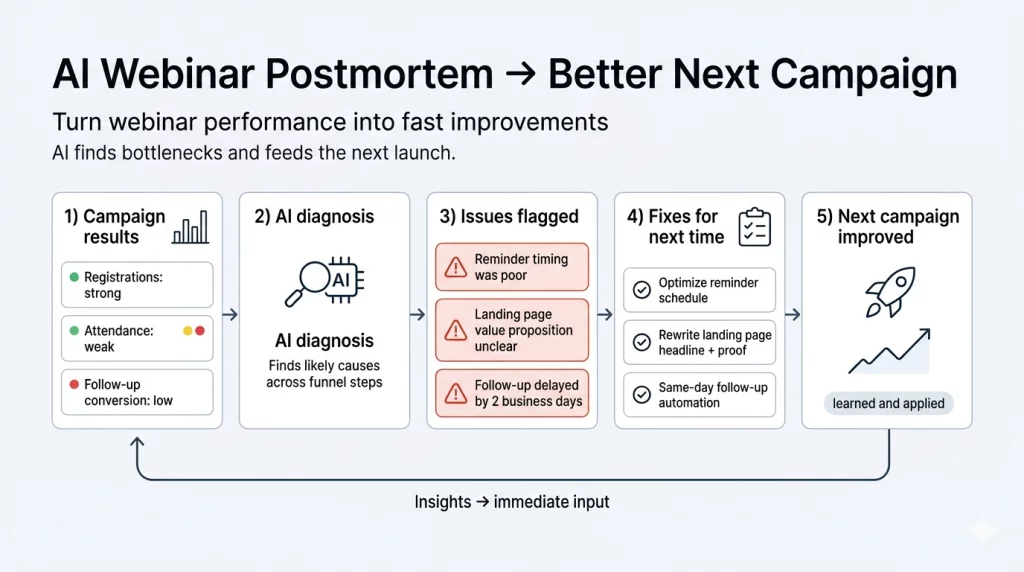
A campaign drove strong registrations but weak attendance and low post-event conversion. AI identifies that reminder emails went out too late, the landing page did not clearly communicate the value of attending live, and follow-up was delayed by two days after the event. That insight becomes immediate input for the next campaign, not a slide in a debrief deck that nobody revisits.
What these workflows actually change for marketing teams
The value of these AI workflows is not just speed. It is a better campaign flow. Used well, these workflows help teams:
- start campaigns faster
- turn research into messaging faster
- create more assets from fewer inputs
- reduce review cycles
- improve coordination across teams
- follow up faster with more relevance
- learn from performance sooner
That matters even more for lean teams, where the real constraint is not ambition. It is an execution capacity.
What to look for in an AI platform for campaign execution
Most buyers evaluating AI for marketing already know AI can generate content. The real question is whether the tool can support the actual workflow behind campaign execution.
If your goal is to reduce campaign bottlenecks, look for a platform that helps your team:
- connect planning, content, tasks, and reporting in one place
- manage dependencies across teams
- centralize approvals and discussions
- track work in real time
- support repeatable workflows for campaigns, webinars, launches, and nurtures
- improve visibility for both marketers and leadership
- embed AI into execution, not just into writing
This is where many teams outgrow point solutions.
A standalone content tool may help draft faster, but it will not solve operational issues like unclear ownership, delayed approvals, or fragmented campaign visibility.
Where NimbleWork fits
NimbleWork is built for teams that want to manage campaigns as connected workflows instead of scattered tasks. It brings planning, execution, visibility, and collaboration into one system, which matters more as campaigns grow more cross-functional and the number of moving parts increases.
With the right setup, teams can build repeatable campaign workflows, manage assets, tasks, approvals, and deadlines in one place, coordinate across functions without losing context, and see where blockers are forming before they delay a launch. Leadership gets visibility without needing a status meeting. The team gets clarity without needing to chase updates.
That is the difference between using AI as a side tool and using AI inside the system where campaign work actually happens. And that is what reduces bottlenecks in a way the whole team can feel.
Final thoughts
The best AI workflows for marketers are the ones that remove the same friction your team keeps running into, campaign after campaign.
They help teams plan faster, write faster, review faster, coordinate faster, follow up faster, and learn faster. They reduce the handoff problems that nobody talks about in planning but everyone feels in execution. And they make it easier to run consistent, high-quality campaigns without adding more tools, more meetings, or more chaos to the process.
If your campaigns keep slowing down in the same places, the answer is rarely more headcount or a bigger tech stack. More often, it is a better workflow — one where every stage connects to the next and nothing important falls through the gap.
That is the most useful thing AI can do for a marketing team. Not replace the thinking. Just help the work move.
FAQs
1. Where do AI workflows actually save the most time in a campaign?
The biggest gains tend to show up in the early and late stages, campaign planning and post-campaign reporting. These are the phases where work is most manual and least visible. Turning a rough campaign brief into a structured execution plan, or converting campaign data into a clear recommendation, can each take days when done manually. AI compresses both significantly. Mid-campaign, the biggest save is in content repurposing and review, reducing how many times the same asset gets touched before it is ready to publish.
2. Do I need to change how my team works to use these workflows?
Not entirely. The most effective approach is to map AI onto the bottlenecks that already exist in your process, not to redesign everything at once. Start with the one stage where work most consistently slows down, whether that is brief creation, review cycles, or post-campaign reporting, and build the workflow there first. Once that becomes routine, expanding is much easier.
3. Can AI handle campaign work across different channels and formats?
Yes, and this is where repurposing workflows add the most value. A single source asset, a webinar, a long-form guide, a customer story, can be adapted into email copy, social posts, ad variations, sales enablement content, and more. The key is giving AI enough context about the channel, the audience, and the goal so the output does not feel like it was just reformatted without any thought.
4. How do I make sure AI-generated content still sounds like our brand?
The output quality depends heavily on the input quality. When you give AI clear brand guidelines, tone examples, audience context, and positioning notes, the gap between generated content and on-brand content narrows considerably. Most teams build a prompt layer that carries brand context, either through a structured system prompt or a reference document, so it does not have to be re-explained every time.
5. What is the difference between using AI for content and using AI for campaign workflows?
Using AI for content means using it to write or edit. Using AI for campaign workflows means connecting it to the actual process, planning, task management, reviews, follow-up, and reporting. Content AI helps you produce faster. Workflow AI helps the campaign move faster. The real leverage comes when both are working together inside the same system, rather than as separate tools that do not talk to each other.
6. Is AI useful for smaller marketing teams or only for large ones?
It is arguably more useful for smaller teams. When you have fewer people, every operational bottleneck hits harder. A two-person team that loses two days to a slow review cycle or a late follow-up sequence feels that directly in pipeline. AI workflows help lean teams execute with a level of consistency and speed that would otherwise require more headcount. The constraint for most small teams is not ambition, it is execution capacity, and that is exactly what these workflows address.