


The best work management software for enterprise teams depends on where work gets stuck between request and result.
For connected projects running Agile, Waterfall or hybrid delivery, compare Nimble. For cross-functional initiatives with clear owners, compare Asana. For workflows teams design themselves, compare monday work management and Airtable. For formal projects with repeatable steps, compare Wrike. For spreadsheet-style planning, compare Smartsheet. For one broad workspace, compare ClickUp. For product backlogs and sprints, compare Jira.
Key takeaways
- Work management connects requests, tasks, owners, dependencies, capacity and delivery across teams.
- Task management tracks assignments. Work management shows how assignments affect shared work and commitments.
- Choose a tool for the coordination problem you need to solve. More features do not automatically mean better work management.
- Enterprise teams should test governance, permissions and integrations, not only features.
A project can be “on track” in every team update and still miss its launch date. The cause often sits between the tasks: a decision no one owns, a specialist booked on three projects, or a handoff that depends on work another team has not started. Work management software makes that gap visible.
Work management software helps teams move work from request to completion
Work management software connects what needs to be done, why it matters, who owns it, what it depends on, when people can do it and how progress is reported. At enterprise scale, that chain crosses many teams, tools and delivery methods.
Task management software tracks individual tasks: owner, due date, status and next step. Work management includes task tracking. It also covers how work is requested, prioritized, coordinated, staffed and delivered across teams.
| Type of software | Main question it answers | Example |
|---|---|---|
| Task management | What do I need to do next? | A designer’s list of assigned work |
| Project management | How will we deliver this defined project? | A launch plan with milestones and dependencies |
| Work management | How does work move across people and teams, and where does it get stuck? | A view of incoming work, owners, capacity, handoffs and progress across projects |
| Collaboration software | Where do we discuss, share and edit together? | Chat, meetings, comments and shared documents |
The categories overlap, and many products include features from more than one. The useful distinction is the job you need the software to do. A board with task owners is task tracking. It becomes part of a work management system when teams use it to coordinate intake, dependencies, capacity and progress across shared work.
What work management software is NOT
- Not a strategy tool. It can show competing requests, but leaders still make the trade-off.
- Not a replacement for team judgment. A dashboard can surface a delay. It cannot settle an unclear decision right or a dispute over priority.
- Not a reason to put every small task into a company-wide system. If work stays with one person or a small team, a task list may be enough.
Eight work management tools for enterprise teams at a glance
Prices are in USD from each vendor’s pricing page, last checked [add date after re-checking]. Annual billing, seat minimums, regional pricing and add-ons change the total. The plans are not comparable feature for feature.
| Tool | Best for | What it brings to the work | Pricing |
|---|---|---|---|
| Nimble | Enterprise teams running connected projects with Agile, Waterfall or hybrid delivery | Timeline and dependency views, cross-project card relationships, advanced scheduling, and organization hierarchy and portfolio management on Enterprise | Team: $10/user/month. Business: $26/user/month. Enterprise: contact sales |
| Asana | Cross-functional initiatives with clear owners and outcomes | Projects, forms, goals, portfolios, reporting and workload features | Starter: $10.99/user/month. Advanced: $24.99/user/month, billed annually |
| monday work management | Teams shaping visual workflows around their process | Boards, views, automations and connections across work | Free plan. Paid from $9/seat/month, billed annually, 3-seat minimum |
| ClickUp | Teams bringing tasks, documents and planning into one workspace | Tasks, docs, goals, forms, time tracking and multiple views | Free plan. Core: $9/user/month, billed yearly |
| Wrike | Structured projects with repeatable steps and handoffs | Gantt charts, dashboards, request forms and configurable workflows | Free plan. Team: $10/user/month. Business: $25/user/month |
| Smartsheet | Spreadsheet-style project and program planning | Grid, Gantt, forms, dashboards, workload tracking and portfolio add-ons | Pro: $9/member/month. Business: $19/member/month, billed yearly. Higher tiers custom |
| Airtable | Custom trackers built around structured information | Database-style records, interfaces, views and automations | Free plan. Team: $20/user/month. Business: $45/user/month, billed annually |
| Jira | Product and software teams using backlogs and sprints | Issues, boards, roadmaps, reporting and automation | Free for up to 10 users. Standard: $8.48/user/month |
Choose by the coordination problem, not the feature count
Work management products look alike in a feature checklist. The differences show up when work gets complicated. Does a delay affect one task or five teams? Do requests need review before they become commitments? Does the organization need a custom tracker, a standard project method or a portfolio view?
1. Nimble (by NimbleWork)
Best when teams run multiple projects across different delivery methods
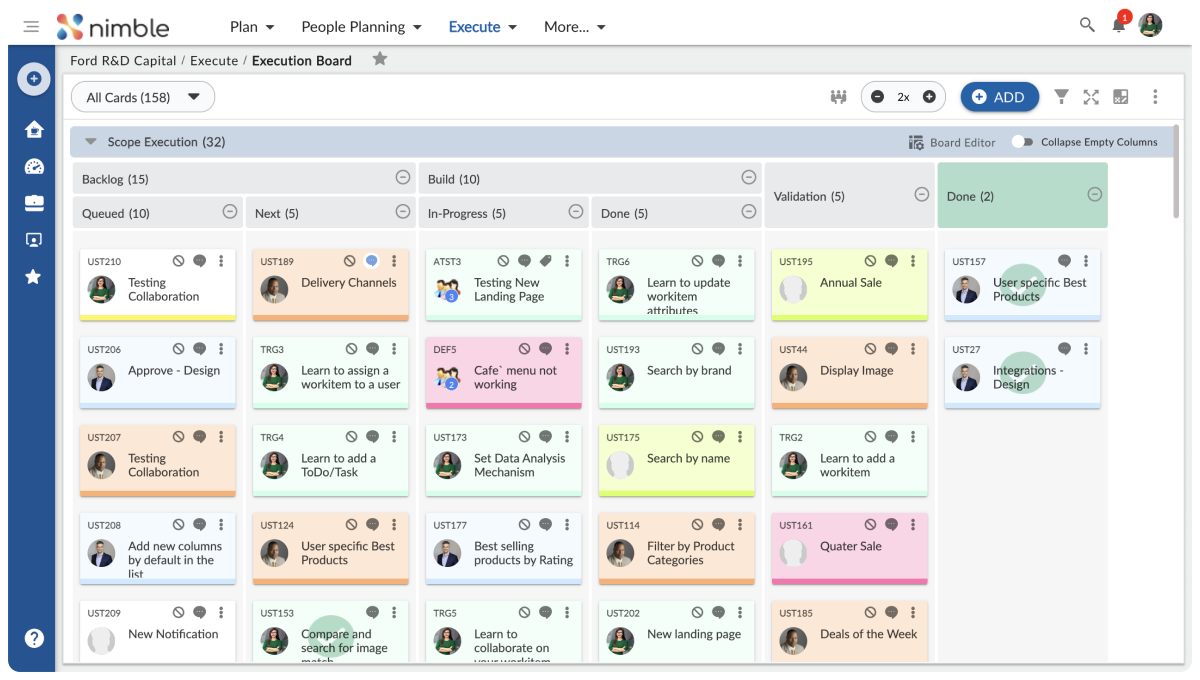
Nimble is best for enterprise teams whose work connects across projects and delivery methods. Teams use boards and lists for daily tracking. The Business plan adds timeline and dependency views, cross-project card relationships, hybrid Agile planning and advanced scheduling for Waterfall execution. The Enterprise plan adds organization hierarchy and portfolio management.

That mix matters when a project plan is not enough. If a resource moves, a dependency slips or priorities change, delivery leads need to see which other commitments are affected. Nimble integrates with Jira, Azure DevOps and GitHub. Jira stays. Nimble connects the work above it.
Good fit when: several teams share resources or dependencies, and the organization uses more than one delivery method.

Pros
- Timeline and dependency views and cross-project card relationships, so a slip on one project shows on others.
- Agile, hybrid and Waterfall scheduling in one tool.
- Single sign-on from Business. Organization hierarchy and portfolio management on Enterprise.
- Integrations with Jira, Azure DevOps and GitHub. Jira stays.
Cons
- Implementation requires a dedicated administrator or a professional services engagement.
- A team of fewer than 30 people on a single backlog may find it more structure than it needs.
- Advanced planning sits above the entry tier, so map your workflows to a plan before you compare price.
Pricing: 30-day free trial available. Team is $10/user/month and Business is $26/user/month. Enterprise pricing is through sales. The advanced planning capabilities sit above the entry tier, so map your workflows to the plan before comparing price.
2. Asana
Best when departments share ownership
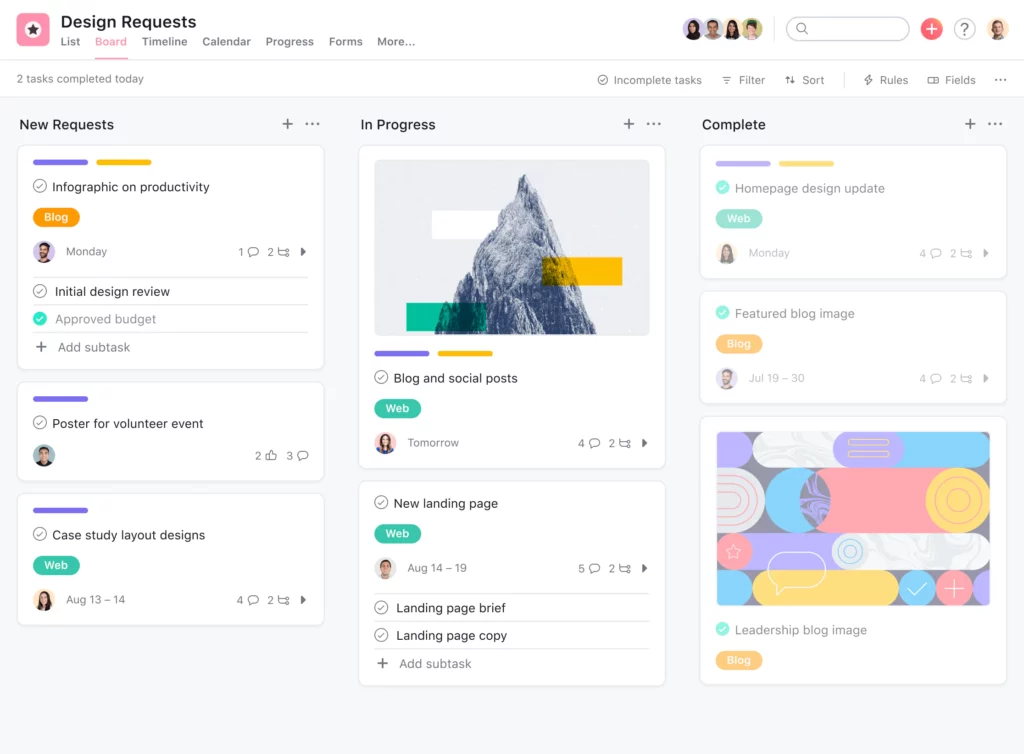
Asana is best for cross-functional work that needs visible owners without a highly technical project system. Projects, forms and custom fields organize the work. Goals and portfolios connect initiatives to broader outcomes.
It provides teams with a centralized platform to organize tasks, track progress, and collaborate efficiently. From startups to large enterprises, Asana simplifies project management processes, promoting clarity and productivity among team members.

Good fit when: several departments coordinate initiatives and need clear owners, status and links to goals.
, confirm which plan covers your scope. A project-level workload view and organization-wide capacity planning are not the same thing.
Pros
- Clear owners, due dates and status across departments.
- Goals and portfolios link initiatives to company outcomes.
- Workload, approvals and proofing on Advanced. Capacity planning on Enterprise.
Cons
- Goals, portfolios and workload need Advanced, which costs more than twice as much as Starter.
- Seats are sold in blocks, so the bill can exceed headcount.
- Organization-wide capacity planning sits in the Enterprise tier, which is quote-only.
Pricing: Starter is $10.99/user/month ($13.49 billed monthly). Advanced is $24.99 ($30.49 billed monthly). Enterprise and Enterprise+ are on quote. See the Asana pricing page.
3. monday.com
Best when teams design their own workflow
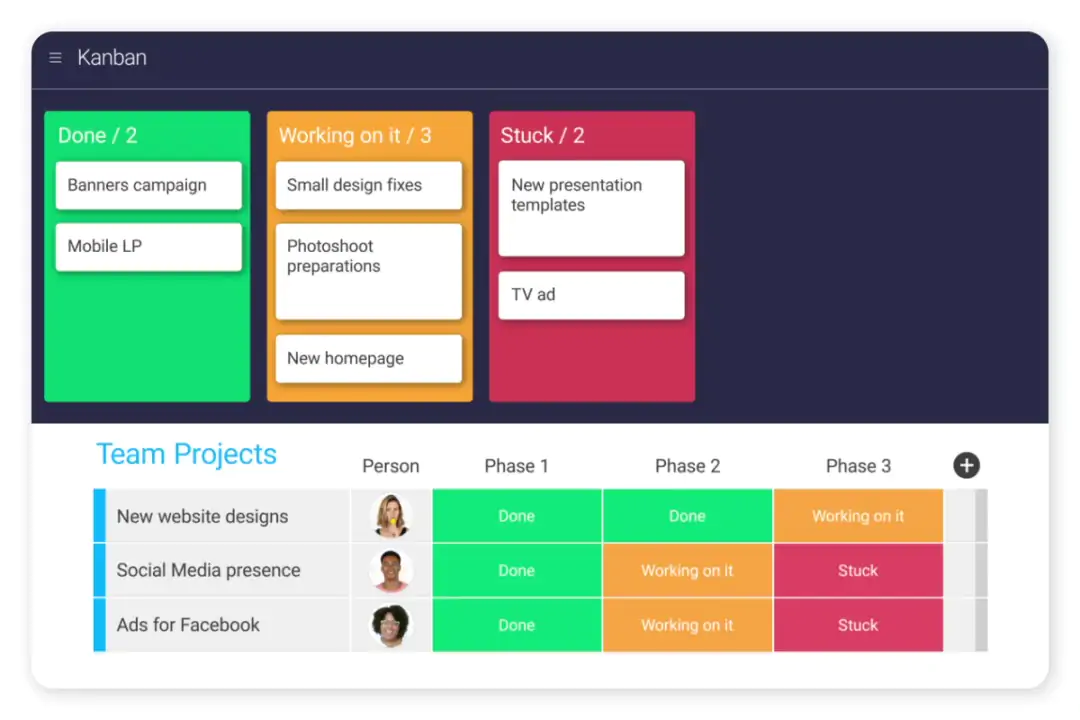
monday work management is best for teams that want to shape visual workflows around their own process. Columns, views and automations let teams model requests, handoffs and recurring processes. It is quick to understand for teams that want work laid out visually.

Pros
- Quick to understand. Boards make work visible.
- Extensive integration options with popular business tools and apps.
- Automations and integrations for requests, handoffs and recurring processes.
- Real-time updates and notifications enhance team communication and coordination.
Cons
- Three-seat minimum, and seats are sold in bundles. Four people need five seats.
- Standard caps automation actions at 250 a month. Pro allows 25,000.
- Boards drift apart across teams without shared conventions.
- Learning curve for configuring complex workflows and automations.
Pricing: Free for up to 2 seats. Basic is $9, Standard is $12 and Pro is $19 per seat/month billed annually ($12, $14 and $24 billed monthly). Enterprise is on quote. See monday pricing.
4. Airtable
Best when the data model is part of the workflow
Airtable is best for work where the data model is part of the workflow, such as a content calendar with channels, assets, approvals and launch dates. It starts with structured records, then builds views and interfaces on top. Record limits per base rise from 50,000 on Team to 125,000 on Business, per Airtable’s help center. Business adds an admin panel and SAML single sign-on. Enterprise Scale adds audit logs.

Good fit when: the work depends on a custom dataset or tracker.
Pros
- Relational records connect work across tables.
- Interfaces and views give each role its own screen.
- Admin panel and SAML single sign-on from Business.
Cons
- Every editor is a billed seat. Viewers and form submitters are free.
- Business costs 125% more per seat than Team.
- Someone must own the design: required fields, how records relate and how the system changes.
Pricing: Free for up to 5 editors. Team is $20/seat/month ($24 billed monthly). Business is $45 ($54 billed monthly). Enterprise Scale is on quote.
Reviews: G2 4.6. I did not check Capterra.
5. ClickUp
Best as a broad work hub
ClickUp is best for teams that want tasks, docs, goals, forms, chat, time tracking and several work views in one daily workspace. It lists more than 15 views, from simple queues to complex portfolios. That can reduce app switching. A wide feature set takes setup discipline.
Start with the views and rules people need now, add more when they solve a real coordination problem, and agree on how teams organize Spaces, tasks and documents.
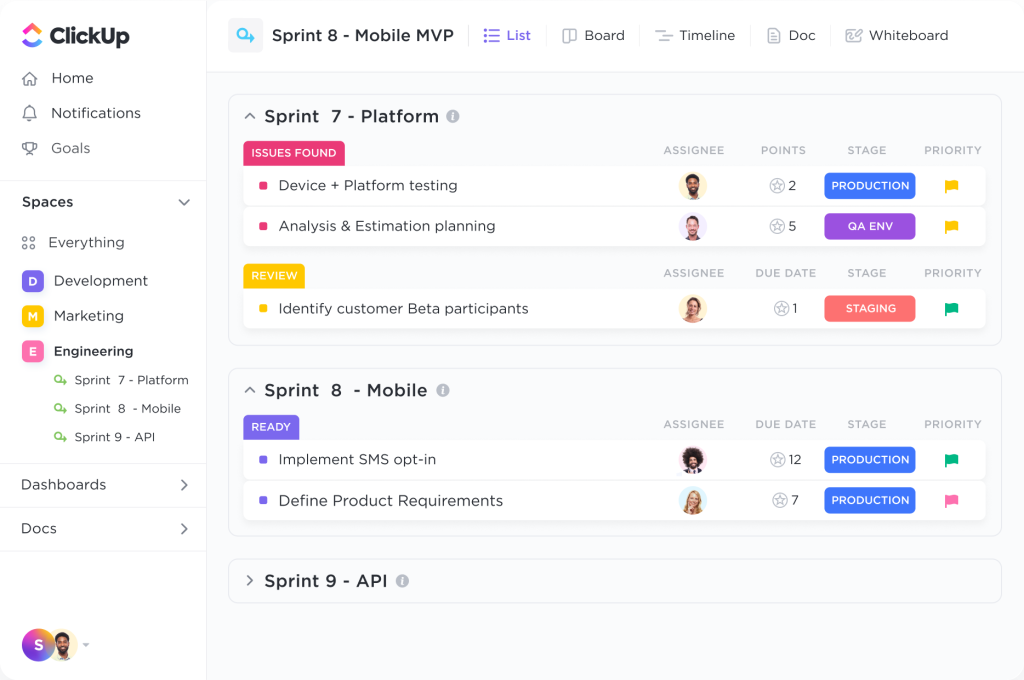

Good fit when: a team wants many day-to-day features in one place and has someone to keep the setup coherent.
Pros
- Broad feature set in one workspace.
- Lowest entry price of the eight ($7) and a Free Forever plan with unlimited tasks and members.
- Strong ratings: G2 4.6–4.7 and Capterra 4.6.
Cons
- A wide feature set takes setup discipline.
- AI is a paid add-on on the classic plans, adding roughly $9–$28 per seat.
- Two plan lineups are in use, so confirm which one your workspace shows.
- The free plan caps storage and automations.
Pricing: Free Forever. Unlimited is $7/user/month ($10 billed monthly). Business is $12 ($19 billed monthly). Enterprise is on quote. Some workspaces show a newer lineup with AI included: Core $8, Business $17 and Max $100, billed yearly. See ClickUp pricing.
You can check out the NimbleWork vs ClickUp for a better understanding of how these tools fit the enterprise work management space.
6. Wrike
Best when repeatable project steps matter
Wrike is best for teams that run formal projects with repeatable steps and a clear intake path. It supports board, table and Gantt views. Team adds Gantt charts, dashboards, calendars and custom fields. Business adds request forms, proofing, time tracking, resource views and real-time reports. Pinnacle adds budgeting, job roles, SAML single sign-on, two-step verification and advanced analytics.
Wrike retired its legacy Enterprise plan for new customers in January 2026 and now sells Pinnacle and Apex by quote.

Good fit when: teams run formal projects with repeatable steps and need a clear schedule and intake path.
Pros
- Request forms and proofing on Business standardize how work enters and gets approved.
- Highly customizable boards and cards cater to diverse project requirements.
- Seamless collaboration with real-time updates and comments.
- Integration with numerous productivity tools and platforms.
Cons
- Team is capped at 15 users, and the price steps from $10 to $25 per seat on Business.
- Business and above are annual-only.
- Budgeting and single sign-on need Pinnacle, which is quote-only.
Pricing: Free plan with unlimited users. Team is $10/user/month (2–15 users). Business is $25 (5–200 users). Pinnacle and Apex are on quote.
7. Smartsheet
Best when teams plan in rows and columns
Smartsheet is best for teams that already plan in spreadsheets and want to keep that structure while adding project views, forms and reporting. A grid is the starting point, with Gantt, card and calendar views. Business adds timeline, workload tracking, unlimited automations, no-code WorkApps and automated data import and export. Guests and Contributors take part free. Smartsheet reports use by more than 75% of the Fortune 500, per its vendor profile.
Pros
- Familiar grid for teams that live in spreadsheets.
- Guests and Contributors do not need a paid seat.
- The largest G2 review base of the eight, about 23,000 reviews, with a 4.4 rating.
Cons
- No free plan. New customers get a 30-day trial.
- Pro is capped at 10 members and 250 automation runs a month.
- Portfolio tools such as Control Center are add-ons or part of higher offerings.
- Premium connectors, such as Salesforce, Jira and ServiceNow, sit in the Enterprise tier.
Pricing: Pro is $9/member/month ($12 billed monthly) for 1–10 members. Business is $19 ($24 billed monthly) for 3 or more members. Enterprise (10+ members) and Advanced Work Management are on quote.
Reviews: G2 4.4. Capterra 4.5.
Good fit when: teams plan in spreadsheets and want familiar structure plus project views, forms and reporting.
8. Jira
Best when work is organized around a product backlog
Jira is best for product and software teams that plan iterative delivery. It is built around issues, backlogs and sprints, with boards, roadmaps, reports and automation. Atlassian says Jira Work Management, its edition for business teams, is included with every Jira license, and it cites 3,000+ integrations in its product guide. Premium adds cross-project dependency management.

Jira can support work beyond engineering, but that may take extra configuration. If business teams need broad intake, resource coordination or portfolio reporting, test those workflows directly. Jira often stays as the engineering tool, with a layer above it that connects work across teams and methods. Nimble is built to sit there.
Good fit when: the team’s main unit of work is a product or software issue moving through a backlog and sprint
Pros
- Offers 25+ pre-built, industry-specific templates for departments like marketing, human resources, finance, and legal.
Cons
- Business-team intake, resource and portfolio reporting may need extra configuration.
- No capacity or workload management.
- Not so flexible for teams that are on different delivery frameworks.
- Atlassian raised cloud prices on October 13, 2026, and the price depends on your user tier.
Pricing: Free for up to 10 users. Standard and Premium are priced by user tier, roughly $8–$10 and $15–$20 per user/month on monthly billing. Enterprise is annual-only and on quote. Check the Atlassian pricing page for your tier.
Which work management software should enterprise teams choose?
No tool wins every situation. Match your situation to a first choice, then shortlist two and run the test below on a real piece of work.
.
| If your teams… | First choice |
|---|---|
| Share resources and dependencies across Agile, Waterfall and hybrid projects | Nimble |
| Coordinate initiatives across departments and need goals tied to work | Asana |
| Want to design their own visual workflow | monday work management |
| Depend on a custom dataset or tracker | Airtable |
| Want one workspace for many functions at a low entry price | ClickUp |
| Run formal projects with repeatable steps and approvals | Wrike |
| Already plan in spreadsheets | Smartsheet |
| Work from a product backlog in sprints | Jira |
Test each tool on one real piece of work before you shortlist
Take one real piece of work, such as a product launch, a service request or a process change, and follow it through each tool. Do not settle for ticking off a sample task. See what happens at the handoffs.
| Test | What to check | Why it matters at enterprise scale |
|---|---|---|
| Request | Can the team collect enough context to decide whether to accept the work? | Intake decides what becomes a commitment |
| Ownership | Is there one clear owner, and can others see what they are waiting on? | Shared work stalls when no one owns a decision |
| Dependencies | Can the team spot a delay that changes another team’s plan? | One slip can reach five teams |
| Capacity | Can a manager see when one specialist is committed to too much? | The same people serve many projects |
| Executive view | Can a leader see what needs attention without a separate status report? | Manual reports are out of date on arrival |
| Access and governance | How do permissions, single sign-on and audit trails work? | Large organizations must control who sees and changes what |
| Integrations | What does each integration sync, do updates go both ways, and what happens when a sync fails? | Teams already depend on tools such as Jira |
If the tool only answers “What is the status of this task?”, it is task management. If it helps teams see how work enters, moves and affects other commitments, it is a work management fit.
Compare the cost of the workflow you will use, not the lowest advertised price. Include seat minimums, billing term, guest access, add-ons, integrations and the tier required for resource or portfolio features.
FAQs buyers ask
1. What should enterprise teams look for in work management software?
Start with the point where work gets stuck. Then check request intake, dependencies, capacity planning, executive reporting, permissions and integrations with the tools teams already use. Skip capabilities your teams will not use.
2. Which work management software gives executives the best real-time visibility?
No single tool is best for every organization. Look for a live view that connects project status with dependencies, capacity and risks. Check whether it reflects work as teams update it or depends on manual reporting.
3. How do I choose software that supports multiple work methodologies in one place?
Check whether the tool can represent each method your teams use and still show how their work connects. Nimble’s Business plan includes hybrid Agile and advanced scheduling. Test your own Agile, Waterfall or mixed-method workflow before you decide.
4. Which platforms handle complex team workflows with automation?
Start with the shape of the workflow. monday is board-led, Airtable is built on structured records, Wrike supports formal request paths and ClickUp offers a broad workspace. Then test whether the automation handles the handoff or approval you need, not just a status change.
5. Which platforms integrate well with existing business tools?
Check what each integration syncs, whether updates go both ways, how permissions work and what happens when a sync fails. A long integration list matters less than reliable data flow for the systems your teams already depend on.
6. Which platforms are fastest to deploy and adopt?
No platform is fastest for everyone. Test one real workflow with the people who will request, manage and deliver the work. Track setup effort, manual steps left over, and whether users can update progress without extra training or duplicate reporting.
7. How much does work management software cost?
Prices range from free plans to custom enterprise pricing. The total depends on users, billing term, plan tier and add-ons. Add-ons can include resource planning, portfolio controls, advanced integrations, extra automation, administration features and AI. Check whether each feature is included, sold separately or only in a custom contract.
Pick for the work between the tasks
Task lists tell people what they own. Work management shows how those tasks connect to incoming demand, available people, other projects and delivery commitments. That does not mean every team needs a large platform. The tool should match the coordination problem. If work keeps getting stuck between teams, compare the tools on those handoffs, not on how many boxes they tick in a feature table.
See how Nimble connects projects, dependencies and capacity across Agile, Waterfall and hybrid delivery. Book a 30-minute demo.