


Many organizations are exploring AI, but a staggering number of initiatives stall right after the pilot phase. Several studies have corroborated this scenario.
MIT’s 2025 study reports that 95% of GenAI projects fail to deliver a measurable ROI, often getting stuck in “pilot purgatory” without scaling to production.
The problem isn’t the technology; it’s the lack of a disciplined operating model. Success requires moving beyond isolated experiments to a governed, scalable system.
For leaders, the challenge is clear. How do you select high-impact AI use cases? How do you mitigate risk, ensure compliance, and prove ROI? This article provides a practical framework for identifying, prioritizing, and implementing high-impact project delivery AI use cases that can deliver real value across your enterprise.
Why do many AI initiatives remain stuck at the pilot level?
Well, most enterprises scope their first AI pilots the same way: they pick something that demos well.
- A chatbot for FAQs.
- Auto-summaries for status updates.
- A quick workflow automation that saves a few minutes.
The pilot looks successful in isolation, but it rarely changes the delivery system.
Reporting still takes hours. Risks are still surfacing late. Decisions still rely on tribal knowledge. The most common failure isn’t model performance—it’s selecting a use case that isn’t tied to a recurring workflow bottleneck with a clear owner, measurable outcomes, and a path to integration.
That’s why “pilot success” doesn’t translate into production adoption.
The 3-part test for choosing high-impact AI use cases for Project Delivery
A use case is high-impact when it:
- removes recurring manual work (weekly/continuous)
- changes a delivery decision (risk, capacity, scope, priority)
- can be governed safely (data boundary + human review + audit trail)
To choose the right use case, you can use different frameworks. Let’s take a look at the ICE scoring model.
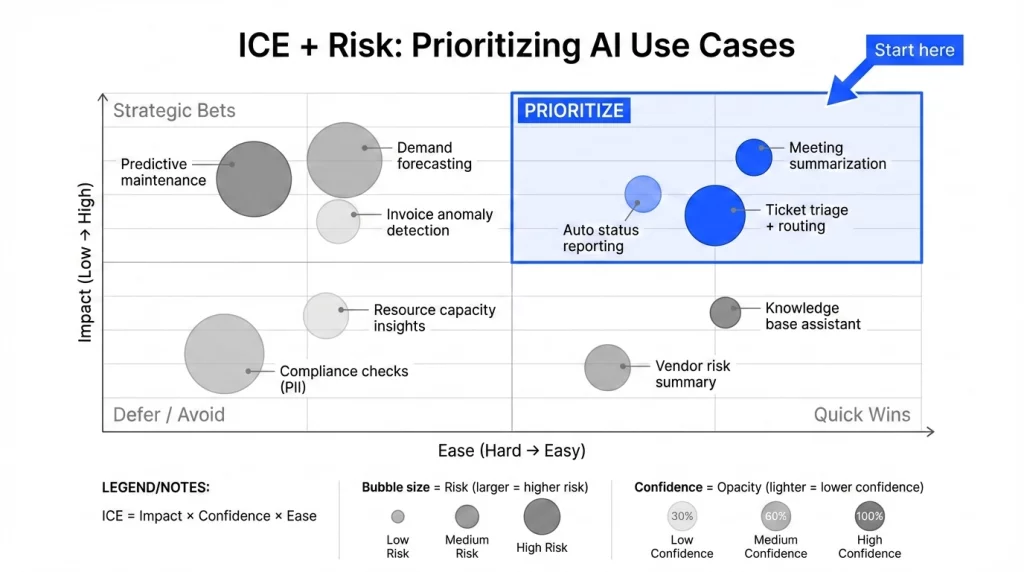
The ICE scoring model, but with ‘risk.’
The ICE (Impact, Confidence, and Ease) model was developed by Sean Ellis, founder of GrowthHackers. He needed a lean, no-fuss system that would help fast-paced growth teams decide which experiments to prioritize, without getting bogged down in endless debates or bloated spreadsheets.
And, ICE struck the sweet spot: quick to use, simple to understand, and structured enough to drive smart decisions. You can use this model to prioritize AI use cases, as it combines expected impact, confidence level, and ease of delivery.
In enterprise delivery, we add one more step: a risk gate. If a use case involves sensitive data or has a low error tolerance, it isn’t rejected—but it must ship with controls (such as human review, audit trails, redaction, and clear escalation paths) before you scale it.
How to calculate the ICE score?
Step 1: Use ICE as the primary prioritization score
ICE Score = Impact × Confidence × Ease (each 1–10 or 1–5)
Step 2: Add a “Risk Gate” (not a complicated penalty)
Score Risk as Low / Medium / High (or 1–5) based on:
- data sensitivity
- error tolerance
- compliance/audit need
- customer-facing vs internal
Then apply:
- If Risk is High → require controls before piloting (human review, redaction, audit trail, fallback flows)
- If controls aren’t feasible in 30–60 days → don’t pick it as a first pilot, even if ICE is high
This keeps ICE clean, but makes it enterprise-ready.
You can use this simple formula:
| Priority = ICE × (1 – Risk Factor) |

If you’re doing this inside a complex enterprise environment, the scoring model is only step one. The challenging part is transitioning from a shortlist of use cases to a safe operating model.
This model should include readiness, governance by design, and an execution plan that integrates seamlessly into existing systems.
NimbleWork provides these services with a structured approach for taking AI from experimentation to production with clear ownership, controls, and measurable ROI.
When is it actually an AI use case?
This is an important difference you must understand. Automation and AI are similar in some sense, but dissimilar in so many ways.
It’s AI (not just automation) when at least one of these is true:
- Unstructured input → structured output
(docs, emails, chat, meeting notes → fields, tasks, risks, summaries) - Reasoning/classification under ambiguity
(routing, prioritization, risk signals, dependency detection when rules aren’t enough) - Recommendation/optimization
(suggest staffing scenarios, next-best action, trade-off options) - Natural language interface over systems
(ask “what changed this week?” and get a grounded answer with citations)
If it’s purely “if X then Y,” it’s automation. If it needs interpretation, summarization, or probabilistic judgment, it’s AI.
Let’s understand with an example.
Rule: “If a task’s due date is missed → mark it ‘Delayed’ and notify the owner.”
With Automation:
“If the task due date is missed → mark as ‘Delayed’ and notify the owner.”
With AI:
AI reads updates across tasks + blockers + approvals and writes:
“Milestone A is at risk because approvals are running 5 days late, and dependency X hasn’t started. Decision needed: confirm scope trade-off or move the date.”
That’s summarization + judgment, not a rule.
Therefore, the decision to opt for either AI or automation depends on your business use case. No one else can help you identify the right use case, as they might not have the complete business context.
Now, when you’re thinking about AI use case workflows for the first time, you might fall into some traps. Let’s check them out briefly.
The ‘low-impact’ traps to avoid (specifically, enterprises)
Enterprise delivery environments aren’t short-lived projects on a single board. They’re portfolios of client engagements where leadership needs real-time visibility across milestones, risks, and portfolio health—without weekly status calls and spreadsheet roll-ups.
That’s why many AI efforts stall. Teams pick “cool” outputs that don’t improve a real delivery workflow. Avoid low-impact traps like:
- “Content-only” automations that don’t change decisions
- “AI insights” with no workflow owner
- No integration path → becomes copy/paste theater
- High privacy risk with unclear policy
In global IT services, delivery success depends on collaboration and standardization—shared work hubs, contextual discussions, reusable workflows, and traceable handoffs from RFP through delivery and ongoing support.
So, it makes sense to choose the ones that move the needle, carefully.
Top 6 high-impact AI use cases you can scale from a pilot
Here are 6 practical AI use cases in project delivery, grounded in real enterprise workflows.
1. SOW/RFP → Delivery Plan (AI-assisted planning)
❓ Where it fits: Presales → delivery kickoff (proposal team, delivery lead, PMO)
🎯 Goal: To convert contract scope into an execution-ready plan faster, with fewer misses.
|
Input needed |
Output expected | KPIs |
Risks + Guardrails |
|
|
|
|
Pilot: Start with 10 recent SOWs in one service line. Target 50% faster planning and 80%+ acceptance after review.
2. Dependency detection across projects (AI-assisted dependency discovery)
❓ Where it fits: Program/portfolio delivery (PMO, program managers, engineering leads)
🎯 Goal: Identify cross-team dependencies early, before they become escalations.
|
Inputs needed |
Outputs expected | KPIs |
Risks + Guardrails |
|
|
|
|
Pilot: Start with 2–3 related programs with shared components. Target fewer late dependencies and achieve better on-time milestones.
3. Risk early-warning signals (AI-assisted risk sensing)
❓ Where it fits: Portfolio governance (PMO head, delivery managers, risk lead)
🎯 Goal: Detect delivery risk while there’s still time to act.
|
Inputs needed |
Outputs expected | KPIs |
Risks + Guardrails |
|
|
|
|
Pilot: One portfolio (20–50 projects) with 5–8 signals. Target earlier detection and fewer surprise escalations.
4. Executive weekly status pack (AI-assisted decision brief)
❓ Where it fits: Leadership reporting cadence (PMO, program directors)
🎯 Goal: Replace manual roll-ups with a decision-ready weekly brief.
|
Inputs needed |
Outputs expected | KPIs |
Risks + Guardrails |
|
|
|
|
Pilot: One exec audience + 10–15 projects. Target 50%+ reduction in reporting time with higher clarity.
5. Customer-ready status updates (AI-assisted client communication)
❓ Where it fits: Account delivery (account manager, delivery lead)
🎯 Goal: Produce consistent, safe client updates that reduce anxiety and status meetings.
|
Inputs needed |
Outputs expected | KPIs |
Risks + Guardrails |
|
|
|
|
Pilot: 2–3 accounts with a fixed cadence. Target less update effort and fewer ad hoc status calls.
6. Post-mortem synthesis → playbooks (AI-assisted learning loop)
❓ Where it fits: Continuous improvement (PMO/CoE, delivery excellence)
🎯 Goal: Convert messy retros into reusable standards and templates.
|
Input needed |
Output expected | KPIs |
Risks + Guardrails |
|
|
|
|
Pilot: Use 10 recent post-mortems. Target a prioritized “top 5 fixes” and 2–3 template updates.
Final thoughts on choosing high-impact AI use cases
The best AI use cases in enterprise delivery aren’t the flashiest demos. They’re the ones that remove reporting overhead, surface risks earlier, and improve decision-making—within governed workflows.
Moving from pilot to production is the hard part.
If you want a structured approach—readiness assessment, use case prioritization, governance, and rollout—try NimbleWork’s AI Enablement Services now.
FAQs
How do we differentiate between “flashy” AI and “high-impact” AI in project delivery?
High-impact AI focuses on solving systemic bottlenecks—like resource overallocation or inaccurate forecasting—rather than just generating text or meeting summaries. To identify high-impact cases, look for workflows where data is abundant but human decision-making is currently slow or error-prone.
Is our data ‘ready’ for enterprise AI project management?
Data readiness is the #1 hurdle for enterprises. You don’t need perfect data, but you do need centralized data. High-impact AI requires a ‘single source of truth’ where historical project timelines, resource costs, and task completion rates are linked.
If your data is currently siloed across disparate spreadsheets, the first “use case” should be using AI to unify and clean that data for better visibility.
How do we measure the ROI of an AI-powered workflow?
Focus on three core metrics:
- Time-to-Delivery: Are projects reaching milestones faster due to predictive scheduling?
- Resource Utilization: Has the “bench time” for high-cost specialists decreased?
- Risk Mitigation: Are you catching potential budget overruns before they happen? For enterprise delivery, even a 5-10% improvement in these areas often translates into millions in saved operational costs.
How should we handle the “learning curve” when implementing complex AI tools?
Complex enterprise tools like Nimble provide deeper insights, but they require a structured rollout. We recommend a “Pilot & Pivot” approach: start with one high-impact, low-risk use case (e.g., AI-driven status reporting) to build team confidence. Once the value is proven, expand into more complex features like automated resource leveling or predictive risk modeling.
Can AI actually predict project delays before they occur?
Yes. Unlike traditional tools that show you a delay after it happens on a Gantt chart, enterprise AI analyzes historical patterns and leading indicators—such as a developer’s current velocity vs. past performance on similar tasks. This allows project leaders to reallocate resources or adjust expectations weeks before a milestone is missed.