How Project Managers use AI in their day-to-day work?
Sruti Satish
Just watch how project managers use AI on the internet and you’ll see something quieter, and more useful.
PMs are slotting AI into the repetitive transitions between activities like:
conversation to minutes,
requirements to tickets,
project data to status narrative,
scattered signals to a risk flag,
technical detail to a stakeholder-ready explanation.
This way, the judgment stays with the PM. The typing goes to the machine.
One note before the examples. Most of what follows comes from practitioner posts, videos, and a couple of 2026 interview studies. Treat the workflows as reported practice, not proven productivity. The time savings people quote are self-reported, and often a little promotional. The patterns are the point.
AI is used mainly for support tasks, rarely for core project management, and gated by organizational policy, security, and governance. Participants described it as an assistant, not a replacement.
That line is the whole map. Administrative and analytical support — summarizing, drafting, searching, flagging — is where AI is genuinely useful today. AI-led estimation, prioritization, and stakeholder management are not. Keep that split in mind and the rest of the picture makes sense.
How project managers use AI, actually
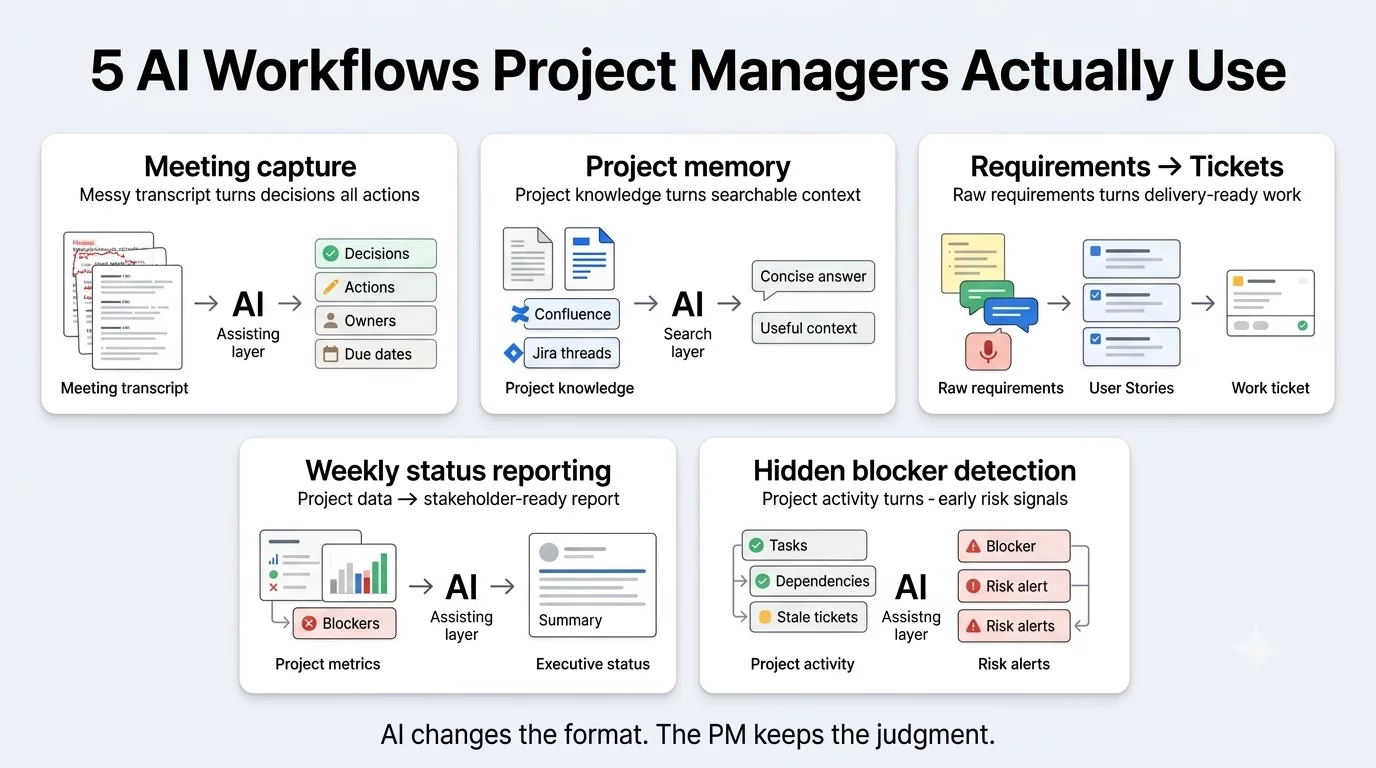
Across the accounts, the same handful of workflows keep showing up.
Workflow
What AI does
Tools people name
Meeting capture
Transcribe, separate decisions from actions, assign owners, draft the follow-up
Copilot, ChatGPT, Granola, Fireflies, Otter
Status reporting
Turn project data, blockers, and KPIs into an audience-ready narrative
Convert raw notes into user stories, acceptance criteria, test cases
ChatGPT, Jira AI, PMI Infinity
Doc search / onboarding
Read large Confluence/PDF sets, produce orientation, answer questions
ChatGPT
Issue analysis
Summarize long Jira threads — who owes what, what was decided
ChatGPT, Jira AI
Risk signals
Scan tasks and discussion for overdue items, dependencies, patterns
Copilot, Jira AI
Data & decks
Chart a CSV; turn a plan into a deck cut for a specific audience
ChatGPT, PowerPoint Copilot, Gamma
None of these is the PM role. All of them are the friction around it.
Five AI workflows PMs use, up close
1. Meeting capture.
Alfonso Ramos, writing on LinkedIn, reported cutting post-meeting write-up from about 25 minutes to roughly 30 seconds.
The interesting part isn’t the number; it’s the prompt. It asks for context, decisions, open items, action items with owners and due dates, priorities before the next meeting, and a ready-to-paste Jira update; and it explicitly tells the model not to infer decisions and to flag anything unclear.
That’s not just ‘summarizing the meeting’. That’s a structured extraction with a safeguard against invented commitments. The PM still checks every owner and date before it counts.
Then, he answered his own historical-context questions instead of pulling analysts into a meeting. He used the same move on long Jira threads: dozens of comments in, a clean read of who owed what and how the issue had evolved out. AI here isn’t replacing the repository. It’s making a scattered one queryable.
3. Requirements into delivery-ready work.
Several PMs describe pasting raw notes like Slack, a client call, and a voice memo and asking for user stories with acceptance criteria.
The judgment call it can’t make: whether the narrative honestly reflects project health, especially the bad news a model tends to soften.
5. Hidden blockers in Jira.
Gupta also queries Jira for work that’s in progress but untouched for days, overdue high-priority items, people carrying too much, tasks blocked by dependencies, and tickets likely to miss the sprint.
He then asks AI to explain why each is at risk and suggest moves. Traditional PM work monitors status. This detects the pattern that predicts a slip, earlier. It’s still not autonomous: the PM decides whether a stale ticket is really a blocker, and whether reassigning it is politically or technically viable.
Users on Reddit echoed this. One user said he uploads the current sprints’ tickets into Jira before standup and have it pull areas of concern. If the AI learns your Jira hierarchy and how your teams complete the tickets, it can help generate custom reporting.
The line PMs won’t cross
The practitioner accounts are strikingly consistent about the boundary. Tovarloza listed what he’d stopped handing to AI entirely: politically sensitive emails, sprint planning and estimation, difficult conversations, relationship-sensitive feedback.
That’s because AI is good at summarizing, preparing, and flagging, and weak at judgment, organizational politics, trust, and human relationships.
The following table shows the exact difference between what you can do with AI and the rest you should never delegate to it.
AI assists / drafts
Human owns
Summarizing a transcript
Making the commitment
Extracting action items
Assigning accountability
Drafting the status report
Declaring project health
First-draft user stories
Confirming scope and acceptance
Surfacing possible risks
Accepting or escalating a risk
Searching documentation
Interpreting what it authoritatively means
Drafting an email
Handling the political or emotional moment
Making a chart
Explaining the cause
Estimates as a discussion aid
Committing to a date
The divide is clean: AI handles what can be checked; the PM keeps what has to be owned.
It also floated a role shift: as AI absorbs administrative production, PMs may spend more time on leadership, ethics, and the hard decisions.
Put both studies next to the viral posts and a more honest picture emerges. Individual experimentation is everywhere. Enterprise-wide integration is uneven. Low-risk documentation use cases clear approval easily; core decisions stay human-led.
And what’s technically possible is often decided by data-access and security policy, not by the model. Better project data, better output — which is its own quiet argument for where you point AI.
The tell no one talks about
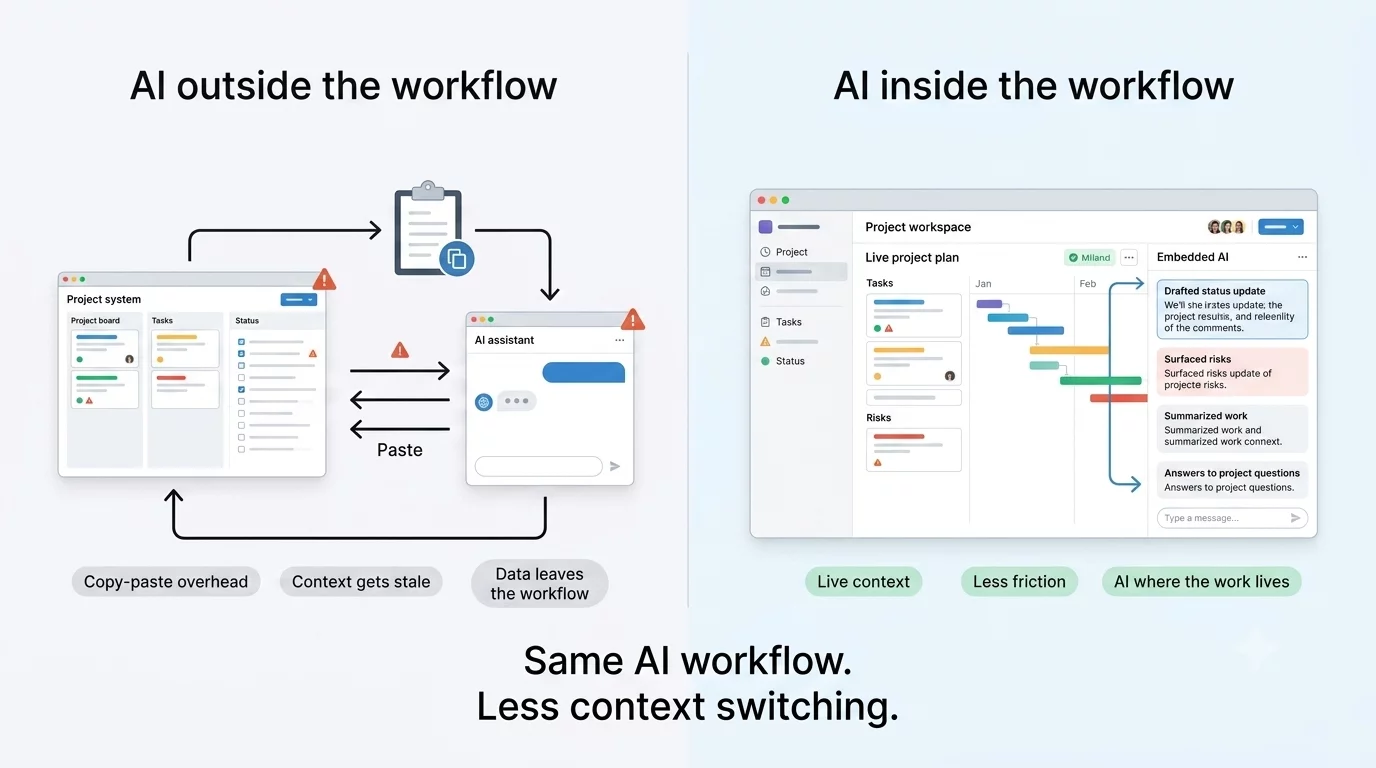
Look again at those five workflows. It’s ChatGPT next to Jira. Copilot next to the docs. A browser tab opens beside the project tool. PMs are copying context out of the system of record, into a general-purpose assistant, and pasting the answer back.
That’s worth noticing. Because modern PM platforms — Monday, ClickUp, Jira — already ship AI. Teams still reach for the tool in the other tab. The cost of that gap is real: a copy-paste tax on every task, context that’s stale the moment it’s pasted, and project data leaving your ecosystem to get summarized somewhere else.
The best solution is to have an AI that already sits on your live project data, inside the tool where the work lives. So a status draft pulls from the actual plan, and a risk flag reads the real board, with no additional export step.
NimbleWork builds its AI in that layer, and it’s worth checking what your own stack already offers before you open another tab. The workflow is the same; the friction and the data exposure are what change.
The pattern that matters
Strip away the hype and the shape is simple. Project managers are inserting AI into activities where information changes form but not meaning. They keep context, judgment, accountability, and the decisions. AI drafts; the human decides.
The teams getting real value do two unglamorous things: they feed AI good project data, and they keep a person in the loop on anything that gets committed, assigned, or reported as truth. That’s not a limitation to be automated away later. For now, it’s the whole reason it works.
Not in the evidence available. Two 2026 interview studies found AI used mainly for support tasks like summarizing, drafting, searching while core decisions stayed human-led. The likelier shift is PMs spending less time on administrative production and more on judgment and leadership.
2. What do PMs use AI for most?
Meeting capture, status reporting, turning requirements into tickets, searching large documentation, and surfacing risk signals — the repetitive transitions between activities.
3. What should a PM not delegate to AI?
Commitments, accountability, declaring project health, accepting or escalating risk, and anything political or relationship-sensitive. Use it to prepare and flag; keep the decision.
4. Which AI tools do PMs use?
PMs mostly use ChatGPT, Microsoft Copilot, Claude, Jira AI, PMI Infinity, and meeting tools like Granola, Fireflies, and Otter. With AI being increasingly built into PM platforms themselves, PMs prefer