



75% of developers lose between 6-15 hours weekly due to tool sprawl averaging 7.4 tools!
Your dev teams fail, not because of bad tools, but because they have too many poorly chosen ones that don’t talk to each other. Planning lives in one place, code moves through another, standups happen in Slack, and no one has a single view of where a release actually stands.
And, most of the time tools get added reactively. One after another or after a painful sprint, because a new hire was familiar with it, until the setup creates more friction than it removes.
In 2026, with more options than ever across every phase of the SDLC, that trap is easier to fall into and harder to climb out of.
So, we created a guide on how to choose the best from a list of dev tools for you. This is not a generic list of every tool that exists — it’s an evaluation guide organized by what a PM actually needs to think about when auditing or building a stack.
This guide cuts through that noise. We’ve evaluated 11 of the best software development tools across planning, coding, testing, deployment, and collaboration, with a focus on what product managers actually need: clear use cases, honest trade-offs, and enough context to match each tool to your team’s real stage and needs.
How to think about your dev tool stack (framework)
Before you evaluate individual tools, it helps to have a mental model of what a stack actually needs to cover. Most PM-level tool decisions fail not because the wrong tool was chosen within a category, but because a whole category was missed or duplicated.
A well-functioning development stack covers four layers:
| Category | What it covers | Why it matters to PMs |
| Planning & Work Management | Backlogs, sprints, roadmaps, portfolio visibility, resource management | This is where strategy meets execution. Weak tools here = sprint chaos and invisible blockers |
| Code and version control | Git repositories, code review, branch management | PMs don’t live here, but understanding what engineers use, affects handoff quality and release timing. |
| CI/CD & Deployment | Pipelines, testing automation, release management | Determines how fast teams can ship and how safely. Affects your release cadence commitments |
| Collaboration & Communication | Async docs, real-time messaging, stakeholder reporting | The connective tissue. Bad tooling here = misalignment between eng, product, and business |
Planning & work management is where PMs have the most leverage. It’s the layer that governs visibility, methodology, and delivery accountability. If one decision matters most to getting right, it’s this one.
If you’re auditing your current stack, use the Software Development Tool Evaluation Checklist at the end of this guide to score each category consistently.
11 best software development tools
Planning & Work Management
This category gets the most depth because it’s where the most consequential decisions for PMs sit. The tool you choose here determines how your team plans, how leadership gets visibility, and how different methodologies actually get operationalized.
1. Nimble from NimbleWork
Best for: Product organizations, engineering teams, and professional services firms at 50–500 people that need hybrid Agile/Kanban support, portfolio-level visibility, and resource management in one platform — without buying three separate tools to get there.
Most tools in this category solve one of these problems well. Very few solve all three, and fewer still do it without requiring expensive add-ons for the parts that should be native.
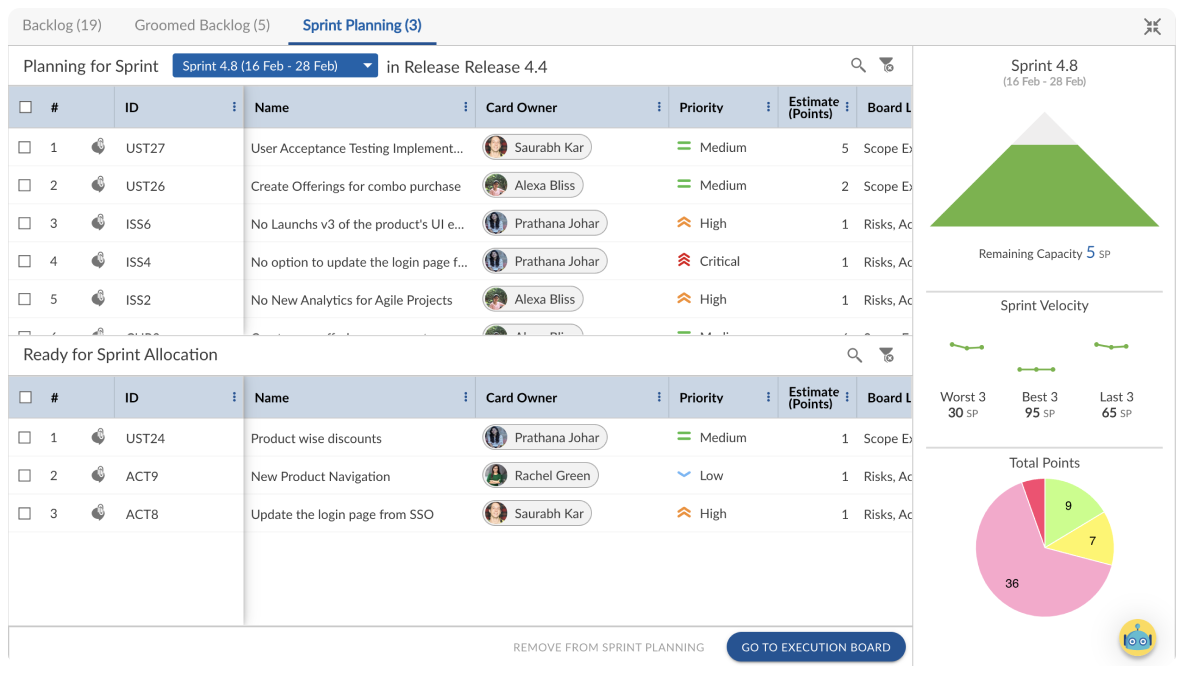

The specific pain Nimble addresses:
For teams running hybrid delivery: Most PM tools force you to pick a methodology. Jira is Agile-native and retrofits waterfall awkwardly. Monday is methodology-agnostic but shallow on Agile specifics. Nimble supports both Agile epics/stories and waterfall work phases in the same platform — teams can run Scrum, Kanban, or Scrumban depending on what the work requires, without switching tools or asking the platform to do something it wasn’t designed for.
For teams hitting the portfolio ceiling: If you’re managing more than three or four concurrent projects and leadership is asking for a cross-project view, most tools send you to manual reporting or an expensive enterprise tier. Nimble’s portfolio management is native — program dashboards, cross-project dependency tracking, and release visibility don’t require a separate product.
For services and PS organizations: Timesheets and project costing are built in, not add-ons. Resource management includes intelligent skill-based matching — not just “who is available” but “who has the right skills and past project experience for this work.” For organizations that bill by project or need to track utilization across a portfolio, this is significant.
For organizations where engineering and PS/delivery teams need to be on the same platform: This is one of the most common buying triggers. Nimble lets engineering run sprints while ops or delivery teams run Kanban flow, with shared portfolio-level visibility connecting it all.
For teams using AI in delivery: Nimble AI auto-populates work items, suggests similar past projects, and surfaces patterns that reduce setup overhead and estimation errors.
Honest trade-offs: Nimble is built for teams where process governance and cross-team visibility justify configuration investment. Lighter teams doing simple task management may find the platform more structured than they need on day one.
Initial setup benefits from either professional services or a dedicated admin — the breadth of features means there’s configuration work upfront to get the environment right for your team’s workflow.
Pricing: Team plan from $10/user/month. Business from $26/user/month. Enterprise custom. Free trial available.
2. Jira
Best for: Engineering organizations running Scrum or Kanban, particularly those already invested in the Atlassian ecosystem (Confluence, Bitbucket, Jira Service Management).
Jira is the tool most teams are either using or have used. It’s the industry standard for Agile engineering work for a reason: the backlog management is powerful, JQL is genuinely flexible for complex filtering, and the integration ecosystem is enormous. If your team runs pure Scrum and you’re already in Atlassian’s world, changing tools has a meaningful switching cost that’s worth acknowledging.
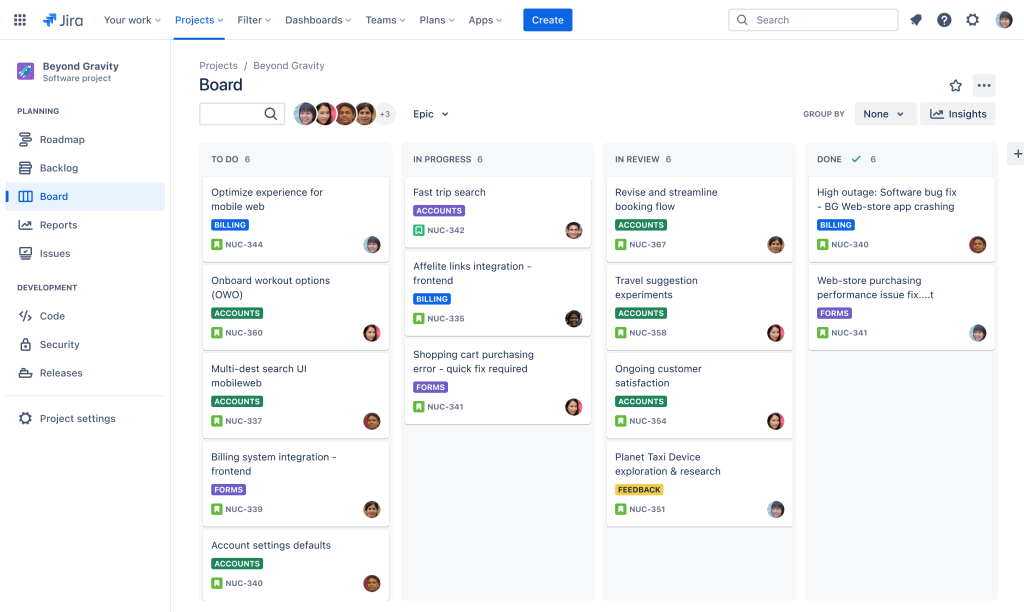

Where it falls short for the buyer: Jira was built for engineering teams. When organizations try to extend it to PM, portfolio, or delivery leadership use cases, they run into its ceilings quickly. Portfolio management requires Jira Align — a separate, expensive product.
Resource management is weak natively and requires third-party add-ons. The UI is polarizing; admin overhead is real; and teams that need methodology flexibility beyond Scrum/Kanban often find it resistant to hybrid approaches.
If you’re on Jira for running pure Scrum with a focused engineering team and you’re not hitting these ceilings, there may not be a strong case to switch. If you are hitting them, that’s the pattern most Nimble migrations start with.
Honest trade-offs: Configuration-heavy; Jira Align is expensive for what it provides; resource management requires add-ons; UI complexity is a common source of low adoption among non-engineering stakeholders.
Pricing: Free for ≤10 users. Standard from $7.91/user/month. Premium from $14.54/user/month. Enterprise – Custom.
3. Monday.com
Best for: Cross-functional teams — marketing, operations, non-technical project management — that prioritize visual UX and fast adoption over methodology depth.
Monday’s strength is its interface. Onboarding is genuinely fast, the visual customizability is high, and it works well for teams that don’t have strong Agile backgrounds but need to manage work across departments. For non-technical stakeholders who need to participate in project visibility, Monday has a lower barrier than almost anything else on this list.


Where it falls short at scale: Monday is not purpose-built for Agile/Scrum. Sprint management is functional but shallow. Portfolio-level reporting requires significant manual configuration or higher-tier plans. Resource management is thin for organizations that need to track utilization. The pricing model escalates quickly as team size grows and feature tiers add up.
Honest trade-offs: Shallow on Agile specifics; resource management requires add-ons; reporting depth at enterprise scale is limited; total cost of ownership is higher than the entry price suggests for larger teams.
Pricing: $0 tier for 2 seats. Basic from $12/seat/month. Standard $14/seat/month. Pro $24/seat/month. Free trial available.
4. ClickUp
Best for: Small, cross functional teams looking to consolidate multiple tools — docs, tasks, goals, time tracking — into a single platform, provided they’re willing to invest time in setup and configuration.
ClickUp’s selling proposition is breadth: almost any PM function you can name, ClickUp has a version of it. For teams frustrated by tool sprawl, this is genuinely appealing. The free tier is functional, pricing is competitive, and the development team ships features quickly.
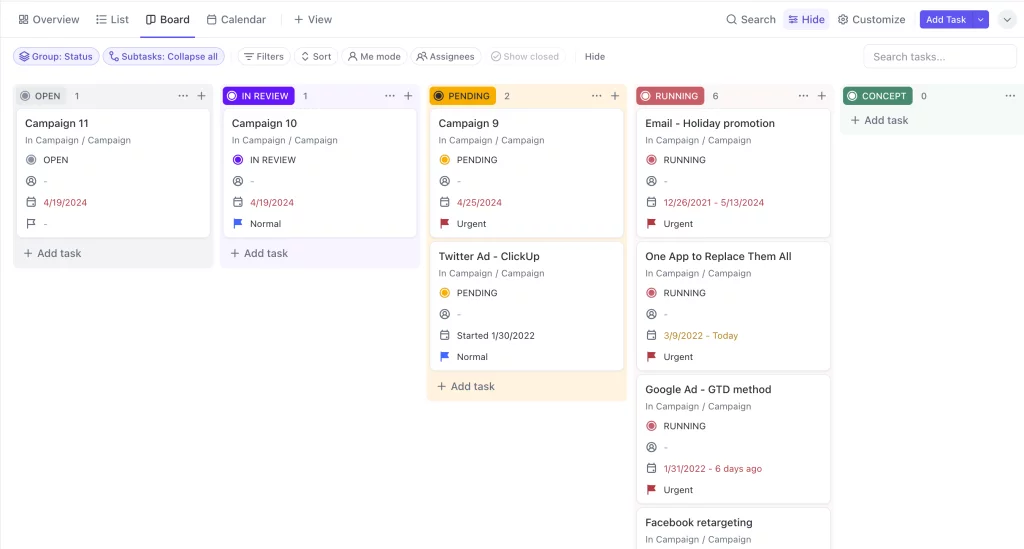

Where it falls short: Feature breadth creates genuine complexity. Without intentional setup and governance, ClickUp workspaces become disorganized quickly at team scale. The mobile experience lags significantly behind the desktop. Performance can degrade on complex workspaces. Teams that buy ClickUp to solve fragmentation risk trading one type of sprawl for another if they don’t invest in configuration discipline.
Honest trade-offs: Steeper learning curve than it appears; mobile app lags desktop; customization without governance creates new problems; depth in any single capability (Agile, reporting, resource management) is shallower than dedicated tools.
Pricing: Free. Unlimited from $10/user/month. Business $19/user/month. Custom pricing for Enterprise
Code & Version Control
PMs don’t typically select tools in this layer — engineers do. But understanding what’s in this layer, and how it connects to the planning layer above it, affects how accurately your PM metrics reflect reality.
5. GitHub
Best for: Code hosting, version control, and open-source or inner-source collaboration — the industry default for software engineering teams.
GitHub is where most software teams live. The pull request workflow is the standard for code review. GitHub Actions has made CI/CD more accessible. Issues provide lightweight tracking that many engineering teams prefer to formal PM tools for bug and task management. If your engineers are already on GitHub, understanding how it integrates with your planning tool matters: Nimble, Jira, and most other PM tools have GitHub integrations that can connect commits and PRs to work items.


Its reputation as the industry standard for open-source projects is complemented by robust collaboration features and a large community that fosters continuous improvement. However, newcomers may face a learning curve, and costs can escalate for larger teams or private repositories, with some advanced features locked behind paid plans.
Honest trade-offs: Costs escalate for larger teams with private repos; not a project management tool — don’t try to run sprint planning out of GitHub Issues at scale; some advanced security and compliance features are enterprise-tier only.
Pricing: Free for public repos. Team plan from $4/user/month. Enterprise pricing from $21/user/month.
6. Bitbucket
Best for: Teams already using Jira and other Atlassian tools who want tighter SCM integration within that ecosystem.
Bitbucket’s core advantage is its native Jira integration — commits, branches, and PRs link automatically to Jira issues. If you’re running a full Atlassian stack, the integration is genuinely seamless in ways that third-party connectors aren’t. Built-in CI/CD pipelines reduce the need for an additional CI tool at a smaller scale.
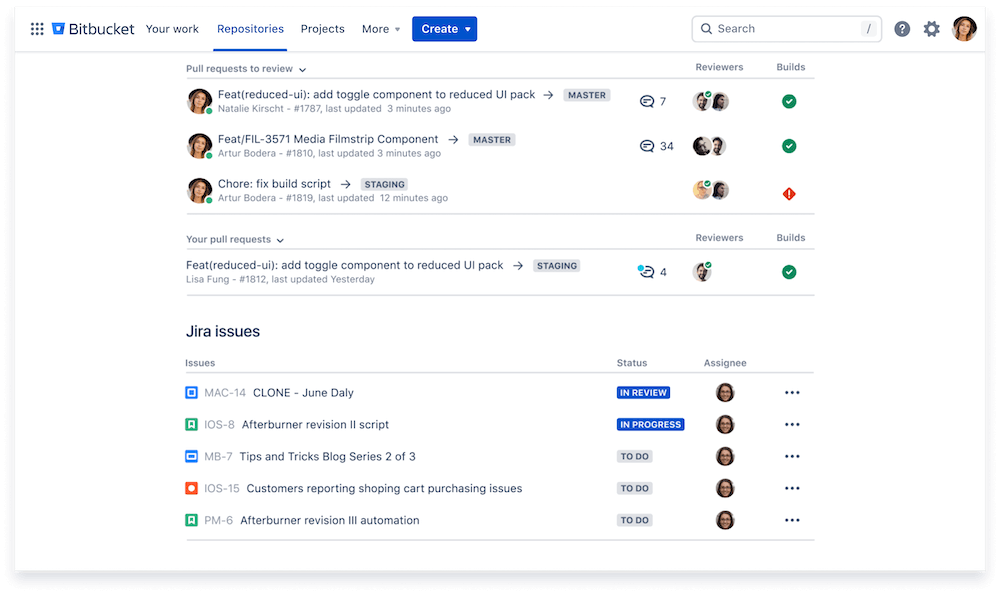

It is more than a mere code repository; it serves as a comprehensive collaboration tool for teams using Git. It excels in Git repository management and continuous integration and deployment (CI/CD) pipelines, making it a favorite among developers looking for a streamlined solution to manage their code and automate workflows.
Honest trade-offs: Less popular for open-source projects than GitHub; UI feels dated to developers who use GitHub daily; advanced features and build minutes require higher-tier plans; ecosystem and community are smaller.
Pricing: Free for ≤5 users. Standard from $3.65/user/month. Premium pricing from $7.25/user/month.
CI/CD & Deployment
This layer determines how quickly and safely your team can get work from “done” to “in production.” PMs care about this because it directly affects release cadence commitments and how quickly feedback from users can inform the next iteration.
7. Azure DevOps
Best for: Enterprises invested in the Microsoft/Azure stack that want a complete DevOps toolchain — boards, repos, pipelines, test plans, and artifact management — in one integrated platform.
Azure DevOps is the most complete DevOps suite on this list. Azure Boards handles work tracking, Azure Repos handles Git, Azure Pipelines handles CI/CD, Azure Test Plans helps teams create and manage a software test plan, organize QA activities, and track testing throughout the development lifecycle. Azure Artifacts handles package management..


For organizations that are all-in on Microsoft infrastructure, the integration across these services is a genuine advantage over assembling equivalent capability from multiple vendors.
Honest trade-offs: Complex initial setup; primarily designed for the Microsoft ecosystem; pricing escalates for larger teams or higher storage/pipeline needs; the breadth of features can be overwhelming for teams that only need part of the toolchain.
Pricing: Free for ≤5 users, then $6/user/month. Basic + Test Plans pricing from $52/user/month.
8. Docker
Best for: Teams building microservices or distributed applications that need consistent, portable environments across development, testing, and production.
Docker’s core value is environment consistency — eliminating “works on my machine” problems by packaging applications and their dependencies into containers that run identically across environments. For teams managing multiple services or running complex local development setups, Docker reduces a significant category of friction.


Honest trade-offs: Real learning curve for teams new to containerization; security risks if images are misconfigured or not regularly updated; adds operational complexity that smaller teams may not need.
Pricing: Free for individuals and small teams. Pro pricing from $11/user/month. Team from $16/user/month. Business from $24/user/month.
Design & Prototyping
This layer reduces the cost of late discovery. The earlier engineering and product align on what’s being built, the cheaper changes are. Good prototyping tools pay for themselves in avoiding re-work.
9. Axure RP
Best for: Product teams that need high-fidelity, interactive prototypes with conditional logic before development begins — particularly for complex enterprise UX workflows.
It is a powerful tool for creating interactive prototypes and specifications, bridging the gap between design and development. Best for advanced prototyping and UX design, Axure offers features like dynamic content simulation, conditional logic, collaborative projects, responsive visualization, and built-in wireframing tools.


Axure sits at the high end of prototyping capability. Dynamic content, conditional interactions, responsive breakpoints, and team collaboration are all native. For products where UX complexity is high and engineering time is expensive, the ability to validate interaction logic in a prototype rather than in code is significant.
Honest trade-offs: Steeper learning curve than simpler tools like Figma; expensive for small teams; overkill for products with simple UX needs.
Pricing: Billed annually – Pro pricing from $29/user/month. Team from $49/user/month. Custom pricing for Enterprise.
10. AWS Cloud9
Best for: Teams working heavily in AWS infrastructure that want a cloud-based development environment without local setup or environment configuration overhead.
Cloud9 provides a browser-based IDE with a terminal, real-time pair-programming support, and tight integration with AWS services. For teams doing backend development directly against AWS infrastructure, eliminating the local environment setup step reduces onboarding friction and the “works on my machine” category of problems.
It brings the power of cloud-based development to the forefront. Ideal for full-stack development, Cloud9 provides a rich coding environment, integrated terminal, collaborative features, and seamless integration with AWS services.


Honest trade-offs: AWS dependency means it’s a poor fit for teams on other cloud providers; lacks some features of mature local IDEs; requires reliable internet access; doesn’t suit developers who prefer local tooling.
Pricing: No additional pricing beyond underlying AWS compute (EC2) and storage (EBS) costs.
11. JetBrains
Best for: Engineering teams that want language-specific, intelligent development environments with advanced debugging and refactoring capabilities.
JetBrains builds dedicated IDEs (integrated development environments) for specific languages — IntelliJ IDEA for Java/Kotlin, PyCharm for Python, WebStorm for JavaScript, and so on. The consistency across the suite means developers switching languages get a familiar environment. Code intelligence is genuinely ahead of general-purpose editors for the languages JetBrains targets.
This robust toolkit is centered around intelligent coding and debugging, making it especially appealing for developers who prioritize efficiency and code quality. With features like intelligent code completion, advanced debugging tools, and an extensive plugin ecosystem, JetBrains helps developers code smarter rather than harder, streamlining the entire development process.


However, these powerful tools can be resource-intensive, potentially slowing down performance on less capable machines. Additionally, the subscription model may be considered costly for individual developers, and there is a learning curve associated with fully leveraging the advanced features offered.
Honest trade-offs: Resource-intensive; the subscription model is a significant cost for individuals; learning curve to leverage advanced features; less relevant for teams using languages without strong JetBrains IDE support.
Pricing: IntelliJ IDEA Ultimate starts with $199, billed yearly. All Products Pack from $299/year. Free licenses available for students and open-source projects.
How to choose the right project management tool for your dev team
The planning and work management layer is the one decision where PMs have real leverage. The right choice here depends on who your team is and what ceiling you’re currently hitting.
| If your team looks like this… | Best fit | Why |
| Enterprises with large and complex project delivery where engineering and PS/delivery need one shared platform | Nimble | Supports different methodologies per team with unified portfolio visibility. |
| Engineering team running pure Scrum, ≤50 people, already in Atlassian | Jira | Best Agile tooling in its class; Atlassian integration is a genuine advantage; switching cost is high. |
| Cross-functional team, fast adoption critical, non-technical stakeholders | Monday.com | UI advantage is real; works for teams without Agile backgrounds. |
| Team consolidating many tools, willing to invest in setup | ClickUp | Broadest feature set; needs governance discipline to work at scale. |
| Mid-market product or IT org, hybrid Agile/waterfall, needs portfolio visibility | Nimble | Only mid-market tool that handles hybrid + portfolio + resource management natively. |
| PS or services org needing timesheets and project costing in one place | Nimble/ Celoxis | Both have native financial tracking; Nimble is stronger on Agile methodology. |
| Enterprise invested in Microsoft stack end-to-end | Azure DevOps | Full toolchain integration outweighs complexity if you’re committed to the ecosystem. |
The most common pattern in teams that switch to Nimble: they’re on Jira, they’ve been on it for three to five years, and they’re hitting two specific ceilings — portfolio visibility and resource management. They look at Jira Align to solve the portfolio layer and find it costs more than their entire current setup. Nimble covers both natively, at a price point that doesn’t require an enterprise procurement process.
Download the Software Development Tool Evaluation Checklist to score your current tools — and any you’re trialing — against the same criteria consistently.
Software development tool evaluation checklist
When you’re shortlisting tools with multiple stakeholders involved, gut feel and generic demos won’t reveal the gaps that matter. A structured evaluation scores every tool against the same criteria, so the decision is based on fit rather than whoever gave the best demo.
The software development tool evaluation checklist covers:
- Planning and backlog management
- Sprint and iteration support
- Portfolio and cross-project visibility
- Resource and capacity management
- Reporting and analytics
- Integration depth (GitHub, CI/CD, Slack)
- Ease of adoption and onboarding
- Pricing and total cost of ownership
If you want to see how Nimble scores against your current setup side by side, book a 30-minute demo.
FAQs
What tools do most software development teams use?
Most teams run a combination across four layers: a project management tool for planning and visibility (Jira, Nimble, Monday), a code repository for version control (GitHub, Bitbucket), a CI/CD pipeline for build and deployment automation (Azure DevOps, GitHub Actions), and collaboration tooling for async communication (Confluence, Notion, Slack). The specific mix depends on team size, methodology, and whether the organization is a product company, services firm, or internal IT function.
What’s the difference between a project management tool and a developer tool?
Project management tools handle planning, backlog management, roadmap visibility, resource tracking, and stakeholder reporting — the organizational layer above the code. Developer tools handle the code itself: version control, builds, testing, and deployment. PMs typically select and own the former; engineers typically select and own the latter. The quality of integration between these two layers is what determines whether PM metrics reflect engineering reality or lag behind it.
Is Jira the best tool for Agile development?
Jira is the most widely adopted Agile tool, but widespread adoption isn’t the same as best fit. It’s genuinely excellent for engineering teams running Scrum or Kanban, particularly in the Atlassian ecosystem. Outside that context — for PMOs, professional services, portfolio management, or hybrid delivery — it requires significant configuration and add-on cost to fill native gaps. Teams with strong portfolio management or resource management needs often find purpose-built alternatives a better long-term fit.
How do I evaluate software development tools for my team?
Use a consistent framework across every tool you trial. The key questions:
- Does it support your team’s delivery methodology without heavy configuration?
- Does it give leadership cross-project visibility without manual reporting?
- Does it handle resource management natively or require add-ons?
- What’s the true cost of ownership at your team size — including add-ons, implementation, and ongoing admin?
The Software Development Tool Evaluation Checklist gives you a structured way to score each tool against these criteria.
What is the best project management tool for software teams in 2026?
There isn’t a single answer — fit depends on team size, methodology, and what ceiling you’re currently hitting. For pure Scrum with a focused engineering team, Jira remains the standard. For hybrid Agile teams that need portfolio-level visibility and resource management without add-on cost, Nimble is the strongest mid-market option. For fast adoption with non-technical stakeholders, Monday.com. For consolidation of many tools into one, ClickUp — with the caveat that setup investment is significant.
Key takeaway
The right stack isn’t the one with the most features — it’s the one your team will actually use, that gives leadership the visibility to make good decisions, and that doesn’t require a separate tool to fill every gap in the one you chose.
The planning layer is where to focus first. Get that right — the right methodology support, the right visibility, the right resource management — and the rest of the stack becomes easier to evaluate and integrate around it.
Two things to help you move forward:
Download the Software Development Tool Evaluation Checklist → Score your current stack and any tools you’re trialing against consistent criteria.
Book a 30-minute Nimble demo → — see how Nimble handles the specific pain points of your current setup, with a real product walkthrough rather than a slide deck.