How Intelligent Planning Helps PMs and Gives Executives Delivery Plan Visibility
Sruti Satish
The business case is approved. The budget is signed. Everyone wants to move.
Then comes the gap. Leadership approved intent, but no one can yet see how the work will actually run. A project manager is somewhere in a room with a proposal, a signed SOW, or a requirement spec, and a blank board. Until that document becomes a plan, the organization is waiting.
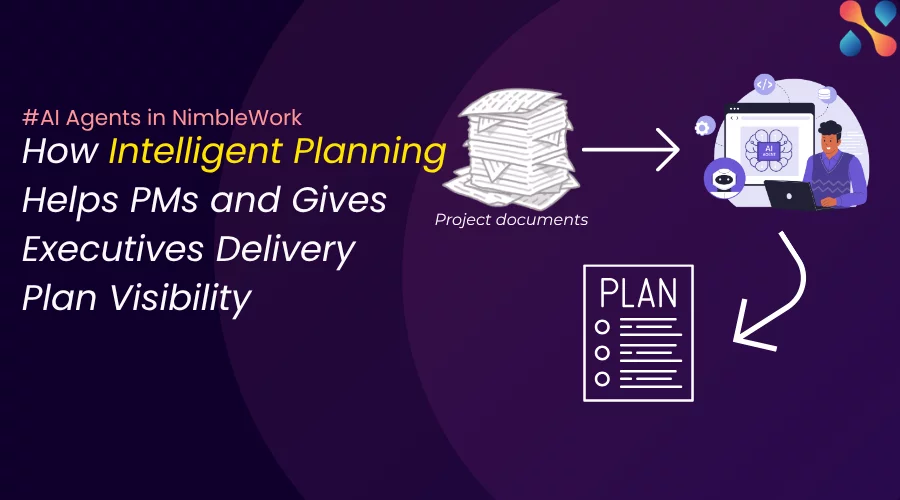
‘Intelligent Planning’ shortens that gap between scope approval and decision-ready delivery visibility. Upload the document, and the agent drafts a structured delivery plan in minutes. You go from business intent to a reviewable plan fast. Smarter, faster, and more confident than before.
This is part of Nimble AI, the AI built into NimbleWork from intake to delivery. It does not replace your judgment. It does the reading and the typing, and hands you a plan to review.
The gap between a scope document and a plan
A scoping document explains what the organization wants. A delivery plan begins to show how that intent could become executable work, through structured activities, dates, priorities, and hierarchy. Until that translation happens, a lot of people are stuck waiting.
Executive sponsors cannot review a credible delivery path. The PMO cannot assess milestones and assumptions. Delivery leaders cannot challenge sequencing or capacity. Everyone has business intent but no one has a reviewable picture of execution.
The manual way to close that gap is a person reading a long document and typing tasks for hours. Intelligent Planning does the first pass in minutes, so the review can start almost immediately.
A first draft, not a commitment
Intelligent Planning only creates a structured first draft. The project manager still validates scope, dates, dependencies, and delivery assumptions before selected work is inserted into the project.
This division of work is critical here. The agent reads uploaded documents and creates drafts. But it’s the PM who validates and decides. So, before you ask if these agents can actually replace PMs, the answer is no.
It helps to look at the planning in three stages.
Stage
What it provides
What it does not provide
Scoping document
Business need, objectives, requirements, boundaries
Intelligent Planning moves you from the first stage to the second in minutes. You and your delivery leaders still own the move to the third. Now let’s look at how the agent does it’s job in the tool.
How does ‘Intelligent Planning’ work
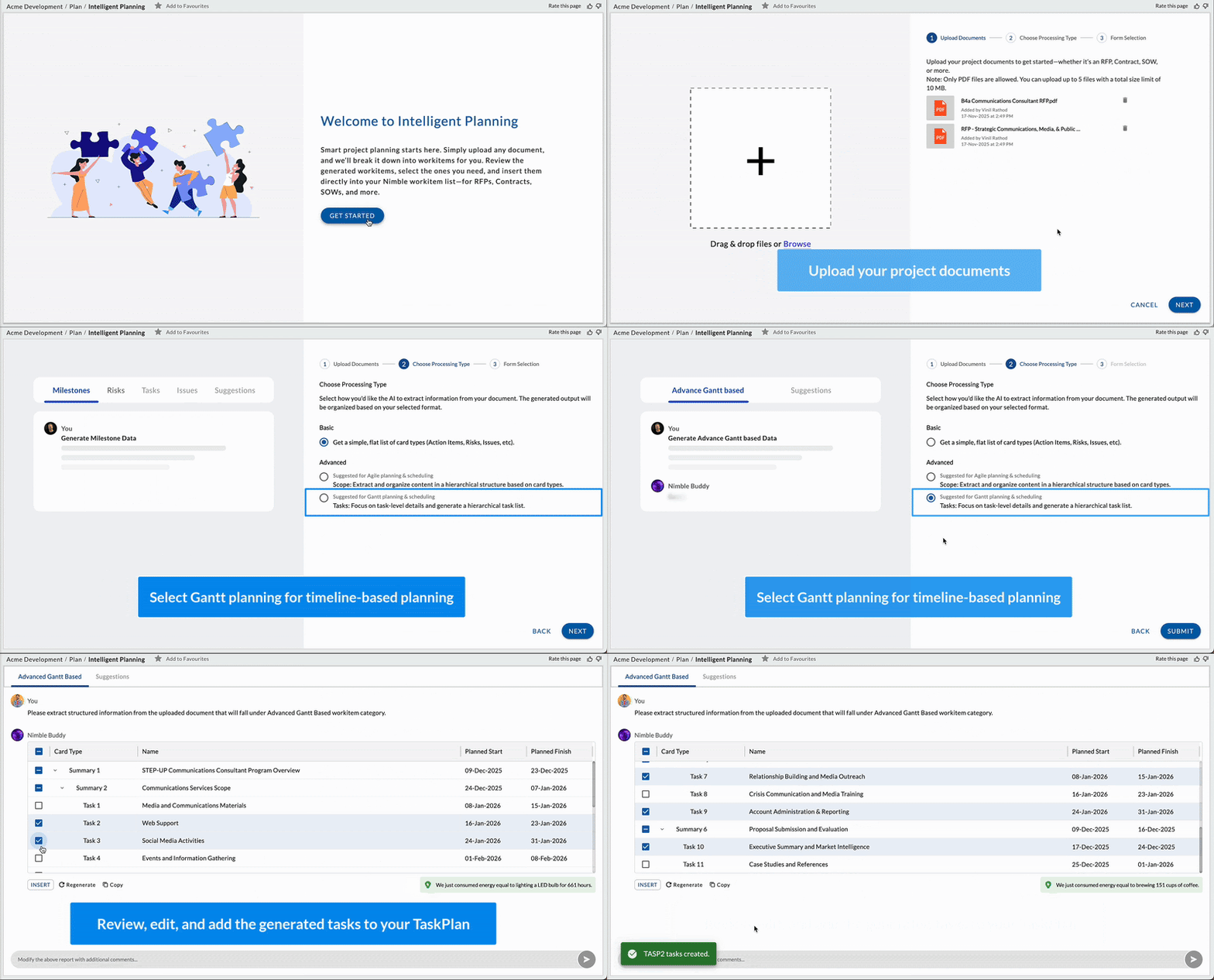
Take a look at the gif below. Upload your project documents, choose the processing type,define the levels and add the work items to your project. It’s simple.
Upload a document, review the AI-generated plan, insert.Source: Nimble KB
How it works, in four steps
The flow is short by design.
Upload. Go to Plan, open Intelligent Planning, and drag in your files.
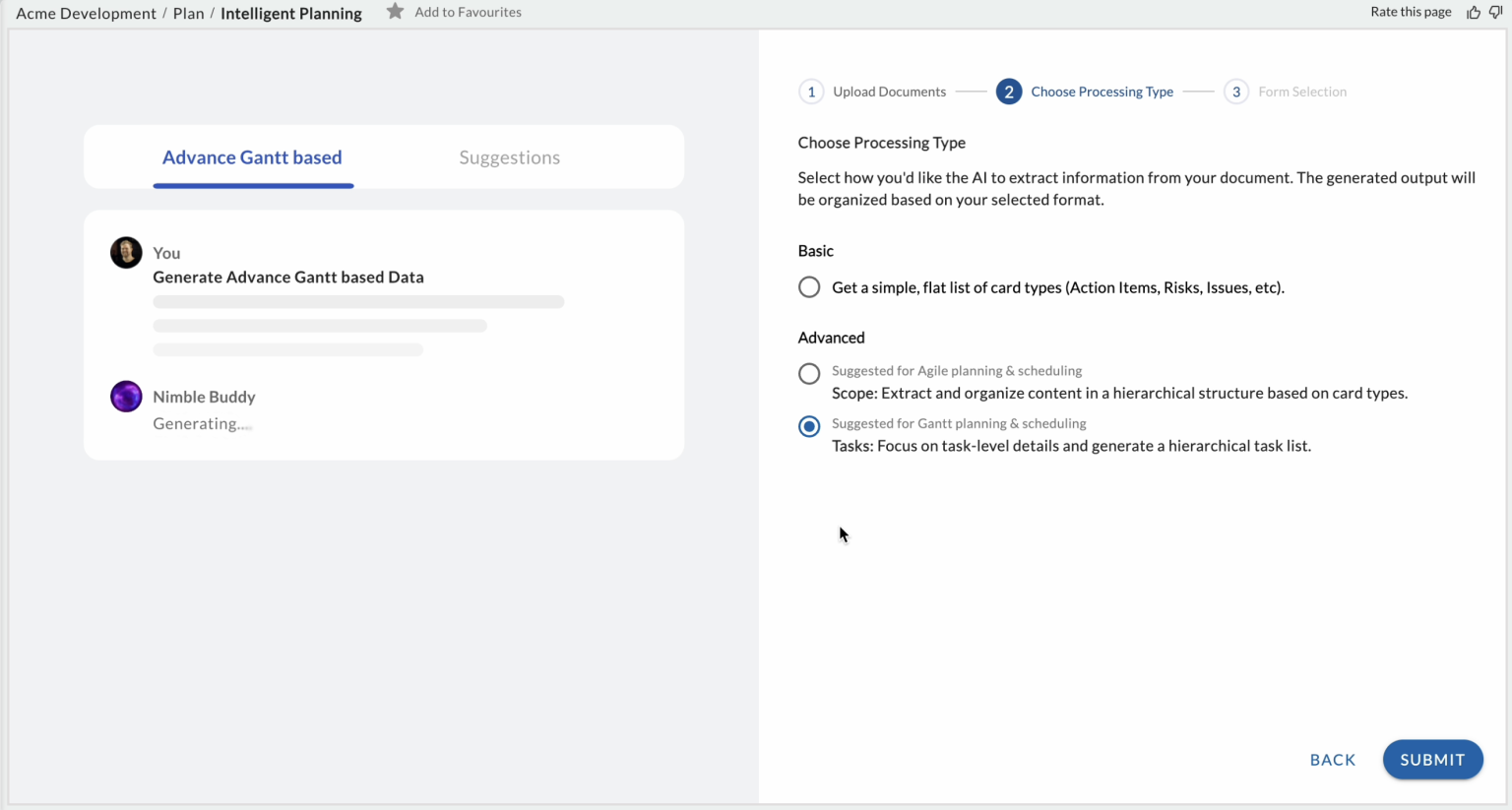
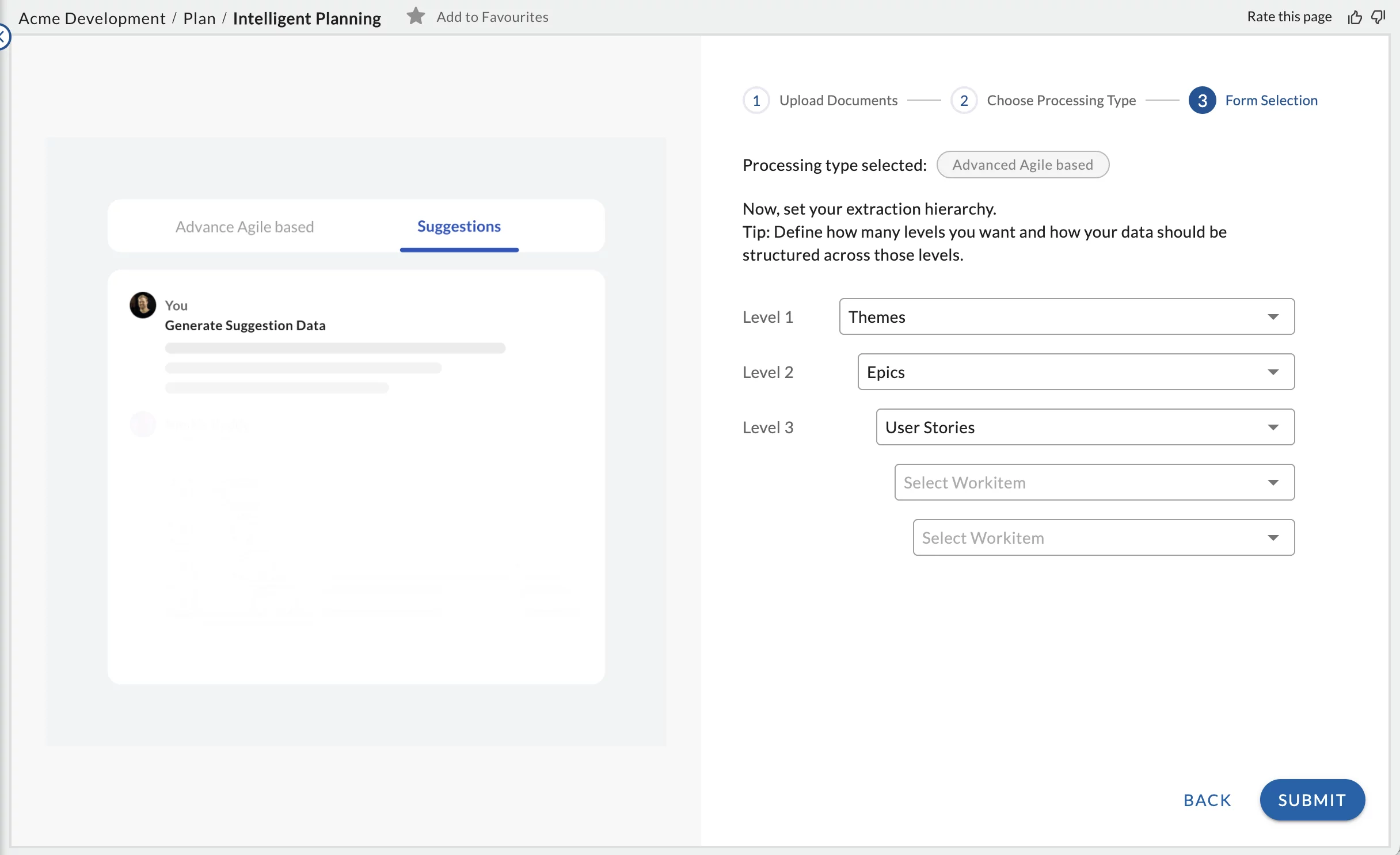
Choose the processing type. For projects created from IT templates, Nimble offers a processing type. Basic gives a flat list of cards. Advanced builds a work hierarchy, for example Theme, Epic, and Story, with a Gantt timeline. The exact levels and options depend on the template you chose and the card types it supports..
Review and adjust. Edit dates, reprioritize, cut what does not fit, or regenerate a section you want reworked.
Insert. Push the approved cards into your project, and start delivering.
Advanced builds the task hierarchy and timeline for you.Source: Nimble KB
It’s now the time for us to look in detail at how this helps different users in their day-to-day work.
Users
Before Intelligent Planning
With Intelligent Planning
Project Managers
Reads a scope document, manually translates requirements into tasks, then chases clarification before building the first schedule.
Produce a draft plan from the source document in minutes, then apply professional judgment to refine sequencing, estimates, dependencies, owners, and risks.
PMO
Needs consistent planning detail across projects but often receives uneven plans and incomplete scope interpretation.
Establish a repeatable first-pass planning workflow and improve visibility into how projects were initially scoped.
Delivery leaders
Waits for the plan to be translated from business language into executable work.
Create an earlier shared baseline for teams to challenge assumptions and identify dependencies before commitment.
Executives
Sees a scope document but lacks a concrete picture of milestones, work, and delivery implications.
Move faster from approved intent to a visible plan that can be reviewed, questioned, and governed.
Let’s start with our project managers.
Want to see how 'Intelligent Planning' works
Check out how does the AI agent reduces the setup work between documented scope and a reviewable plan.
For the project manager: kickoff without the grunt work
This is where Intelligent Planning is the most helpful. Kickoff is the PM’s most manual moment, and the one most likely to miss scope.
Take a services PM starting an engagement. The signed SOW runs 40 pages. Instead of reading it line by line and building the plan by hand, she uploads it and picks Advanced.
In minutes she has a Theme, Epic, and Story tree with a Gantt. She trims two epics that are out of scope, adjusts three milestone dates to match the contract, regenerates one section that came back thin, and inserts the rest. Kickoff prep that used to eat an afternoon is now a review.
The point is not that the AI is right the first time. The point is that it gives her something to react to. Editing a draft is faster than facing a blank board, and it catches deliverables she might have skimmed past.
A Theme, Epic, and Story hierarchy, ready to edit and insert.Source: Nimble KB
Before you insert, run the checklist
Do not skip the ‘Review and adjust’ step. A short check before you insert is what turns a draft into a plan you can stand behind:
Does the hierarchy reflect the intended scope, with all contractual deliverables represented?
Has anything out of scope crept in?
Are dates grounded in real constraints, and are milestones and dependencies sequenced correctly?
Are the priorities right?
Do ownership and resource assumptions still need resolving?
Should any item be removed, rewritten, or regenerated?
Is it ready for governance review, or only for more planning?
For delivery leaders and executives: earlier visibility
Less structural variance between PMs.
The classic PMO problem is that ten PMs build ten differently-shaped plans, which is what breaks consolidated reporting later. When the plan is drafted from a shared template, a senior PM and a brand-new one produce structurally consistent work breakdowns. Consistency becomes the default, not something you chase in review.
Faster mobilization across the portfolio.
The approval-to-execution gap is where portfolios leak time. Turning each approved scope doc into a reviewable draft in minutes, rather than hours of manual entry, compresses that gap on every project at once. More projects reach the “ready to review” state on day one.
Earlier, cleaner governance review.
Because the drafts are shaped the same way, sponsors and the PMO are reviewing comparable plans, which makes milestone-and-assumption checks faster across a set of projects.
Lower quality variance from less-experienced PMs.
A junior PM starts from the same structured draft a senior one would, so the floor on plan quality rises.
For everyone else who starts projects
The PM feels it most, but anyone who turns a document into a plan gets time back.
Program manager. Stand up several related project plans quickly, structured the same way, so they roll up cleanly into one program view.
Presales and bid teams. Turn an RFP into a draft plan to size the effort and shape the response, before a single resource is committed.
Product owner or business analyst. A requirement spec becomes a draft Epic and Story tree to refine, not build from zero.
Professional services and client delivery. An SOW becomes a plan aligned to the contract on day one, so internal work and client commitments start in sync.
A few practical prerequisites and limits, so there are no surprises:
Intelligent Planning is part of the Nimble AI Agent add-on. Confirm your plan includes it.
The Basic and Advanced processing type appears for projects created from IT templates.
The AI can only suggest card types that exist in the selected project template.
Validate the draft against your project goals before you insert it. The tool prompts you to.
The draft is not saved once you leave the screen, so insert what you want to keep.
The bottom line: you stay in control
Intelligent Planning takes the reading and the typing off the PM’s plate at kickoff.
More importantly, it lets executive sponsors, the PMO, and delivery leaders see a reviewable delivery path on day one, while there is still time and low cost to challenge assumptions, fix sequencing, and catch what is missing.
Every plan comes back for review, and nothing enters your project until you insert it. Edit the dates, regenerate a weak section, and cut anything the document did not really ask for
Approved scope becomes an AI-generated draft, then a human-validated, governed plan. Intelligent Planning drafts. You decide..
One honest note: Intelligent Planning is part of the Nimble AI Agent add-on, so check that your plan includes it.
Proposals, contracts, SOWs, and requirement specifications. It pulls the work out of them and drafts cards and tasks with dates and priorities.
2What is the difference between Basic and Advanced type?
Basic generates a flat list of cards. Advanced builds a parent-child hierarchy, Theme to Epic to User Story, up to five levels, with an auto-built Gantt timeline.
3Does it replaces the project manager?
No. It drafts a plan you review, edit, and insert. The judgment, the scope calls, and the final plan stay with you.
4Is Intelligent Planning included or an add-on?
It is part of the Nimble AI Agent add-on. Confirm your plan covers it, or ask us to enable it.