



Completed a sprint? Fantastic! Catch a high five on this achievement! But don’t hurry to hop on the next one. You’ve got another significant thing to do: conduct a retrospective meeting (aka retro), a secret weapon of high-performers in literally any industry or department, partially or fully agile. Actually, teams holding successful retrospectives are reported to have:
- 20% better performance
- 24% more responsiveness
- 42% higher quality with less variability
—than those who don’t.
Whether you’ve committed to the code and squashed the bugs (mostly) as an IT team or finished your hiring sprint in agile recruitment, learn how to run successful retros in this article. We promise—no more drowsing over your notes (and maybe a cup of coffee) in the office’s conference room or dully staring at the screen in a work-from-home setting.
So, What Are Sprint Retrospectives?
A sprint retrospective, or retro, is a team gathering typically organized after the sprint review and facilitated by the Scrum Master. During this event, your team reflects on what went great, where you failed, and how you can perform better in your future sprints.
Basically, you need to answer the following questions:
- What rocked? (Review your closed issues)
- What collapsed into a pile of nothing? (Why are some issues still open?)
- What should you change/try next time?
81% of Scrum teams hold a retrospective meeting after each sprint. That is, it can be weekly, bi-weekly, or monthly, depending on the sprints’ duration.
Yet, although sprint retros are a formal, traditional part of the Scrum framework in software development, they are likewise a useful practice for non-software teams that are going more agile. Some companies may run “design sprints” or “marketing sprints” with retrospective meetings, stopping to reflect on what worked, what didn’t, and how they can improve.
No big fans of those on your team, anyway?
They will love your retrospectives after implementing the following strategies. Mark our word.
Expert Tips on Running a Retrospective Meeting After a Sprint
Pick the Right Retrospective Software
Of course, you can use that trio of pens, sticky notes, and a whiteboard (or just a Slack thread if you’re working remotely) to run a sprint retrospective like in yesteryear.
However, the study shows that most Agile teams (79%) are already turning to retro tools to facilitate communication and capture all the necessary discussion points after the sprint.
How about you? Why not renovate your approach to automate and speed up the process and make every meeting more effective?
Consider the best retrospective tools as follows:
- NimbleRetro
- Neatro
- Discusss
- EasyRetro
- goReflect
- Parabol
With NimbleRetro, you can start a successful retrospective meeting as easily as 1-2-3 (well, okay, five steps): Create a New Retro, Configure, Select Template, Select Icebreaker, and Invite Members. Bingo—you have everyone on the same retro page!
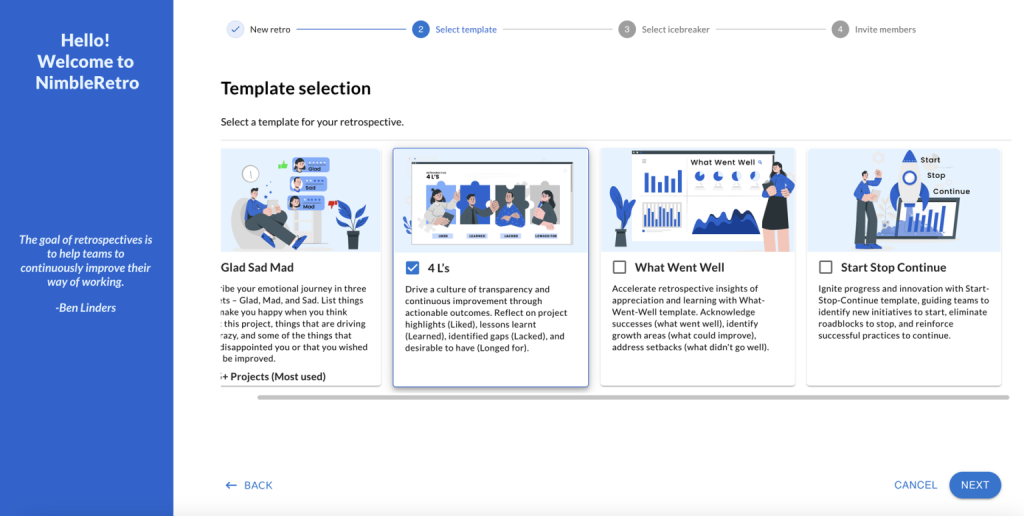

For example:
The Teradata team uses Nimble’s platform and regularly participates in Scrum meetings, including sprint planning, daily stand-ups, reviews, and retrospectives. They call retros “probably the single most useful thing in our Scrum experience.”
Always Start with an Icebreaker
As an event industry expert, Adam Young, CEO and Founder of Event Tickets Center, notes, “A retrospective meeting is a team event. And just like any event, it should start with an engaging icebreaker to set the tone, buy into the purpose, and interact with the participants (preferably, get your team members talking). On those grounds, it’s not the question of whether to do icebreakers or not. It’s rather the question of the most effective ice-breaking minute or two.”
Grab the following icebreaker ideas for retrospectives:
- Gratefulness exchange: Express gratitude to each other for specific, small achievements during the sprint.
- Mood GIF/emoji: Share GIFs or emojis mirroring your mood.
- Sprint selfie caption: Imagine you took a selfie mid-sprint. How would you caption it?
- Three-word check-in: Summarize your sprint experience in exactly three words.
- Sprint-as-a-movie: Describe the sprint as if it were a movie title.
Plus, you can also browse NimbleRetro’s icebreaker formats.
For example:
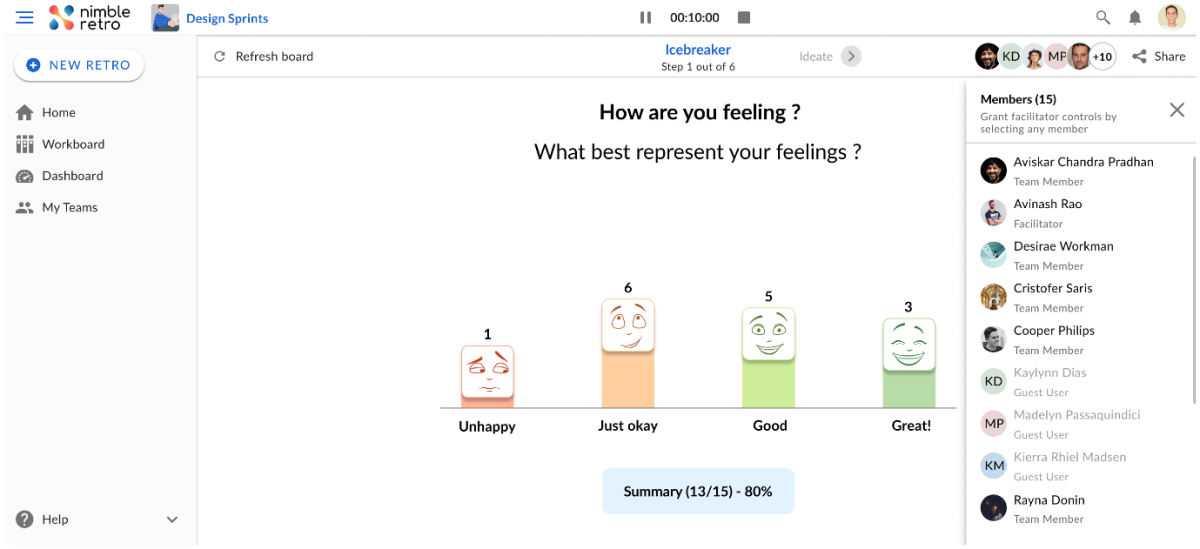
Here’s a “Happiness Index” poll to kickstart your retro:
- Q: How are you feeling?
- A: Unhappy | Just Okay | Good | Great

Create a Comfy Yet Stimulating and Inclusive Environment
Relaxed and Refreshing Space
According to Holly Finnefrock, Founder and CEO of Everblue Pond, natural elements, like water and greenery, create the most soothing and refreshing effect on people. “Among others, tabletop water fountains and indoor plants in your retrospective meeting room can help improve employees’ mood and well-being and boost their productivity for a more result-oriented discussion.”
But what if you’re running your sprint retrospectives virtually?
Here’s a splendid kicker for your background setup via Zoom, MS Teams, or any other video-conferencing tool.
For example:
This is what the Lightwire Business team does for their remote retrospectives. They select a background theme for retros each fortnight to “break the ice and begin what is usually a long and focused meeting on a light-hearted and exciting note.”


Source: LinkedIn
Inclusive Atmosphere
Now, your task is to make sure everyone feels included in your retrospective meeting, disregarding diverse factors like these:
- Gender
- Age (generational diversity)
- Background
- Timezone
- Language, etc.
It may be particularly critical for multi-geographic teams with employees speaking different languages.
For example:
Suppose some of your team members feel more at ease while brainstorming ideas and expressing their thoughts in their native language. You don’t have to become polyglots or choose only one language for communication (English, is it?) to involve everyone in your sprint retrospective meetings.
You may use special tools or services for free translation online: Instant Voice Translate or Talkao Translate.
Add More Interactivity
How can you transform your retrospectives from sleepy fiestas to engaging quests?
No more yawns with these engaging brainstorming sessions:
- Color dot voting → Green (I loved it!), Yellow (Neutral), Red (It requires improvement.)
- The Starfish retrospective → Break your points into five sections: “Keep Doing,” “Start Doing,” “Stop Doing,” “Do More Of,” and “Do Less Of”
- The Sailboat Metaphor → The Wind (What helped you finish the sprint successfully), the Anchors (What slowed you down), the Rocks (What challenges are still ahead of you), the Island (What is your ideal destination?)
- The 5 Whys technique → Repeat the question “Why?” five times to determine the root cause of an issue/problem.
For example:
In NimbleRetro, the 5 Whys analysis is at your fingertips.


Alternatively, create a custom template for a starfish retro like this.


Also, think about other ideas for exciting and interactive retrospectives:
- Icebreakers (discussed above)
- Polls
- Gamified activities with scores, levels, awards, etc.
- Role-playing simulations
- Team-building games
For example:
See how HCSS software developers engaged in a bridge-building exercise to jumpstart their sprint retro.


Source: Instagram
However, for Nicolas Breedlove, CEO at PlaygroundEquipment.com, it’s usually better to put such team-building activities or games at the end of your retrospective meeting agenda. He highlights, “Stick to the ‘first work, then play’ principle. It’s a strategic move for higher discipline, emotional balance, and concentration on the meeting’s priorities first. Eventually, you can end on a high note and improve employee morale through team building.”
Manage Your Time and Format Wisely
First of all, how long should a sprint retrospective generally take?
A 30-minute session is the traditional minimum. The longest retros may take three hours, usually after longer sprints. Mike Cohn, the co-founder of Scrum Alliance and Agile Alliance, shares, “Ninety-nine percent of my retrospectives are done in less time, usually far less time [than three hours].”
Note: The most preferred timeframe among Scrum masters in Agile teams is 60 minutes to save time and run more productive retrospective meetings.
How to Run Faster (But Not Less Successful!) Sprint Retrospectives
Naturally, you’d want a retro that doesn’t drain your workday hours.
Here’s how to achieve it with time-management techniques:
- Time-box each phase into five to ten minutes → Limit your meeting phases with a timer.
- Assign a Timekeeper → Let someone be responsible for time-tracking and reverting you back on track when you drift off topic.
- Prioritize the top three major areas → Don’t try to fix the universe but rather concentrate on the key points.
- Opt for a familiar retro template or format → Don’t hop between formats all the time.
How to Format Sprint Retrospectives
The most commonplace retro formats are as follows:
- Start (What should we start doing?) | Stop (What should we stop doing?) | Continue (What should we keep doing?)
- The 4 L’s: Liked (Highlights) | Learned (Lessons learned) | Lacked (Gaps) | Longed for (Desirables to have)
- Glad (Things that made you happy) | Sad (Things that disappointed you) | Mad (Things that drove you crazy)
Stanislav Khilobochenko, VP of Customer Services at Clario, also recommends trying the “silent retro” style, especially in highly introverted teams. He explains, “It’s an introvert-friendly format that preserves psychological safety—no pushing to speak up. Also, it switches your team members from group thinking to independent thinking without emotions. Rather than going emotional, they get more focused on expressing their thoughts. First, brainstorm silently, then—discuss everything in a group.”
Wrap it Up with Feedback
The ultimate goal of your sprint retrospective meeting is to improve, right? But here’s the question: Who improves the retro itself?
When you round it up with a retro-on-the-retro session and ask your team members for feedback about your meeting, you emphasize that it’s a highly adaptive and transformable process, just like your code (or any project you’re working on).
Adrian Iorga, Founder & President of 617 Boston Movers, also remarks that it contributes to the overall feedback culture in the workplace. “Feedback-sharing is a beneficial practice when implemented habitually after all team gatherings. It can be no longer than three minutes. Yet, it will be enough to close your retro or any other meeting with comments or even criticism from your workers as a part of your continuous culture of feedback in the company.”
For example:
If it’s done in NimbleRetro, the facilitator can click “Finish Retro” to sum your retrospective up with feedback: Great, So-so, or Meh!
Run Your Sprint Retrospectives Like a Pro With NimbleRetro
Your retros don’t have to be pointless and boring.
With NimbleRetro, a versatile retrospective tool for Agile teams, you’ll make them super-engaging and collaborative with minimum time and maximum productivity.
Try NimbleRetro to look back at your sprints smarter, not sadder. Happy and productive retrospecting to your team!