


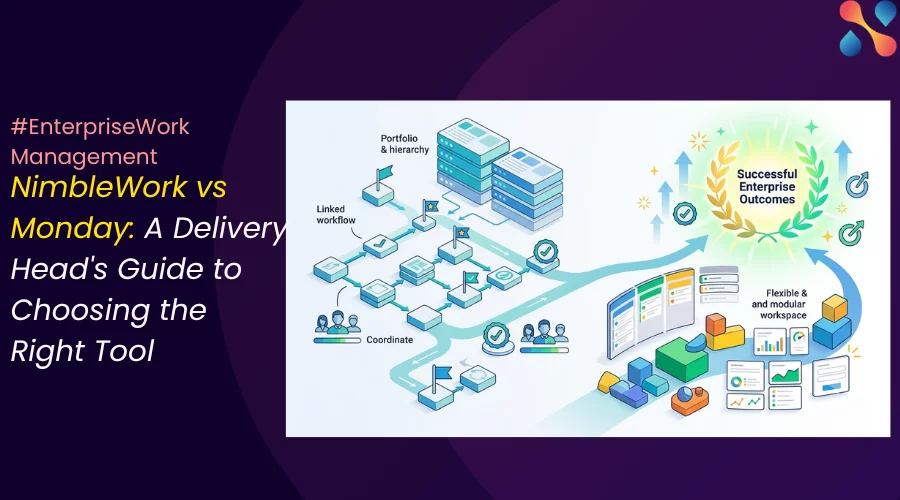
For a Head of Delivery, comparing enterprise software platforms was easy for a long time. You had simple work management tools on one side and complex project portfolio tools on the other. But not anymore.
‘NimbleWork vs Monday’ is a case in point. And we’re going to focus on a massive friction point for any modern day organization: balancing strict PMO governance and project control without suffocating the autonomy of people doing the work.
Both of these platforms have evolved tremendously over the years. Both now cover project visibility, resource planning, automation, AI, dashboards, permissions, and enterprise administration. So, just putting a feature list side-by-side isn’t going to help you make the right decision.
The true differentiator is their underlying philosophy. It’s about the distinct paths they take to scale operations. Therefore, the real choice comes down to the two different operating models.
What we believe
NimbleWork is the better fit for
- governed, hybrid agile + waterfall enterprise delivery
- your requirements are closer to formal PPM, resource economics, and schedule control
whereas Monday.com is suitable for
- flexible, cross-functional work management with credible enterprise oversight.
- requirements are closer to rapid adoption and locally adaptable workflows.
Ask yourself: are you an organization that needs absolute delivery governance and process standardization? Or are you prioritizing organization wide adoption and flexibility?
Let’s test this as we go forward.
Which tool balances governance, capacity and adoption?
NimbleWork is strongest when governance must be built into the delivery system. And, Monday is strongest when a common platform must adapt quickly to many teams.
Choose NimbleWork when… | Choose Monday.com when… |
The PMO must govern demand, approvals, schedules, resources, cost, and delivery in one model. | The priority is broad adoption across delivery, operations, marketing, HR, finance, and other functions. |
Agile work must roll into Waterfall milestones, baselines, critical paths, or earned-value reporting. | Teams need visual boards, forms, dashboards, docs, automations, and no-code configuration with a short learning path. |
Portfolio decisions require formal evaluation, strategic scoring, capacity checks, and funding controls. | Portfolio leaders need connected visibility and risk signals, but local teams should retain room to configure how they work. |
Resource planning depends on skills, locations, roles, cost rates, approved actuals, and scarce-capability matching. | Resource managers need approachable project allocation and FTE capacity views across a large portfolio. |
Process variance is a material compliance or delivery risk. | Over-standardization would slow adoption or push teams back to spreadsheets. |
Monday.com leads in adoption, visual clarity, and cross-functional flexibility.
Teams can see and shape their work quickly around Monday. A delivery team can use projects and Gantt views, an operations team can use boards and forms, and an executive can view a portfolio or dashboard without asking every function to work in the same screen.
The tool also has a much broader public adoption signal. Its review base runs into the thousands, with recurring praise for visual clarity, customization, and collaboration. That does not prove it will fit a regulated enterprise, but it gives buyers more evidence about everyday use.
For a Head of Delivery, monday.com’s strongest use cases are:
- Coordinating high volumes of cross-functional work.
- Replacing shared spreadsheets and departmental trackers.
- Giving teams a no-code platform that local administrators can configure.
- Connecting project-level detail to executive portfolio views.
- Bringing occasional users and non-project functions into the same work system.
Its current Enterprise product is deeper than the old ‘flexible board tool’ label suggests. The portfolio solution connects project boards to a portfolio, provides project health snapshots, and supports up to 200 projects in the standard portfolio. monday.com also supports cross-project dependencies, while the All Projects Dashboard rolls up milestones, budgets, planned versus spent effort, and project progress.
The trade-off appears after adoption. As boards, automations, workspaces, and local conventions multiply, navigation and reporting can become harder to maintain.
One 2026 G2 reviewer in finance described the risk precisely: without strong governance, teams may use the platform in different ways as workflows scale. That is a process problem, but it is also an operating cost the buyer must plan for. Read the monday.com review set on G2.
NimbleWork leads when delivery control is non-negotiable
Nimble covers boards, lists, timelines, dependencies, Scrum, Kanban, work management, and team collaboration. Its advantage is not that it has more views. Its advantage is that execution sits inside a more formal project and portfolio model.
Three capabilities create the separation.
Hybrid delivery is a native planning pattern
Many enterprise programs do not run one methodology. Software teams work in sprints. Infrastructure follows dependencies and fixed dates. Compliance teams require approvals. Finance tracks baseline cost and actual effort.
Nimble can link Agile work items to a higher-level task in an advanced schedule, so sprint progress rolls into a formal plan. The same environment supports milestones, baselines, critical-path planning, Gantt views, Sprint Burndowns, Release Burnups, and cumulative-flow reporting. Nimble’s Hybrid Agile overview explains that linkage.
monday.com can model the same program with project boards, Gantt views, dependencies, portfolio rollups, and separate boards for specialist work. It is a credible approach, especially when teams value autonomy. Nimble has the edge when the relationship between Agile execution and the formal plan must be a standard delivery construct rather than a customer-designed board architecture.
Portfolio management governs what should start
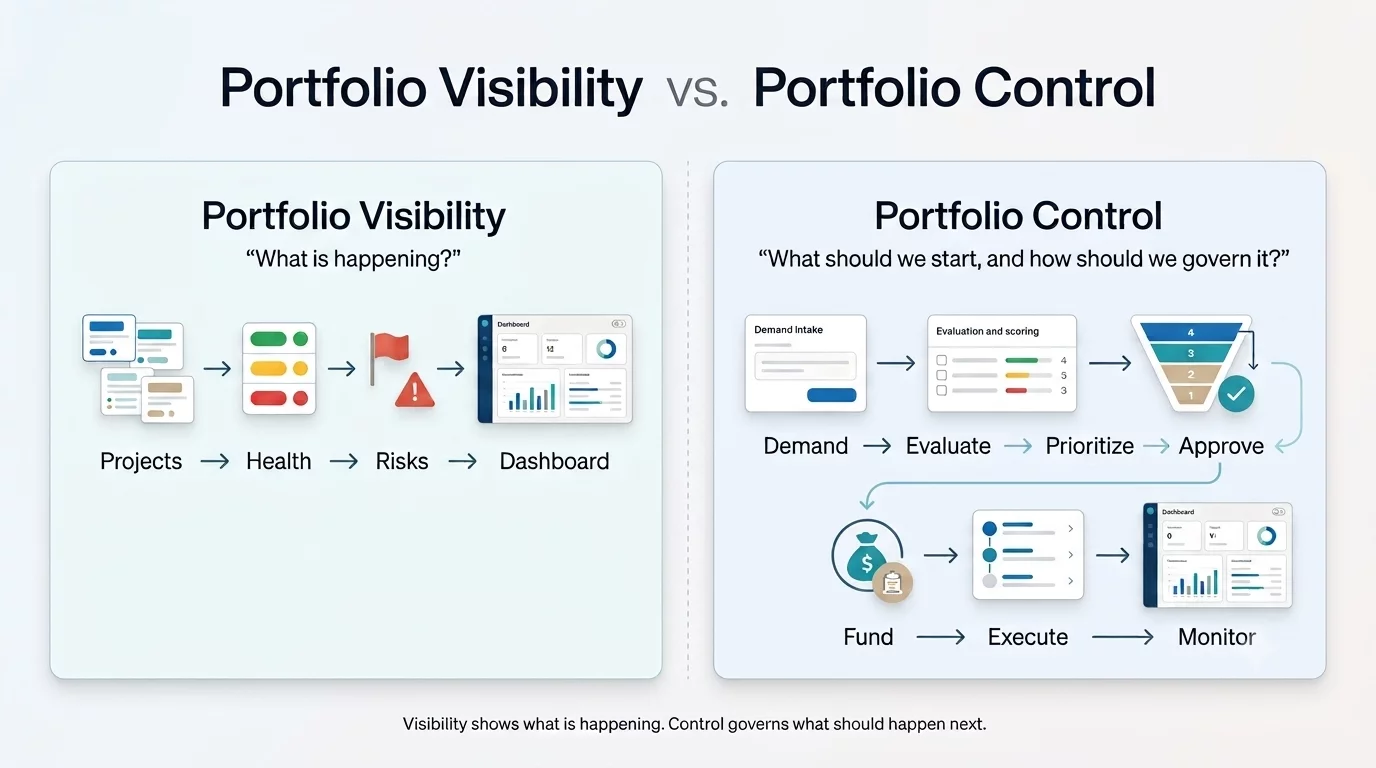
monday.com’s portfolio model is strong at visibility. Portfolio Health Snapshot, the All Projects Dashboard, connected project boards, and daily AI Risk Insights help leaders understand progress and emerging problems. The Risk Insights feature scans project data and produces a daily list of potential risks.
Nimble goes further upstream. Its portfolio model captures demand, evaluates it against defined business drivers, supports prioritization and approval, allocates budget, and then monitors the approved work. Nimble’s portfolio documentation describes evaluation against criteria such as revenue impact, compliance needs, customer impact, and cost efficiency.
That is the difference between portfolio visibility and portfolio control. Monday can build an investment-scoring workflow with forms, formulas, automations, and dashboards. Nimble is the more natural fit when that workflow is a core PMO process and must remain consistent across business units.

Project economics are closer to the schedule
Nimble links baselined effort, resource cost per hour, approved timesheet actuals, planned value, earned value, actual cost, and estimate at completion. Its earned-value documentation is unusually explicit about how those measures are calculated.
Monday.com can track project budgets and planned versus spent effort in its portfolio dashboards. That may be sufficient for many delivery organizations. Buyers that need cost-rate modeling, approved actuals, billing rates, or earned-value measures should test the detailed finance workflow rather than assume a portfolio budget column is equivalent.
Resource management is now a close contest, with one important distinction
NimbleWork’s resource model is stronger when an assignment is an enterprise control process. Resource requests can include role, skills, location, availability, and allocation needs. Its matching logic scores candidates against the request, including exact and alternate persona or skill matches.
Nimble can also maintain cost definitions by role, skill premium, location, and effective date. See Nimble’s score-based allocation and cost definition.
Monday.com has three connected layers:
- A Resource Directory with roles, skills, locations, and resource managers.
- A Resource planner for high-level allocation within each project.
- A Capacity manager that consolidates plans across projects and shows utilization in FTEs.
A portfolio-connected Capacity manager can include up to 200 Resource planners. It documents the full model in Resource management for Enterprise.
The biggest implementation risks are different
Risk | NimbleWork | monday.com | What to test |
Adoption | Formal fields and lifecycle rules may feel heavy to occasional users. | The interface is approachable, but large accounts can still develop a learning curve. | Time five common actions with real team members. |
Governance | A badly designed central process can create bureaucracy. | Local freedom can produce duplicate fields, inconsistent statuses, and board sprawl. | Change a shared template and inspect its effect across active projects. |
Reporting | Deep configuration may require specialist administration. | Rollups depend on disciplined project structures and field mapping. | Add a non-standard project and see whether executive reports remain correct. |
Performance | Reviewers have reported slow or clunky experiences in parts of Nimble. | Reviewers report occasional lag with larger dashboards and complex accounts. | Load realistic volumes, not a ten-row demo board. |
Integration | The public integration footprint is smaller, and some reviewers ask for broader native connections. | The marketplace is broader, but complex integrations and automation setup still draw criticism. | Build two production integrations and test error handling. |
Change control | Central changes can affect many governed processes. | Product and template changes can require local cleanup across boards. | Run a versioned template change with rollback criteria. |
These risks are not reasons to reject either product. Rather these tell you where the implementation budget should go.
AI strengthens both products but does not remove the operating-model choice
Monday.com’s AI is broad and increasingly operational. Sidekick can work in portfolio context, AI columns and workflows can act on board data, and Risk Insights produces daily portfolio risk signals. Enterprise admins can control access to agents and AI features and monitor AI usage. See monday.com’s current plan packaging and AI governance controls.
Nimble’s AI is more delivery-artifact oriented. Intelligent Planning can turn uploaded proposals or requirements into a structured project plan. Its add-on agents can generate card descriptions, acceptance criteria, BDD scenarios, tasks, test cases, and comment summaries. Nimble also offers Smart-Fill, related-work suggestions, and an in-product Intelligent Hub.
The transcript imagines AI automatically translating every rogue status into an enterprise standard without affecting team freedom. Buyers should treat that as a future design idea, not a current selection criterion.
What do the users say?
monday.com users praise flexibility but warn about scale discipline
G2’s review summary consistently highlights ease of use, customization, team collaboration, and project organization. A 2026 IT manager said a board could range from “a todo list” to a full engineering change-request tracker. Another reviewer said the platform enabled technically capable business users to create complex workflows without IT. Read monday.com reviews on G2.
The negative themes are just as relevant for enterprise buyers. G2 records learning curve, missing features, and lack of intuitiveness among recurring cons. TrustRadius highlights complex automation setup, some integration limitations, and occasional sluggishness on large dashboards. Gartner reviewers also flag notification noise, per-seat pricing, and features gated to higher tiers.
Monday.com can win adoption quickly, but flexibility is not self-governing. Assign an enterprise product owner, define board and field standards, limit who can create shared structures, and monitor automation volume.
NimbleWork users praise implementation and tracking but flag UI and reporting
A verified G2 reviewer praised Nimble’s “ease of use in a multi user/multilocation environment” and responsive implementation support. Other G2 reviewers mention centralized tracking, progress visibility, and easier team coordination.
The criticism is consistent across the smaller sample. On Capterra, one reviewer said the “UI could be a little more upmarket,” while another asked for better dashboard customization and integrations. Gartner’s critical summary similarly says navigation could improve and parts can feel sluggish.
Nimble’s depth does not excuse usability friction. Put project managers, resource managers, finance users, and delivery teams in the proof of concept. Ask NimbleWork for references that match your industry, scale, and deployment model.
The comparison that matters
We mentioned earlier that feature-by-feature comparison isn’t going to be of great help. Having said that, a quick look at the critical ones will help put things in perspective.
Evaluation area | Nimble | monday.com | Decision cue |
Primary model | Governed enterprise delivery | Flexible enterprise work platform | Decide whether control or adoption is the harder problem. |
Daily work | Boards, lists, timelines, dependencies, Agile and work-management templates | Boards, projects, docs, forms, views, dashboards, automations | monday.com usually offers the easier cross-functional entry point. |
Portfolio intake | Demand capture, evaluation, strategic drivers, selection, approval | Forms, boards, formulas, automations, portfolio workflows | Nimble leads when investment governance must be standardized. |
Portfolio oversight | Portfolio and program analytics, role-based views, strategy-to-execution linkage | Portfolio board, health snapshot, All Projects Dashboard, Risk Insights | monday.com is now credible for visibility; test decision controls separately. |
Hybrid delivery | Native linkage between Agile work and formal schedules | Configurable projects, Gantt, Agile boards, portfolio rollups | Nimble leads for tightly coupled Agile-Waterfall programs. |
Scheduling | Baselines, constraints, critical path, advanced scheduling, earned value | Gantt, milestones, dependencies, cross-project dependencies | Nimble fits schedule-led and contract-led delivery. |
Resource planning | Requests, skills, roles, locations, scored matching, costs, actuals | Resource Directory, Resource planner, Capacity manager, FTE utilization | monday.com is visually strong; Nimble goes deeper into governed staffing and economics. |
Process controls | Process templates, personas, forms, business rules, routing and blocking | Managed templates, account and board permissions, custom roles, automations | Both can govern; Nimble makes formal process more central. |
Reporting | Delivery, flow, schedule, resource, cost, and portfolio analytics | Visual dashboards, portfolio health, budget and effort rollups, AI risk reports | Build the actual executive pack in both products. |
AI | Intelligent Planning, Smart-Fill, related-work suggestions, delivery agents | Sidekick, agents, AI columns, workflows, Notetaker, portfolio Risk Insights | monday.com is broader; Nimble is more focused on delivery artifacts. |
Security and administration | Organization and project access by role/persona, activity logs, SSO on Business, SOC 2 Type II and ISO 27001:2022 claims | Custom roles, multi-level permissions, SAML SSO, audit log/API, AI governance, regional hosting | Validate your exact compliance and residency requirements in contract. |
Ecosystem evidence | Smaller public review and integration footprint | Large review base, marketplace, and broad adoption | monday.com carries lower ecosystem risk. |
Go through these parameters in detail. The table is here to help you make a better decision with respect to the critical ones. Now, let’s look at the pricing structure of both the tools.
Pricing
Plan | NimbleWork | monday.com |
Free | $0; up to 10 users and 10 projects | $0; up to 2 seats and 3 boards |
Entry paid | Team: $10/user/month, billed monthly. (customized annual option available). | Basic: $9/seat/month, billed annually |
Mid tier | Business: $26/user/month, billed monthly.(customized annual option available). | Standard: $12/seat/month; Pro: $19/seat/month, billed annually |
Enterprise | Custom quote | Custom quote |
AI | AI Agents listed as a $3/user/month add-on; other add-ons vary | AI credits included by plan, with additional credits available; Enterprise receives custom credits |
monday’s entry price might be good for wide deployment. Yet,the features central to this comparison—portfolio management, resource management, multi-level permissions, enterprise reporting, and 250,000 monthly automation and integration actions—sit in its custom-priced Enterprise plan.
Nimble’s Business tier includes Hybrid Agile and advanced Waterfall scheduling, while Enterprise adds organization hierarchy, people management, unlimited custom templates and fields, and portfolio capabilities. A public seat-price comparison therefore does not answer the enterprise question.
Ask both vendors for a three-year cost model covering:
- Full members, occasional contributors, viewers, guests, and external partners.
- AI credits or agent add-ons at realistic usage.
- Automation and integration limits, API volume, and middleware.
- Migration, solution design, training, and managed administration.
- Sandbox, test environments, data residency, premium support, and customer success.
- The systems each platform will replace—and the ones that must remain.
The cheapest license can produce the higher total cost if the PMO must maintain parallel tools for scheduling, resource requests, financial control, or executive reporting.
Use a weighted decision model for a Head of Delivery
Do not score every feature equally. A practical weighting for a regulated or delivery-intensive enterprise is:
Criterion | Suggested weight | Likely leader |
Portfolio governance and demand control | 20% | NimbleWork |
Hybrid scheduling and dependency control | 15% | NimbleWork |
Resource capacity, skills, and economics | 15% | NimbleWork |
Team adoption and daily usability | 20% | monday.com |
Cross-functional configurability | 10% | monday.com |
Reporting and executive visibility | 10% | Depends on required measures |
Security, administration, and integration | 10% | Depends on enterprise architecture |
Change the weights before the product demonstrations. If adoption and cross-functional breadth account for half the decision, monday.com is likely to lead. If formal governance, hybrid schedules, and resource economics account for half, NimbleWork is likely to lead.
Final thoughts on NimbleWork vs Monday
At what point does flexibility become insufficient governance? And at what point does governance become too much process for the people actually doing the work? Finding that specific tipping point is your absolute key to solving the scale dilemma.
Choose NimbleWork when delivery reliability depends on formal process, hybrid methods, advanced schedules, governed demand, scarce-resource allocation, and cost or earned-value control. Budget for process design, role-based training, and usability validation.
Choose monday.com when the main requirement is a flexible platform that many functions will adopt, configure, and use every day—while still giving leaders portfolio, capacity, risk, and enterprise administration. Budget for a platform owner, managed templates, a common data dictionary, and controls against board sprawl.
For most Heads of Delivery, one question resolves the debate:
Would the organization struggle more to enforce a common delivery model, or to get thousands of people to use it?
If the answer is enforcement, Nimble is the stronger candidate. If the answer is adoption, monday.com would be the right choice.
See how NimbleWork runs governed, hybrid delivery at scale → Book a demo
FAQs
Which handles hybrid Agile-Waterfall better?
NimbleWork – both methods on one data model with shared financials and governance. Monday.com connects them through relational boards, which works well with disciplined board administration.
Is monday.com suitable for an enterprise PMO?
Yes. Its Enterprise plan now includes dedicated portfolio and resource management, cross-project dependencies, permissions, custom roles, audit capabilities, AI risk reporting, and capacity planning. It fits PMOs that want strong visibility with team-level flexibility. PMOs that need formal investment governance, earned value, or governed hybrid planning should test whether its configurable model goes deep enough.
Which product has better resource management?
monday.com now provides a credible visual model through its Resource Directory, project Resource planners, and portfolio Capacity manager. Nimble is stronger for formal requests, skills-based matching, cost definitions, approved actuals, and resource decisions tied to portfolio governance. The better choice depends on whether you need capacity visibility or governed staffing economics.
Which platform is easier to adopt?
monday.com usually has the advantage because its visual boards and no-code configuration are familiar to a broad range of functions. Nimble can be easy for daily tracking, and reviewers praise its implementation support, but its deeper governance requires more deliberate training and change management.
Which product has better AI?
monday.com’s AI covers a broader workspace and portfolio context, including agents, Sidekick, workflows, AI columns, meeting notes, and risk insights. Nimble’s AI is more focused on delivery artifacts and planning, including generated project plans, descriptions, acceptance criteria, tests, tasks, summaries, and field suggestions. Test both for accuracy, permissions, review effort, and ongoing cost.
Can monday.com enforce enterprise standards?
Yes, through account permissions, custom roles, Managed templates, project structures, board and column permissions, and automations. The remaining question is operational: how much central design and maintenance are required to keep many workspaces and boards aligned over time?