



When investing in project management software (PMS), you’re breathing out: “Finally! From now on, our team will row in sync toward success!” Yet, somehow, as work days go by, you don’t notice any teamwork improvement. Quite on the contrary, you see more disorder, miscommunication, and the “Great Return” of sticky notes to the office. (Yes, some of your team members returned to using those on their laptop monitors.) It even gets poorer and poorer, resulting in missed deadlines and failed projects. And you don’t know why!
Shockingly, the reason is… the tool itself!
In fact, 38% of workers are dissatisfied with their PM tool, and only 17% feel it meets their unique requirements. But why do project management tools let teams down and miss the mark on promoting real collaboration, and how to pick the right one that won’t?
Whether you need it for small or large team collaboration, we’ve prepared the answers. Read on.
Here’s Why Project Management Tools May Flop at Supporting Collaboration
They Are Too Complicated.
There’s no denying that one of the primary challenges with PMS is complexity.
They may seem like rocket science to your team members. Naturally, they can’t cooperate well if they need to master the “science” of PM software adoption. If you need to organize an X-day training course (and a double espresso with the highest caffeine kick) for the whole team to start using a project management tool, that’s where issues hide.
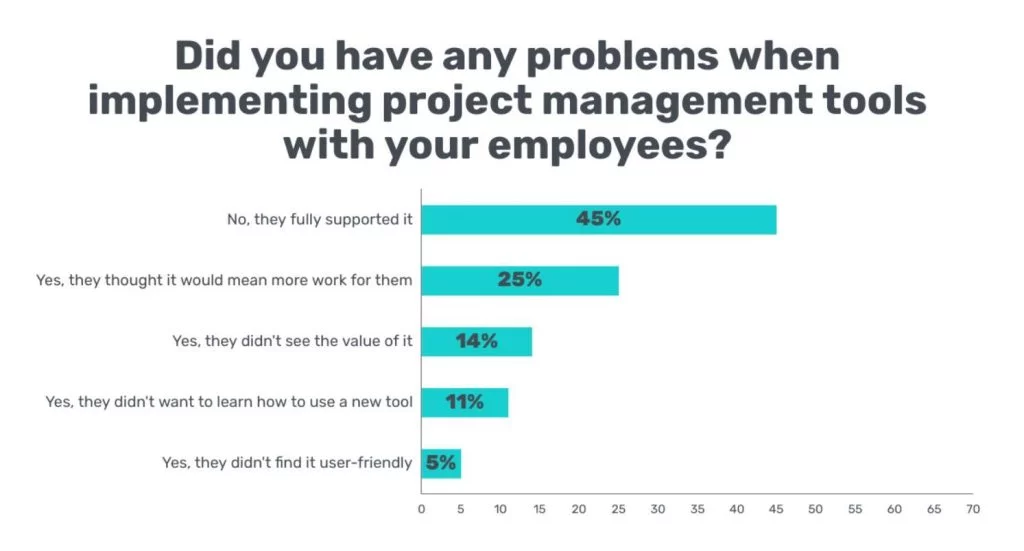
Indeed, problems with project management tools may arise during the very implementation stage. In the survey, 11% of employees didn’t want to spend time learning how to use a new tool, and 5% didn’t find it user-friendly.

Source: GetApp
For example:
If you take Planisware or ClickUp, you’ll see they have a rather steep learning curve. ClickUp’s interface, in particular, may overwhelm new users with its complex hierarchy: Workspaces → Spaces → Folders → Lists → Tasks → Subtasks → Nested Subtasks → Checklists.
What PMS should have for highly collaborative teams → User-friendliness
A well-designed, intuitive UI (user interface) is like an advanced GPS navigator. It adequately guides your crew task-to-task and project-to-project. And no one gets confused and stuck in between.
Plus, whenever a new hire joins the team, they won’t spend hours during onboarding to learn how to use your project management tool.
Conversations Happen Elsewhere or Break Down.
How do your team members usually communicate? Do they get bogged down in emails and chats while disconnecting from the project management platform?
If they don’t do it in one centralized place, it’s a one-way ticket to communication breakdowns and, consequently, collaboration failures. Due to such a detachment, everyone gets lost in the Bermuda Triangle of communication tools (mainly the email, chat, and PM systems).
Even if you can communicate via comments under tasks without leaving the tool and hopping to another one, this will be a good appetizer, but your team will still be hungry for more social interactions.
For example:
Asana, one of the most popular PM tools, does offer a “Messages” tab inside every project and a comment section under each task. However, it doesn’t have a central hub for communication and socialization overall, aside from projects, which is also an invaluable aspect in strengthening employees’ bonds.
What PMS should have for highly collaborative teams → Socializing hub
In the opinion of Avner Brodsky, CEO at GoodWishes, “Most project management tools fail teams at collaboration because they connect tasks and projects, not hearts and minds. Instead, they must give them an opportunity to socialize more authentically and share anything via the platform, from their moods amid projects to warm shout-outs to their colleagues after successful task or project completion.”
When you have a socializing hub in your PM tool, you can encourage friendly conversations and stronger social connections between team members:
- Daily gratitude circles (virtual) with employee appreciation messages
- Tag-a-colleague rituals for recognition and praise
- Photo shares (e.g., “Wednesday is CatsDay—Share a pic of your cat!”)
- Just-for-fun GIFs
- Congratulatory words on special occasions (e.g., a birthday or a work anniversary)
They Don’t Visualize Work.
Now, imagine that you log in and stare at the endless task list, wondering, “Who is finishing what now? And are we anywhere near the project’s end?”
Most PM tools still fall back on to-do lists with checkboxes, especially at basic or beginner levels. They don’t have project visualization instruments, such as Gantt charts with progress-tracking features or Kanban boards with columns and drag-and-drop features to move tasks from one column to another. Sometimes, those are treated as advanced and locked behind a paywall.
For example:
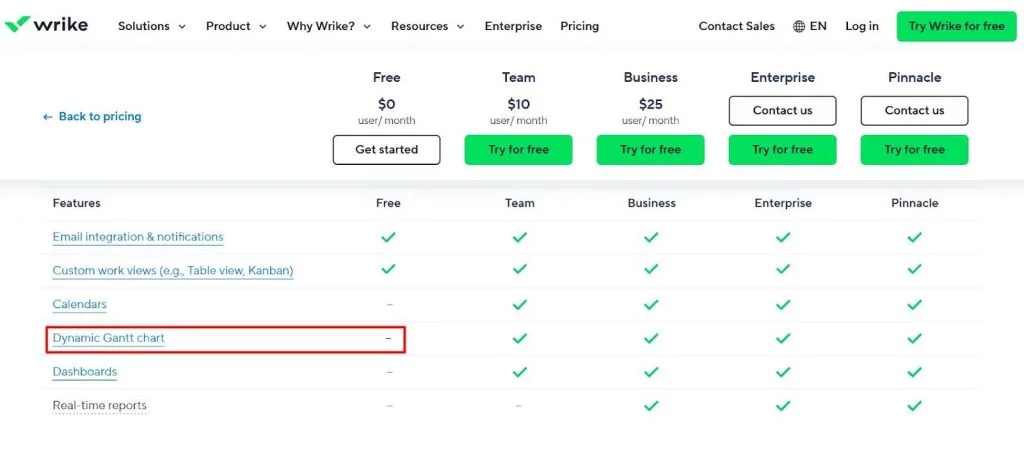
A free plan at Wrike, another well-known project management tool, doesn’t presuppose a Gantt chart. It is available only in paid versions.

Source: Wrike
What PMS should have for highly collaborative teams? → Visualization
For John Elarde III, Operations Manager at Clear View Building Services, “visualization is a universal language” understood by everyone and translated into PM success. “You should be able to visualize work and ‘feel’ project momentum. When you actually see who does what and get a macro-view of your projects’ trajectory and progress, you can notice bottlenecks earlier and distribute workloads more effectively for better collaboration through your project management software.”
That’s why every team leader should prioritize visual project management tools to ensure that everyone speaks the same “language” and co-works productively.
They Don’t Match Teams’ Work Styles and Hinder Collaboration Across Departments.
According to Microsoft’s research, 59% of workers believe collaboration tools don’t align with their preferred work style and make it difficult to join forces across departments.
Traditionally, most project management platforms are labeled as “one-size-fits-all.” But in reality, they turn into “one-size-fits-none.”
What PMS should have for highly collaborative teams → Needs-match and adaptability
Ideally, it should enable successful cross-departmental collaboration between different teams of:
- Hiring specialists
- IT professionals
- Product developers
- Marketers
- Salespeople
- And others.
It’s also important to mind your business niche.
Working in a hyper-narrow niche with roofing businesses, Sean Shapiro, Managing Partner at Axia Advisors, says, “It’s all about business specifics: how the company operates, what communication format employees prefer, etc. So, the right project management software for cooperation is the one that offers more agility and flawlessly calibrates to your team’s unique needs. Another smart move when choosing one would be to look for a platform tailored to your specific industry: construction, finance, or any other.”
For example:
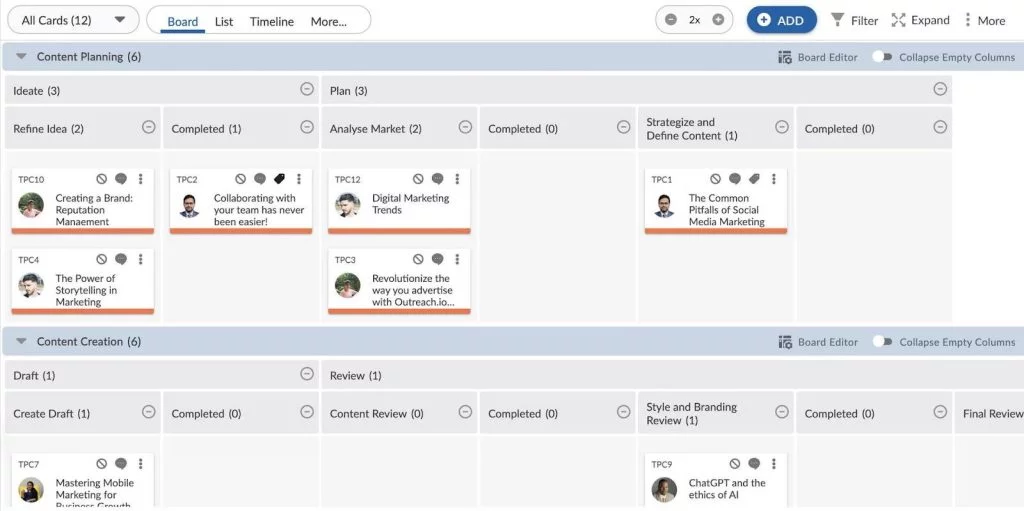
Suppose you manage a team of creatives. In that case, you’d better consider PM tools for creative agencies. Tools like Nimble adapt to everyone’s needs and provide a more agile approach to work management, allowing you to switch gears or even make a U-turn right amid the project.

For teams in steel processing or fabrication, ERP software for steel industry aligns daily workflows with quoting, inventory control, job tracking, and delivery—all within a single system built around industry-specific demands.
They Lack Interactivity and Stimulating Elements.
Is your project management tool engaging? Or is it just an empty digital shell where nothing really happens besides marking your tasks as done?
The second variant will be detrimental to team motivation and collaboration. Who would be enthused and inspired to cooperate on projects in a dull place like that?
What PMS should have for highly collaborative teams → Interactivity and gamification
Some project management tools do offer built-in interactive elements, like a poll/voting system or an AI assistant (in Nimble—it’s Nimble Buddy), that help users collaborate on projects.


It should also be a place where you can not only work but also play, that is, engage in virtual team-building activities on the spot, such as icebreakers or GIF battles (Who creates the funniest GIF about a Zoom meeting or workation, huh?).
Then, there may be game-like elements to gamify tasks:
- Levels
- Challenges
- Points
- Awards
- Badges, etc.
Lacey Jarvis, COO at AAA State of Play, remarks that this is critical for Gen-Z engagement. “Entering many industries as a new workforce, Gen Z employees are particularly interested in interactive and gamified project management tools that improve team cohesion through play. However, it shouldn’t be like a kid’s playground with items that distract from tasks rather than teaming up employees. It should rather create a challenging and motivational environment that rewards teamwork.”
Adopting the Right Project Management Tool for Collaboration—Nimble
Let’s see how Nimble can improve the feeling of togetherness in your team and help you manage your projects smarter.
Intuitive, Easy-to-Use Interface
With Nimble, you won’t have to click through tons of tabs to find your to-do list. This project management platform has a user-friendly interface, intuitive design, and navigation for teamwork.
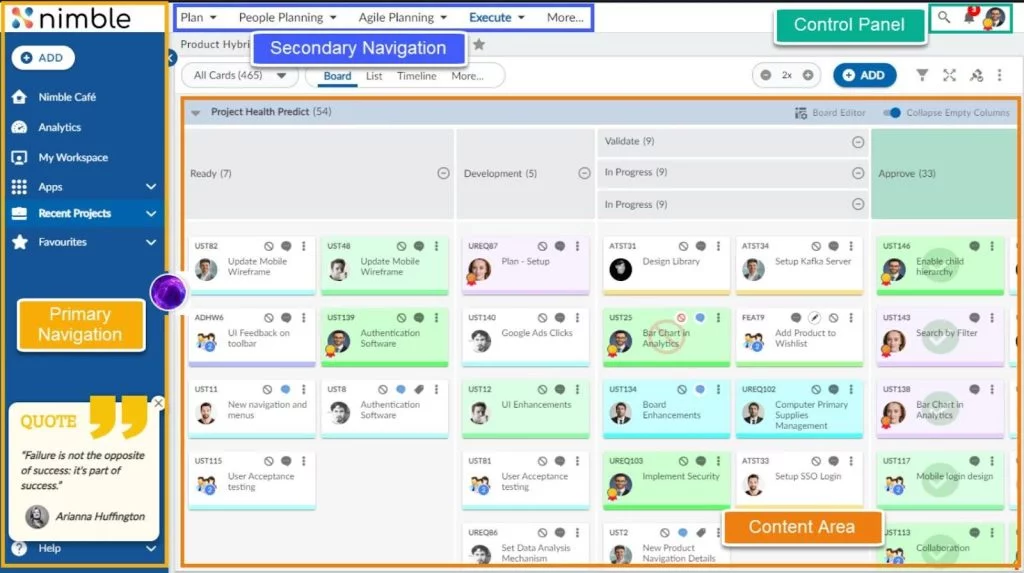

Your team members won’t ever get lost in the tabs labyrinth and collaborate more intuitively—no manual or training needed!
For example:
Santander prefers Nimble specifically for “Intuitive UI, nice design, good functionalities.”
Visualization
You get a variety of Nimble’s visualization options for real-time collaboration:
- Gantt charts
- Timelines
- List views
- Kanban boards
- Dashboards and reports in graphs and charts
In Nimble, you can easily implement Kanban to visualize work in columns: “To Do,” “In Progress,” and “Done.”


For example:
For Inteec’s sales team, project visualization is one of the key advantages of Nimble’s SwiftKanban.
Communication + Socialization
Whether you want to thank your crew members with Kudos, celebrate the joy of an individual or team-wide achievement, or simply type a quick message, take a “Thank-Talk-Celebrate” approach in Nimble Café. It’s a powerful communication and socialization feature for teams.
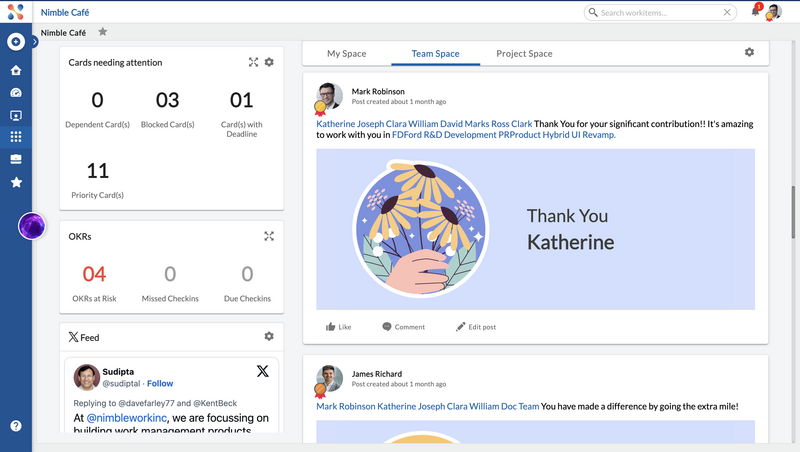

Besides, you can select any Kudo you wish to thank your colleagues for doing a great job or going above and beyond.
High Adaptability for Teams
Nimble fits your team’s needs like a glove, thanks to the following ready-to-use templates:
For example:
Need to plan and execute your marketing strategies?
There you go.


Note: The major focus of this PM software lies on agile teams.
For example:
It helped Faurecia with a “smooth transition from traditional to agile behavior.”
Motivation and Gamification
Nimble is a highly motivating and gamified project management tool for collaborative teams.
For example:
Everyone may get just the right dose of inspiration with motivational quotes on the board.
Also, when you send or receive Kudos, they aren’t just tokens of appreciation and motivation. They help earn points and gamify work with Gold, Silver, and Bronze badges.
Ready to Start Collaborating More Effectively with Nimble?
If you’re drowning in task lists and your projects fail because of the wrong project management software (or none at all), Nimble is your team collaboration savior. Consider its benefits once again: an intuitive UI with work visualization features, adaptable templates for every department, a built-in communication hub (Nimble Café), gamification elements, and more!
Let your projects always have a positive ending—try Nimble to collaborate on projects rather than see them collapse.