
In this article, we will help you understand how to view Sentiment Analysis in SwiftKanban.
|
Skip Ahead to: |
Overview
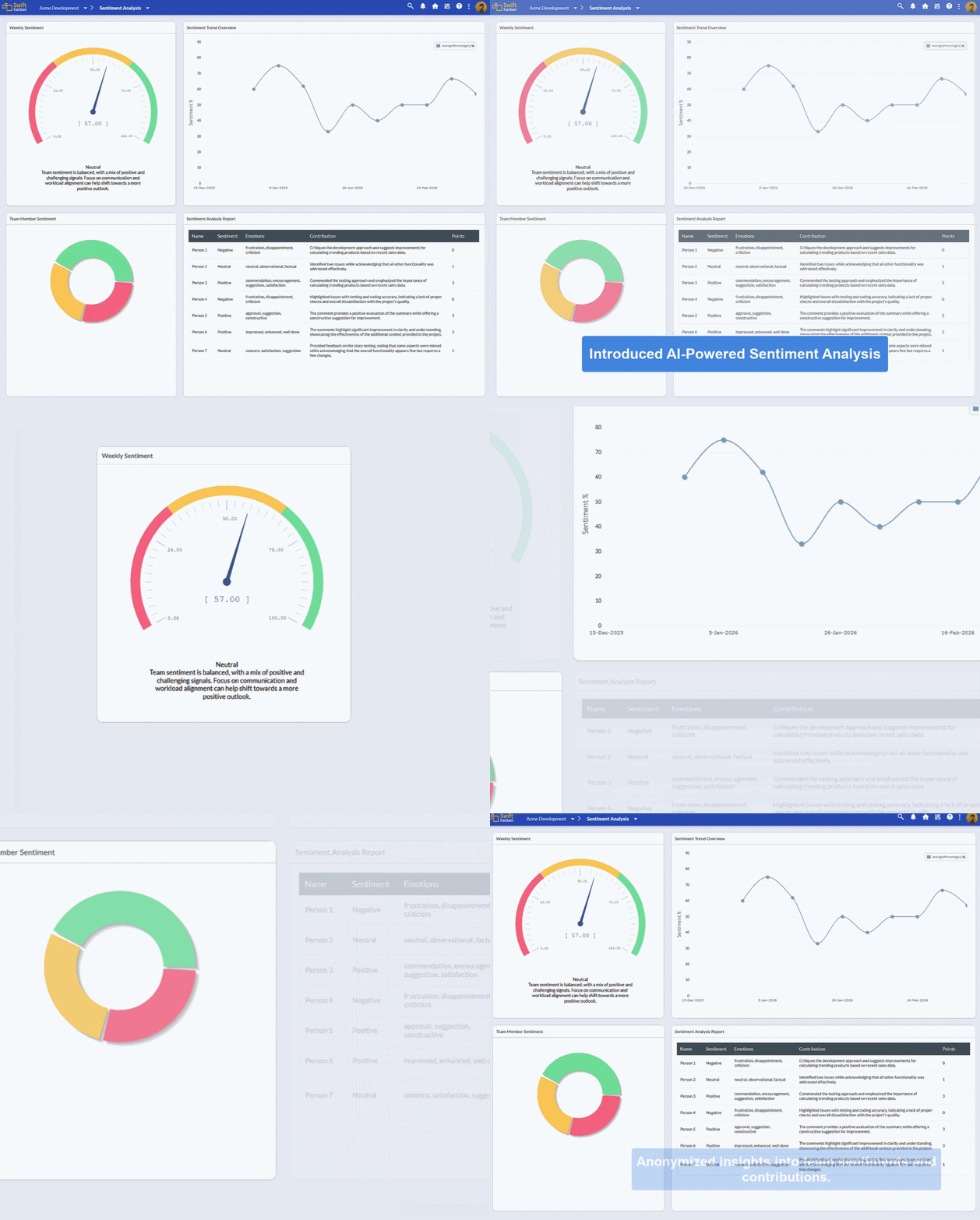
The Sentiment Analysis feature in SwiftKanban provides powerful AI-driven insights into team morale by analyzing comments, kudos, and feedback shared by team members on cards. By detecting whether sentiments are positive, neutral, or negative, the feature helps leaders understand how team members feel about their work and enables them to foster a more positive and collaborative work environment.
Sentiment insights are generated automatically by AI by evaluating interactions and comments shared by team members on cards.
Note: These AI Agents are license-based Add-ons. Please contact [email protected] to enable the Kanban Assist feature for your account.
Why use Sentiment Analysis?
- Stay connected to team morale without waiting for formal feedback sessions.
- Identify challenges early, such as frustration or disengagement, to intervene timely.
- Celebrate positivity and foster an encouraging work environment.
- Make informed decisions backed by real-time team sentiment data.
Example:
A Project Manager can review team sentiment after a product release to gauge team satisfaction with the outcome and process.
Navigation
To access Sentiment Analysis in SwiftKanban:
- Open your Project.
- Click Kanban Board in the top navigation menu.
- Select Sentiment Analysis from the dropdown list.
Sentiment Analysis insights are generated automatically by AI based on team comments and interactions on cards within the last week.
Key Features
AI-Powered Sentiment Tracking
Automatically analyzes comments and interactions on cards to detect and categorize sentiment.
Insightful Visualization
Graphical widgets make it easy to understand overall and detailed sentiment insights at a glance.
Trend Monitoring
Weekly trends help track changes in team morale over time and correlate them with project activities.
Privacy-Focused
Individual identities remain anonymous, ensuring a safe space for honest feedback.
Actionable Insights
Highlights specific concerns, areas for improvement, and positive feedback to help managers take meaningful actions.
Who Can Access Sentiment Analysis?
In SwiftKanban, only users with the following roles can access the Sentiment Analysis feature:
- Manager
- Admin
These roles typically monitor team engagement, productivity, and overall project health.
Tip: By regularly reviewing sentiment insights, leaders can better understand team morale and proactively address concerns.
Important Notes
- License Requirement: Sentiment Analysis is available as part of the Kanban Assist AI add-on.
- Privacy Assured: Individual team members’ names are anonymized (for example, Person 1) to maintain confidentiality.
- Data Scope: Analysis is based on comments and interactions from the previous week.
- AI Evaluation: Sentiments, emotions, and contributions are assessed automatically by AI.
- Points System: AI assigns points based on sentiment:
These points help track the quality and tone of contributions over time.
Understanding the Sentiment Analysis Widgets
The Sentiment Analysis page includes four widgets that provide a comprehensive view of team sentiment.
1. Weekly Sentiment (Dial Chart)
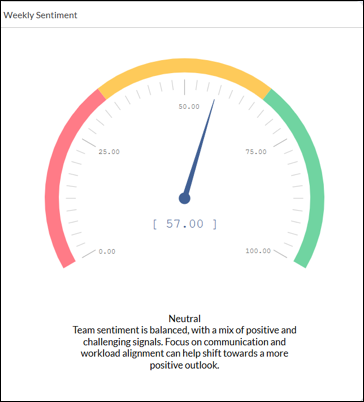
What it shows: The overall percentage distribution of positive, neutral, and negative sentiments detected during the past week.
Why it’s useful: Provides a quick snapshot of the overall team mood. If sentiment is largely neutral or negative, it may indicate issues that need attention.
AI-generated Summary: A textual summary generated by AI highlights team dynamics such as motivation, concerns, or areas needing improvement.
2. Team Member Sentiment (Donut Chart)
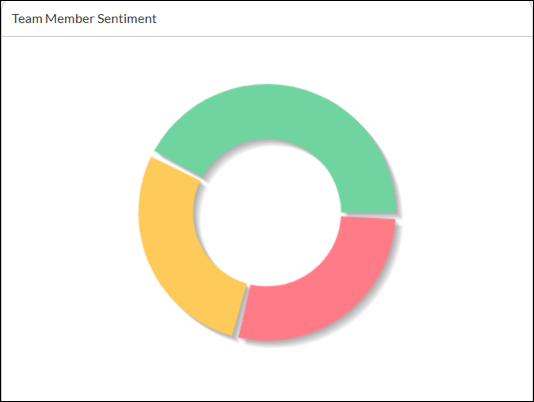
What it shows: A breakdown of how many team members expressed positive, neutral, or negative sentiments during the past week.
Why it’s useful: Helps understand variations in team sentiment. A few negative sentiments in an otherwise positive environment may highlight specific concerns that require attention.
Example:
If 50% positive, 30% negative, and 20% neutral, it indicates mixed feelings that may require a follow-up discussion.
3. Sentiment Trend Overview (Line Chart)
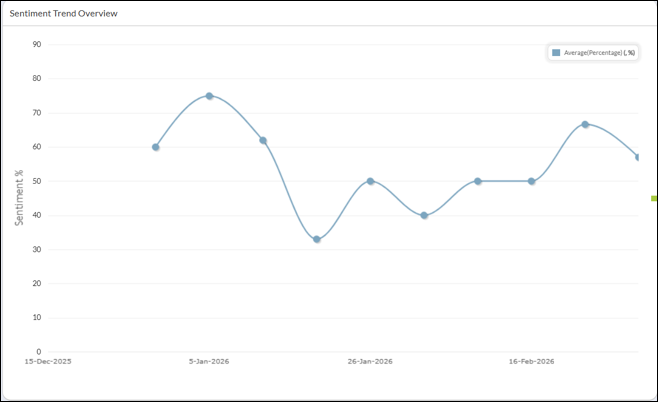
What it shows: A weekly trend line showing how team sentiment has evolved over the past three months.
Why it’s useful: Helps correlate sentiment changes with project events such as releases, deadlines, or major deliverables.
Data Range: Weekly sentiment scores averaged over 12 weeks, enabling managers to identify long-term morale trends.
4. Sentiment Analysis Report (Table Report)
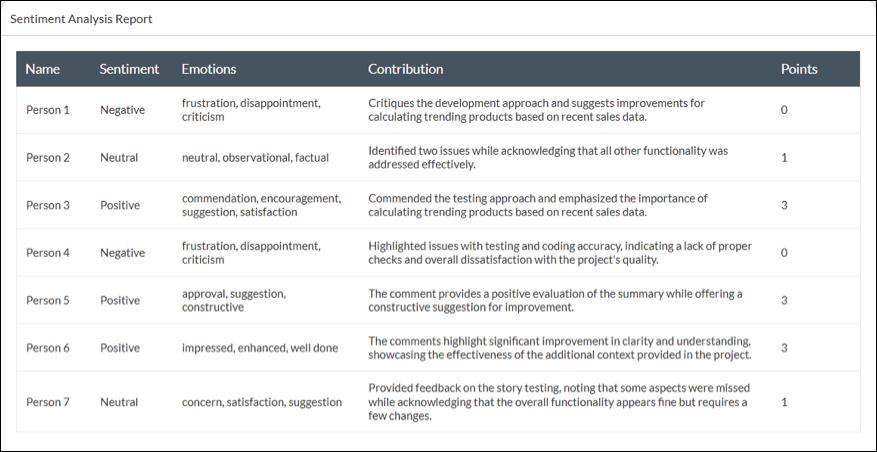
The Sentiment Analysis Report provides detailed insights in a tabular format.
Why it’s useful
Provides deeper insight into praises, suggestions, and concerns shared by the team, enabling managers to take targeted action.
Conclusion
The Sentiment Analysis feature in SwiftKanban provides valuable visibility into team morale by leveraging AI-powered insights from team interactions on cards. By proactively monitoring sentiment trends, managers can address challenges early, recognize positive contributions, and foster a healthier and more engaged team environment.