
This article covers how to add and manage workitems/cards in Nimble, along with the different workitem/card types.
|
Skip Ahead to: |
Common Steps to Add a Workitem on the Workitem Page
To add a workitem:
- Click the ADD button on the listing page of the workitem.
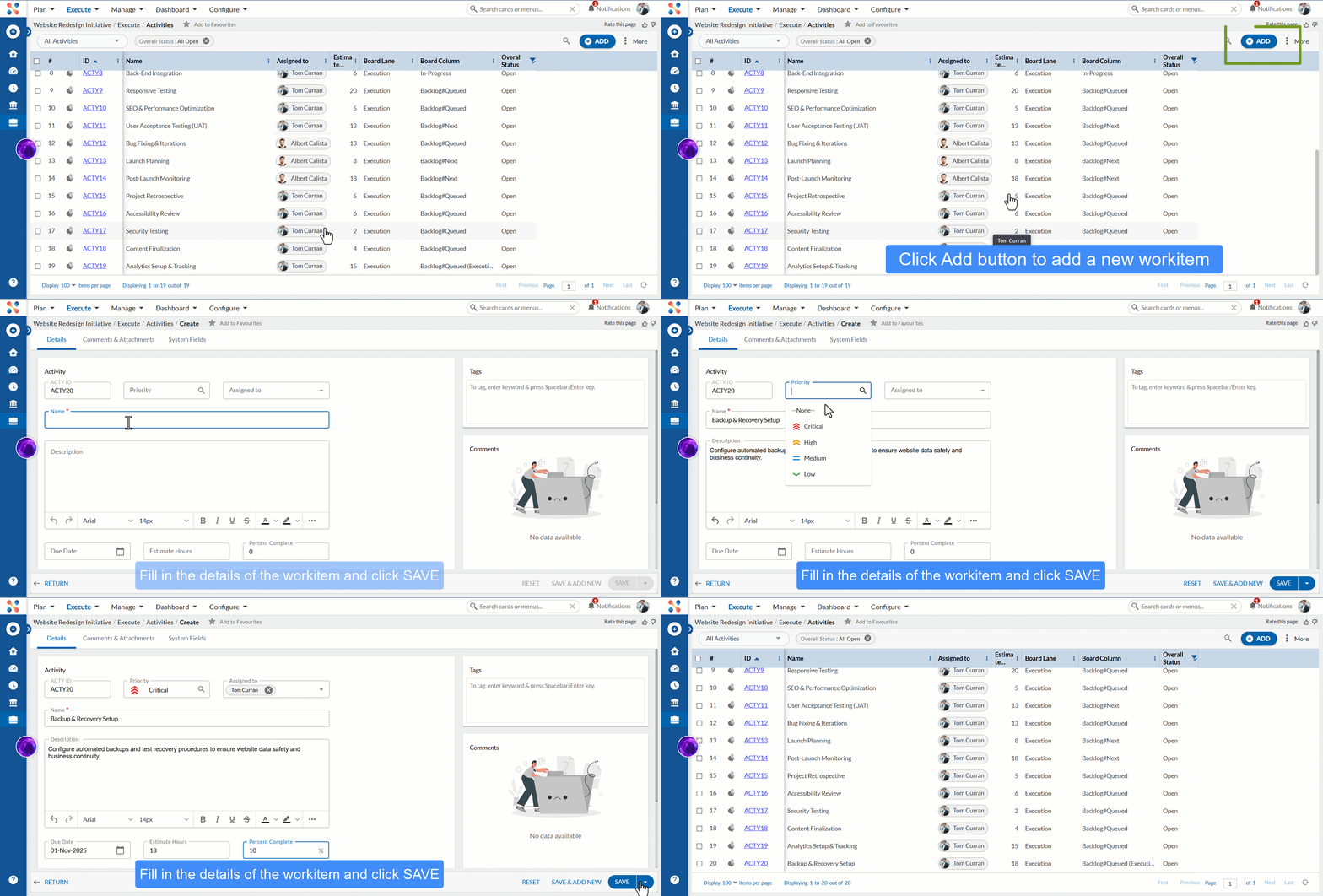
- Enter the details as explained below:
- Name: Enter a logical name for the workitem. The name should indicate what this workitem is about.
- Description: Enter a short description of the workitem. You can enter the information gathered from the customer in the everyday language.
- Priority: Specify the urgency of the activity. This could be high, medium, or low, depending on the urgency of the issue.
- Assigned to: Select the person responsible for completing the activity.
- Estimate Hours: Enter the estimated hours for the workitem.
- Due Date: Enter a due date for the workitem.
- Percent Complete: Specify the percentage of work completed for the activity (eg- 10%, 25%, 50%, 75%). Note: The fields may vary based on the workitem.
- Click the SAVE button.
Once the card is created, the following tabs become visible:
Common Operations to Manage a Card
- Edit
- Insert Rows
- Delete
- Export
- Import
- Copy
- Convert Card Type
- Sort
- Log Effort (available only for projects which have the ‘Include in Timesheet’ option enabled for the workitem).
Different Card Types in Nimble
Card Types in Nimble represent structured workitems used to plan, track, and manage various aspects of project execution—such as features, tasks, issues, and risks. They enable teams to streamline workflows, ensure traceability, and maintain clarity across all stages of delivery. The following is a comprehensive list of card types available in Nimble:
A-B Tests
The A-B tests are used to compare two versions of a webpage or app against each other to determine which one performs better and will have the maximum impact and drive business metrics. Note: The A-B Tests menu is only available for the A/B Testing Template. Navigation: Execute >> A-B Tests
Action Items
An action item is a documented event, task, activity, or action that will be carried out and monitored. Action items might occur as a result of a discussion by a group of people as an action plan. The action item is assigned to a member responsible for performing the action and reporting to the group on the status. Navigation: Manage >> Action Items
Activities
An Activity card is used to track routine operational or non-development tasks, such as documentation, meetings, follow-ups, or reviews. It helps maintain visibility into ongoing team efforts that support project health and collaboration. Navigation: Execute >> Activities
Adhoc Work
Working on an Adhoc basis allows tasks to be done as they are requested without any formal approval process. By definition, Adhoc work is a task that is requested and performed on an immediate basis. Such type of work is generally unplanned and unscheduled and appears almost out of the blue. To track such type of work in your project, we have introduced the Adhoc Work Form. Navigation: Execute >> Adhoc Work
Assignment and Exam Papers
The Assignment and Exam Paper allows you to track and organize Assignment and Exam Papers and store relevant documents and data, and collaborate with key stakeholders like peers, faculty, and teaching assistants. By creating a consistent structure to be followed by all peers, the project ensures that all bases are covered, and no steps are missed during the preparation and submission of the Assignment and Exam Paper. Note: This menu is only available for the Managing Student Life Template. Navigation: Execute >> Assignment and Exam Papers
Change Requests
Change Requests are created by Product Managers or Business Analysts when new requirements arise, often due to customer needs. The Change Management process includes capturing the request, analyzing its impact, prioritizing, assigning resources, implementing the change, testing, reviewing, and finally closing the request. Navigation: Manage >> Change Request
Customers
You can seamlessly onboard a customer from the sales team to the customer success team by collecting all the key information that the sales team collects during the post-sales handoff meetings. It includes the expectations of the customer, the cost of onboarding, and the CSAT rating they intend to achieve by using the product. Note: This menu is only available for the Post Sales Handoff Template. Navigation: Execute >> Customers
Defects
A defect is a non-conformity observed against the specifications. Defects are logged as a part of the testing process, reported internally, or reported by customers. You can manage the entire life cycle of the defect through the automated process defined in your project, which includes reporting, verification, resolution, and closure. Configure the Defect Form to capture information on the defect identification stage, priority, and impact, to be able to take measures to prevent them early in the project. Navigation: Execute >> Defects
Digital Assets
Digital Assets help businesses store and manage all customer-related content—such as contracts, proposals, presentations, or marketing collateral—in one centralized location. This makes it easy to access, share, and reuse important files, improving collaboration and productivity. They also support marketing efforts by organizing e-books, whitepapers, or webinars to engage prospects, educate users, and convert them into loyal customers. Note: This menu is only available for the Digital Assets Management Template. Navigation: Execute >> Digital Assets
Digital Marketing Campaign
A Digital Marketing Campaign is created for a marketing campaign by defining target audiences, setting goals & budgets, and keeping track of deadlines. Setting up Digital Marketing Campaigns is also very important, as is tracking and managing them. Note: This menu is only available for the Digital Marketing Template. Navigation: Execute >> Digital Marketing Campaign
Donations
Easily manage donations, and donors’ information, track their contributions and fetch receipt details. It focuses on empowering organizations to effortlessly collect and manage contributions for their causes. From one-time donations to recurring gifts and campaign-specific contributions, our menu caters to a range of giving opportunities, helping you maximize your fundraising potential. Note: The Donations menu is only available for the Fundraising and CRM Template. Navigation: Execute >> Donations
Donors
Donors play a significant role. As a donor, you can make a difference in the lives of others and drive meaning. Not only supporting but also contributing to initiatives through your donations. Donors act as a catalyst for progress, helping to address societal challenges, promoting education, supporting healthcare, protecting the environment, and uplifting communities. As a donor, support organizations to achieve their missions and bring about transformative outcomes. Note: The Donors menu is only available for the Fundraising and CRM Template. Navigation: Execute >> Donors
Employee
Fill out the employee information as the final step in the recruitment process to ensure smooth execution of Employee Onboarding. Ensure that all information, such as job location, department, working mode, and so on, is included as discussed at an early stage of the recruitment process. has been received. Note: This menu is only available for the Employee Onboarding Template. Navigation: Execute >> Employee
Epics
An Epic represents a large body of work that can be broken down into smaller user stories or tasks. It allows you to plan and track progress at a higher level of precision. Epics help structure multi-sprint initiatives and define large features or capabilities. Navigation: Execute >> Epics
Features
A feature is the function of the product that adds business value to it. It represents a collection of user stories. A chunk of functionality that delivers and evaluates considerable business value. Navigation: Execute >> Features
Grants
Follow up with potential foundations that can become donors and manage all the grants. Also, prioritize the potential organizations and track the approval process, and get notified on the approaching expiry date of the sanctioned Grants too. Note: This menu is only applicable to the Grants Tracking Template. Navigation: Execute >> Grants
Issues
Issues can be unexpected behavior or potential problems in a product or software which may hamper the product quality or service. Issues can be raised internally, or by clients and customers, which are generally termed as ‘Tickets’ and need to be resolved. In the application, the Issue Management process includes logging identified issues, reviewing and analysing the impact, informing stakeholders, assigning resources, taking steps to resolve, reporting status, and closing issues. Navigation: Manage >> Issues
Items
An item is a documented event, task, activity, or action that will be carried out and monitored; in other words, it is meant to track any work that needs to be done by the team member while working on the project. Note: This menu is only available for the Simple Work Management Template. Navigation: Execute >> Items
Job Applications
A Job Application allows you to plan and execute the recruitment of candidates until their joining. Collect and access candidate data and ensure that all the required data has been received. Manage your hiring process and communicate with your team. Note: This menu is only available for the Recruitment Template. Navigation: Execute >> Job Applications
Job Postings
A Job Posting is the first step in the recruitment process to track the job posts to be filled and monitor their progress. A job posting includes information about the position such as department, job location, working mode, job roles, responsibilities, etc. Note: This menu is only available for the Job Postings Template. Navigation: Execute >> Job Postings
Legal Requests
Legal Requests are used to capture and manage formal submissions related to legal matters—such as contract reviews, compliance checks, IP filings, or policy updates. These requests help ensure legal alignment across projects and are typically handled by legal or compliance teams. You can assign owners, set deadlines, track status, and attach relevant documents to maintain traceability and accountability. Note: This menu is only available for the Legal Requests Template. Navigation: Execute >> Legal Requests
Marketing Deliverables
A Digital Marketing Campaign is created for a marketing campaign by defining target audiences, setting goals & budgets, and keeping track of deadlines. Setting up Digital Marketing Campaigns is also very important, as is tracking and managing them. Note: This menu is only available for the Marketing Strategy Template. Navigation: Execute >> Marketing Deliverables
Marketing Initiative
A marketing initiative refers to a specific action or marketing strategy undertaken by any business or organization to promote its products or services to its target audience. A successful product launch can generate buzz, create excitement, and ultimately drive sales. However, launching a product is not an easy task. It requires careful planning and execution. For that marketing initiatives are designed to help businesses achieve their marketing goals and increase brand awareness, generate leads, boost sales, and build customers. Note: The Marketing Initiative menu is only available for the Marketing Product Launch Template. Navigation: Execute >> Marketing Initiative
Marketing Event
Marketing Event is a strategy that involves promoting a product or brand through face-to-face interactions with audiences at events. These events can take many forms, including online or virtual events that offer interactive features like chat boxes and social networking. The goal of marketing events is to build strong relationships with customers and raise awareness about a product or service. Product launches are a popular type of event that often include presentations, demonstrations, and interactive experiences to generate interest and excitement among potential customers. Overall, event marketing can be an effective way to drive sales and achieve market success. Note: This menu is only available for the Event Management Template. Navigation: Execute >> Marketing Events
Org Documents
It refers to the documents/materials needed to establish and manage a student organization, such as meeting minutes, membership forms, policy documents, event planning documents, and other important organizational information. These documents are essential for the proper functioning and governance of a student organization. Note: This menu is only available for the Student Organizations Template. Navigation: Execute >> Org Documents
Org Expenses
It refers to the costs incurred in setting up and running an organization. These can include registration fees, purchasing supplies, operational costs, or any other miscellaneous expenses. Proper management of these expenses is essential for the sustainable operation of the organization. Note: This menu is only available for the Student Organizations Template. Navigation: Execute >> Org Expenses
Personal Expenses
Personal expenses are the expenditure that is indirectly calculated for tuition, food, or housing. These expenses also include basic necessities like laundry, mobile phone services, shopping, personal care products, medicines, car or house insurance, registration, relaxation, enjoyment, etc. For every student, personal expense estimates are different. When you prepare a budget for your personal expenses, you need to consider that the expenditure will vary based on your living situation and your current location. If you want to budget your expenditure, be sure that you consider all the possible expenses that you will need to manage. You can use personal expenses to pay for subscriptions, books and study materials, food orders, travel, entertainment, personal care products, etc. Note: This menu is only available for the Managing Student Life Template. Navigation: Execute >> Personal Expenses
PM Activities
Product Marketing Activities offer a complete solution for positioning, pricing, and promoting your product. It guides you from development to launch, helping target new audiences and markets. Whether you’re a product marketer, marketing manager, or part of a startup, it helps streamline marketing efforts and drive business goals. Note: This menu is only available for the Product Marketing Template. Navigation: Execute >> PM Activities
Product Events
The event may include a presentation that showcases the features and benefits of the product, as well as demonstrations, product samples, or interactive experiences that allow attendees to engage with the product firsthand. The launch event may also provide an opportunity for the company to network with potential customers, partners, and investors. Ultimately, the goal of a product launch event is to drive sales and achieve market success by introducing a new product in a way that generates interest, excitement, and enthusiasm among potential customers and stakeholders. Note: This menu is only available for the Product Event Management Template. Navigation: Execute >> Product Events
Releases
Releases help you plan and create your releases and tag sprints to them. For each project, you can track the progress of each release separately. It helps teams organize and communicate long-term planning across iterations. Navigation: Plan >> Releases
Requests
A request is a formal document (digital or paper) that describes maintenance work that needs to be completed, and it helps to identify work needed, issued by the customer to the maintenance department. By responding to Requests, these individuals play an essential role in keeping organizational stakeholders productive, comfortable, and safe. Note: This menu is only available for the Work Requests Template. Navigation: Execute >> Requests
Research Projects
The research project allows you to track and organize research projects and store relevant documents and data, and collaborate with key stakeholders like peers, faculty, and teaching assistants. By creating a consistent structure to be followed by all peers, the project ensures that all bases are covered, and no steps are missed during the preparation and submission of the research project. Note: This menu is only available for the Research Projects Template. Navigation: Execute >> Research Projects
Risks
Risks are potential events or situations that can impact your project objectives if they occur. Managing risks proactively helps teams anticipate uncertainties, minimize negative impacts, and stay on track to achieve project goals. Nimble provides a dedicated Risk card to identify, assess, and monitor risks throughout the project lifecycle. This article explains the rationale behind adding risks and how to manage them efficiently using Nimble. Navigation: Manage >> Risks
Sales Contact
A Sales Contact is a step in the sales process to document and store the different types of sales contacts for the organization and make information about every interaction available to everyone. Once you interact with a sales contact or any other anyone from the company and are found to be a sales good customer or sales contact and store the information for future interactions. Note: This menu is only available for the Sales Contacts Template. Navigation: Execute >> Sales Contact
Sales Lead
A Sales Lead helps you track your sales opportunities and represents a collection of leads for your sales opportunities. Note: This menu is only available for the Sales Pipeline Template. Navigation: Execute >> Sales Leads
Social Media Campaigns
Social Media Campaigns are designed to empower businesses to plan, execute, and optimize with remarkable efficiency. With a range of useful features, you can easily strategize your campaigns, build engaging content, schedule posts, monitor audience engagement, analyze performance, and collaborate seamlessly. With a holistic approach to social media marketing, you can enhance your brand’s reach, boost audience engagement, and drive meaningful results. Whether you’re a small business or a large enterprise, you can unlock success in the dynamic world of social media marketing. Note: The Social Media Campaign menu is only available for the Social Marketing Template. Navigation: Execute >> Social Media Campaigns
Social Media Posts
Simplify tasks, seamlessly collaborate, and stay on schedule with an intuitive social media platform. From boosting valuable insights and accessing your work anytime and anywhere. You can simply revolutionize the way you work and maximize your efficiency today! A social media post can reach a wide range of people, improve your brand awareness and attract the targeted audience with target content. When people find your content to be helpful, engaging, or inspiring, they are more likely to become loyal customers. So, it’s important to have a proper marketing strategy, create compelling posts, and engage with them efficiently. Note: The Social Media Post menu is only available for the Social Media Marketing Template. Navigation: Execute >> Social Media Post
Sprints
Sprints form a part of a release as sprints are tagged to a specific release. Each Sprint is a subset of the final Release and is built on the functionality of the prior Sprint. It is a fixed time period where the team works on selected items such as user stories, tasks, or bugs. It helps teams deliver small parts of the project regularly and track how much they can complete in each cycle. Navigation: Plan >> Sprints
Student Applications
Job, college, or internship application forms are important. Application forms are important because it helps employers or universities to gather data about candidates. Based on the collected data, they need to make informed decisions. These forms provide information about the organization for which you are applying and the type of role you want to apply for on the basis of your experience. Not only does this give individuals an edge over other candidates when applying for jobs, but it also prepares them for what to expect from an Organization and increases confidence in their work. Note: This menu is only available for the Managing Student Life Template. Navigation: Execute >> Student Applications
Task Plans
Task Plans are used to divide a project into multiple concurrent or time-phased activity streams. They allow you to generate tasks separately for each plan, enabling incremental software development. You can define duration, dates, and task dependencies as needed. Additionally, custom and pre-defined practices can be added and instantiated within each Task Plan. Navigation: Execute >> Task Plans
Team Goals
Set clear goals for the team – Create a plan, assign the goals to the team, and manage the work to achieve them. You can also prioritize work in line with the company’s goals to boost the team’s overall productivity and get effective results. Note: This menu is only available for the Team Goals and Objectives Template. Navigation: Execute >> Team Goals
Team Objectives
Set clear objectives for the team – Create a plan, assign the objectives to the team, and manage the work to achieve them. You can also prioritize work in line with the company’s objectives to boost the team’s overall productivity and get effective results. Note: This menu is only available for the Team Goals and Objectives Template. Navigation: Execute >> Team Objectives
Technical Stories
A technical story (also called a technical user story) is a form used to describe any work which is non-functional and technical in nature. The technical stories are created to improve the technical support of a system. One example of technical work is creating/changing back-end tables to develop a new function or improve the functionality of an existing function. Navigation: Execute >> Technical Stories
Test Cases
A Test Case defines the conditions, steps, and expected results used to validate whether a system or feature behaves as intended. It helps ensure thorough testing coverage and repeatability. Test Cases are typically linked to requirements like User Stories, Features, or Defects. Navigation: Execute >> Test Cases
Themes
A Theme is a high-level strategic grouping used to organize related epics or features around a goal. Themes provide clarity at the portfolio level, helping teams prioritize and align work with organizational objectives. They help maintain long-term vision beyond individual tasks. Navigation: Execute >> Themes
Tickets
The Tickets workitem is used for tracking support or service requests across internal or external stakeholders. Each ticket can include issue details, priority, requester, and resolution status—supporting structured handling of user queries, bugs, or access needs. Note: This menu is only available for the IT Requests Template. Navigation: Execute >> Tickets
Topics
The Topics workitem is used to organize knowledge or learning content into clearly defined subject areas. It helps manage curriculum outlines, onboarding content, or documentation groups. Topics can be linked to the Trainings, Test Cases, or Digital Assets to provide structured, searchable learning paths. Note: This menu is only available for the Content Planning Template. Navigation: Execute >> Topics
Training
Training workitem is used to plan, assign, and track training sessions or learning modules for individuals or teams. It can include session details, trainer info, target audience, duration, and feedback. This card helps ensure structured learning and team upskilling. Navigation: Manage >> Training
User Requirements
Requirements management is a continuous, systematic process that helps identify, organize, communicate, and manage the changing necessities of any project. User Requirements specify the requirements the user expects from the software and is useful while planning costs, timetables, milestones, testing, managing releases, etc. Navigation: Execute >> User Requirements
User Stories
User Story is a short and simple way to describe something a user wants to do in the system. It tells what the user needs, why they need it, and what benefit they get. A User Story is a software system requirement formulated by the customer, in one or two sentences, in the everyday language of the user. User stories are used for the specification of requirements (together with acceptance tests). Each user story is limited to ensure that it does not grow too large. Navigation: Execute >> User Stories
Videos
The Videos workitem is used to track the creation, review, publishing, or reuse of video content across projects. It captures information like video type, intended audience, production stage, and associated assets or campaigns. Note: This menu is only available for the Video Production Planning Template. Navigation: Execute >> Videos