
Overview
The REST API Client lets you connect an external application — such as an automation script, CI/CD pipeline, or integration service — to Nimble’s project-level resources using the Nimble REST API. It uses OAuth 2.0 client credentials, so the application authenticates on its own with no user login required at run time.
Organization-level vs. project-level: This article covers the project-level resources of the Nimble REST API — instances, comments, attachments, to-dos, time entries, and related data — accessed using OAuth 2.0 client credentials. For organization-level resources (Users, Projects, and Team Members), which are accessed using an API key, see the Nimble REST API article.
When you register a REST API Client, Nimble generates a Client ID and a Client Secret. You use these credentials to get a short-lived access token, then include it on every API request.
Base URL: https://api.digite.com/rest/v2
|
Skip Ahead to: |
Register a REST API Client
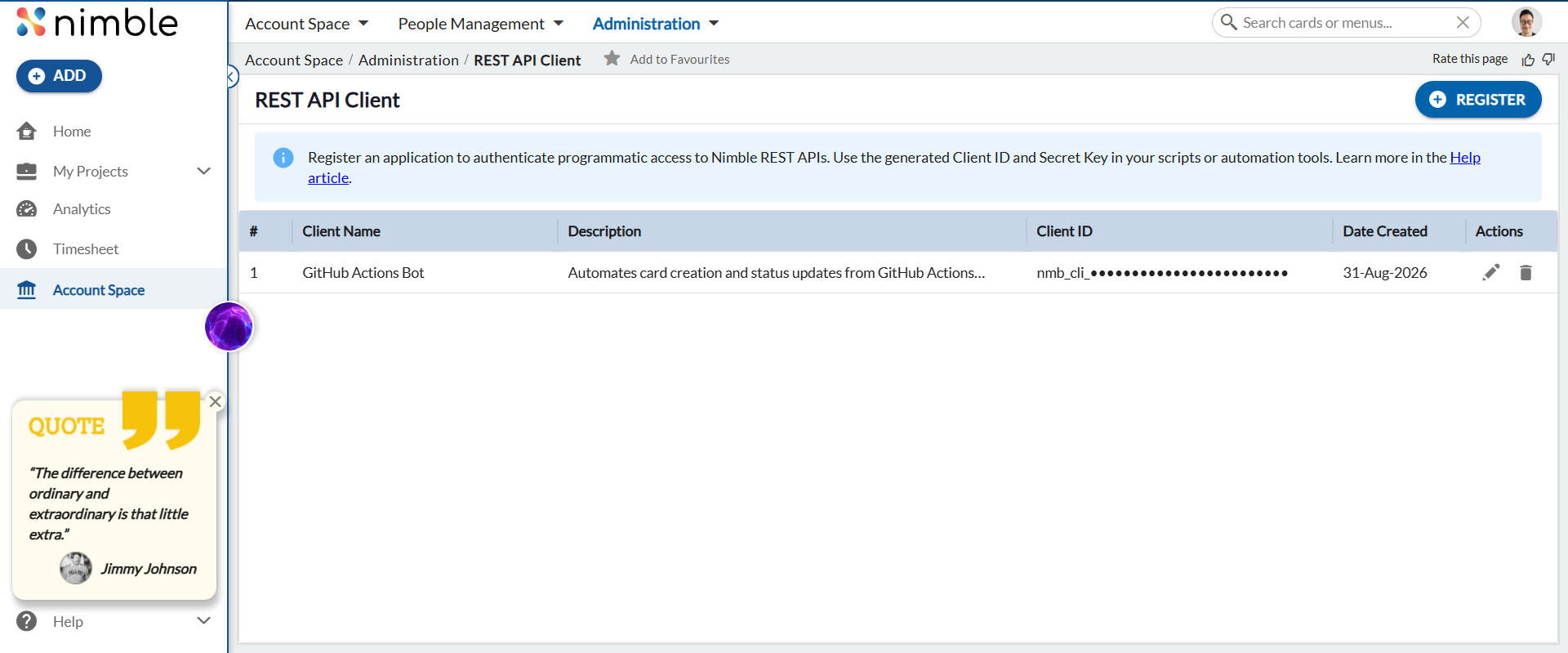
Go to Account Space > Administration > REST API Client.
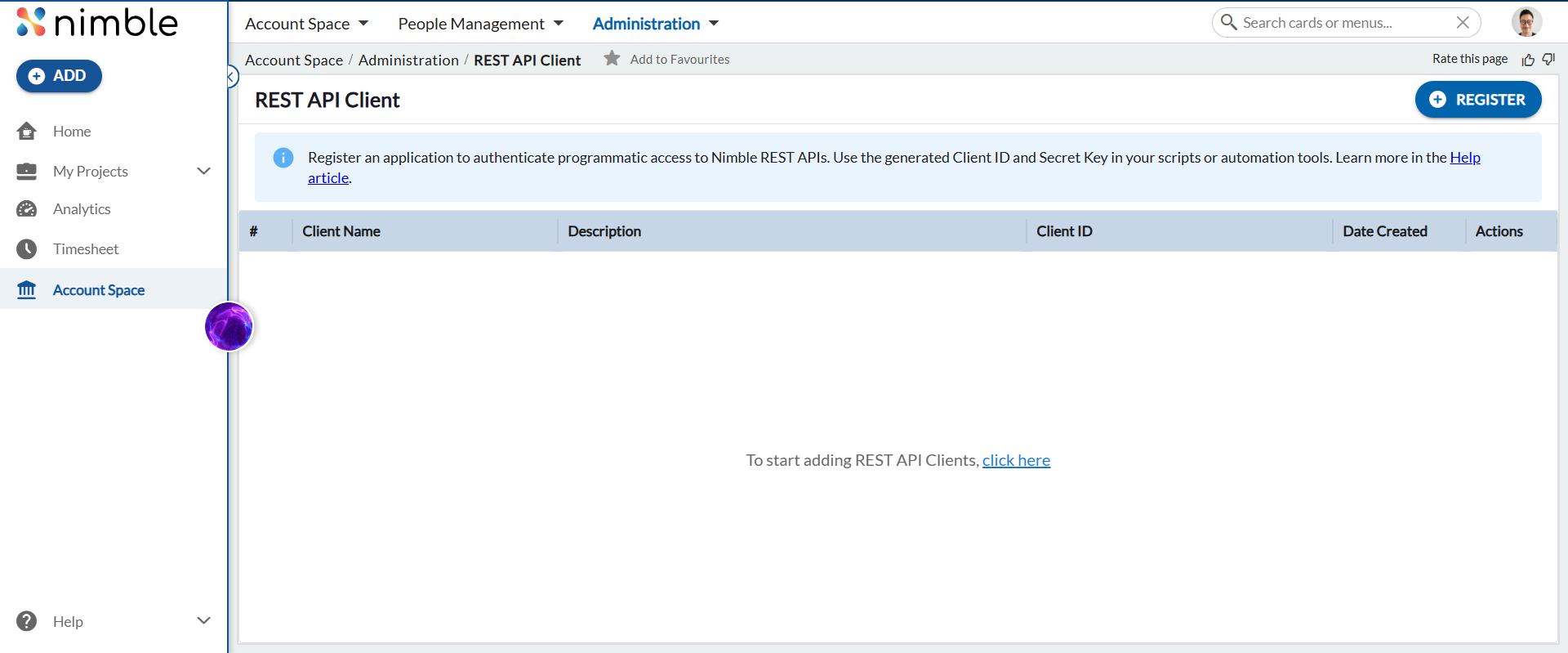
- Click REGISTER.
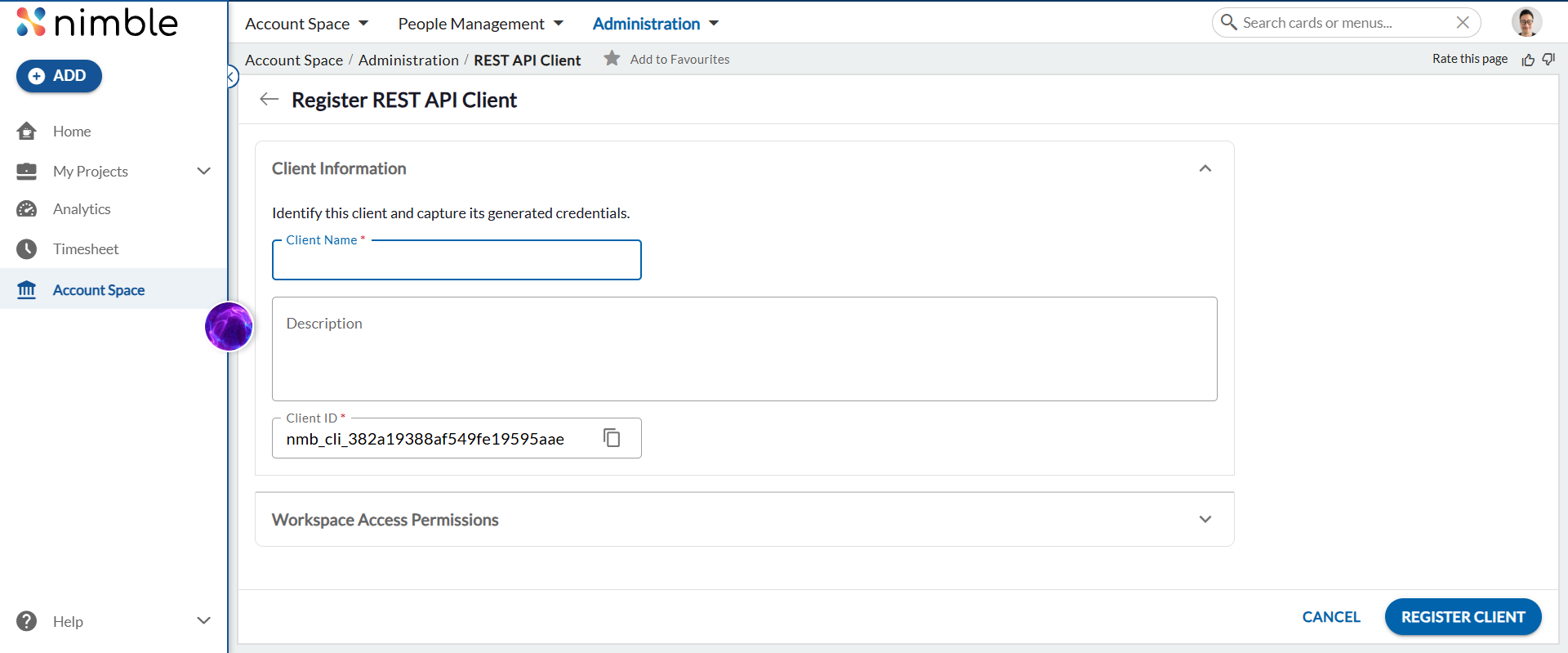
- Enter a Client Name and an optional Description. The Client ID is auto-generated (editable before saving).
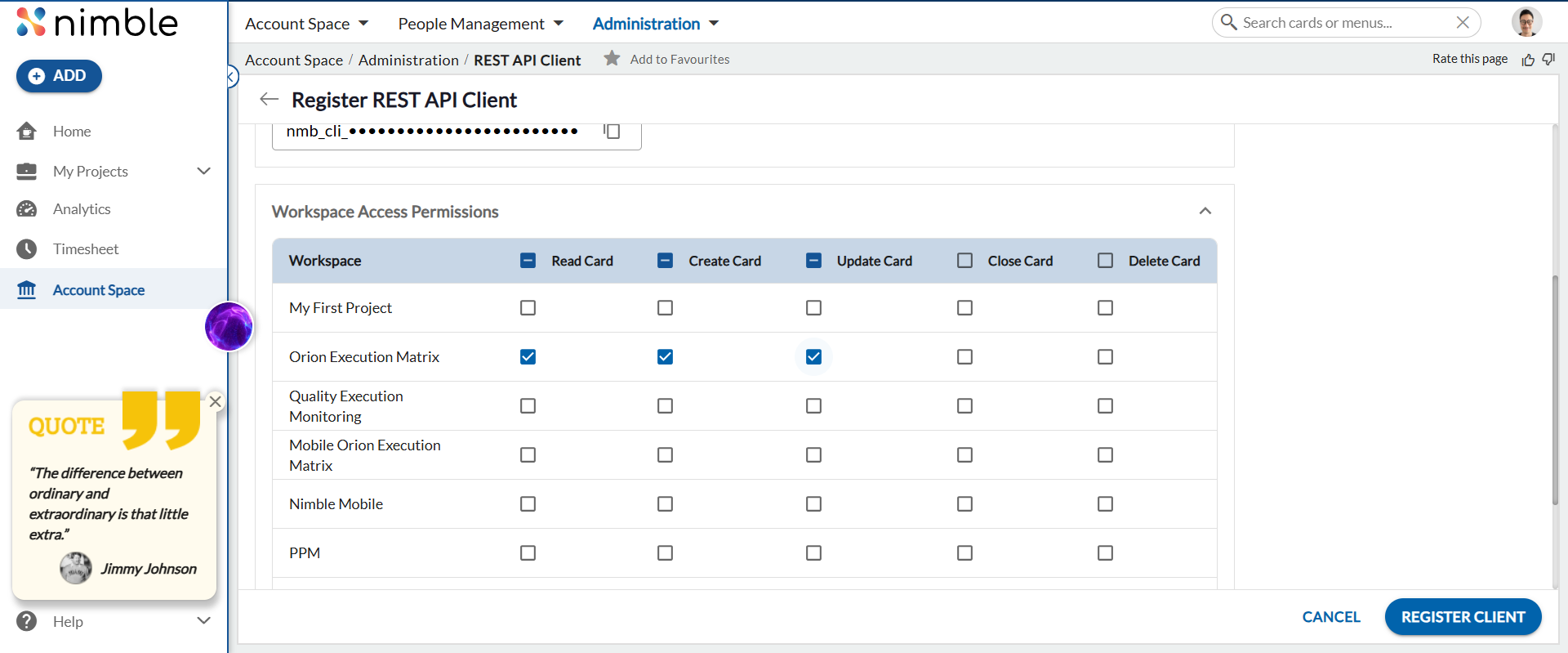
- Expand Workspace Access Permissions and tick the operations this client is allowed to perform — Read Card, Create Card, Update Card, Close Card, Delete Card — for each workspace it needs access to. These permissions are granted per workspace, so the same client can have different rights in different projects, and it can never do more through the API than the boxes you tick here.Example: a read-only reporting client that only pulls data from the Mobile Team workspace would tick only Read Card for that workspace; a client that files and updates bugs would also tick Create Card and Update Card, while leaving Delete Card unticked so it can never remove work items.
- Click REGISTER CLIENT. Copy the Client Secret immediately — it is shown only once and cannot be retrieved again.
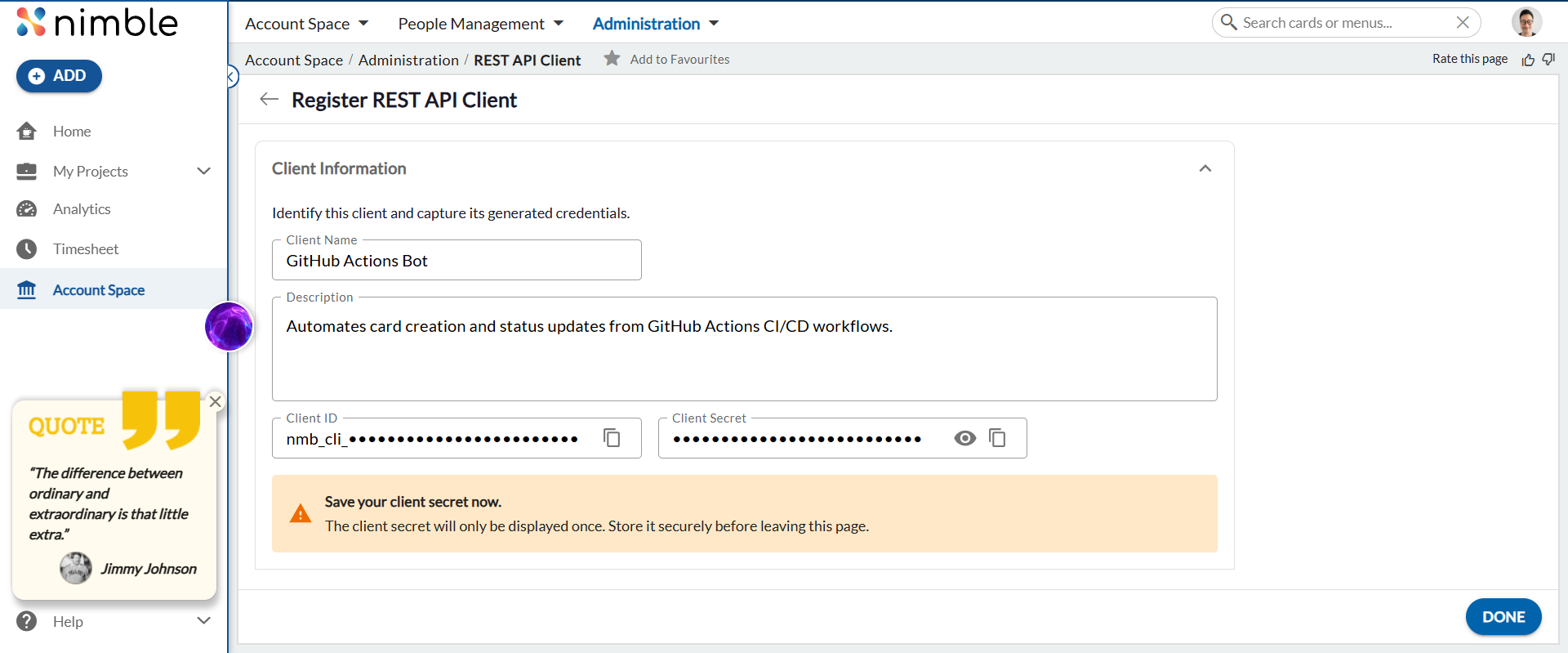
Click DONE. The client appears in the list with edit and delete options.
Get an Access Token
Why exchange credentials for a token?
Every API call requires Authorization: Bearer <token>. Using a short-lived token instead of sending your secret on every request provides these security benefits:
- Limited exposure — your secret is sent once; only the token (~180 days) travels with each request. If intercepted, it becomes useless after expiry.
- Scoped access — the token carries only the permissions needed for the session.
- Revocability — a compromised token can be invalidated without rotating your client secret.
- Auditability — token issuance is a logged event.
- Stateless validation — downstream services verify the self-contained JWT without storing your secret.
Get a Token — step by step
You only need to do this once. The token stays valid for about 180 days; after that, repeat these steps to get a new one.
You can use any API client or HTTP tool. The steps below use Postman (a free, widely used API client) as an example — the same idea applies to Insomnia, cURL, or any similar tool.
- Open a new request. In Postman, click New > HTTP Request (or the + tab).
- Set the method to
POST. To the left of the address bar is a dropdown that showsGETby default — change it toPOST. - Paste the address into the long field next to the method dropdown:
https://api.digite.com/rest/v1/oauth/token
- Add the header. Click the Headers tab (just below the address bar). You will see a table with two columns, KEY and VALUE:
- In the KEY column, type:
Content-Type - In the VALUE column (same row), type:
application/json
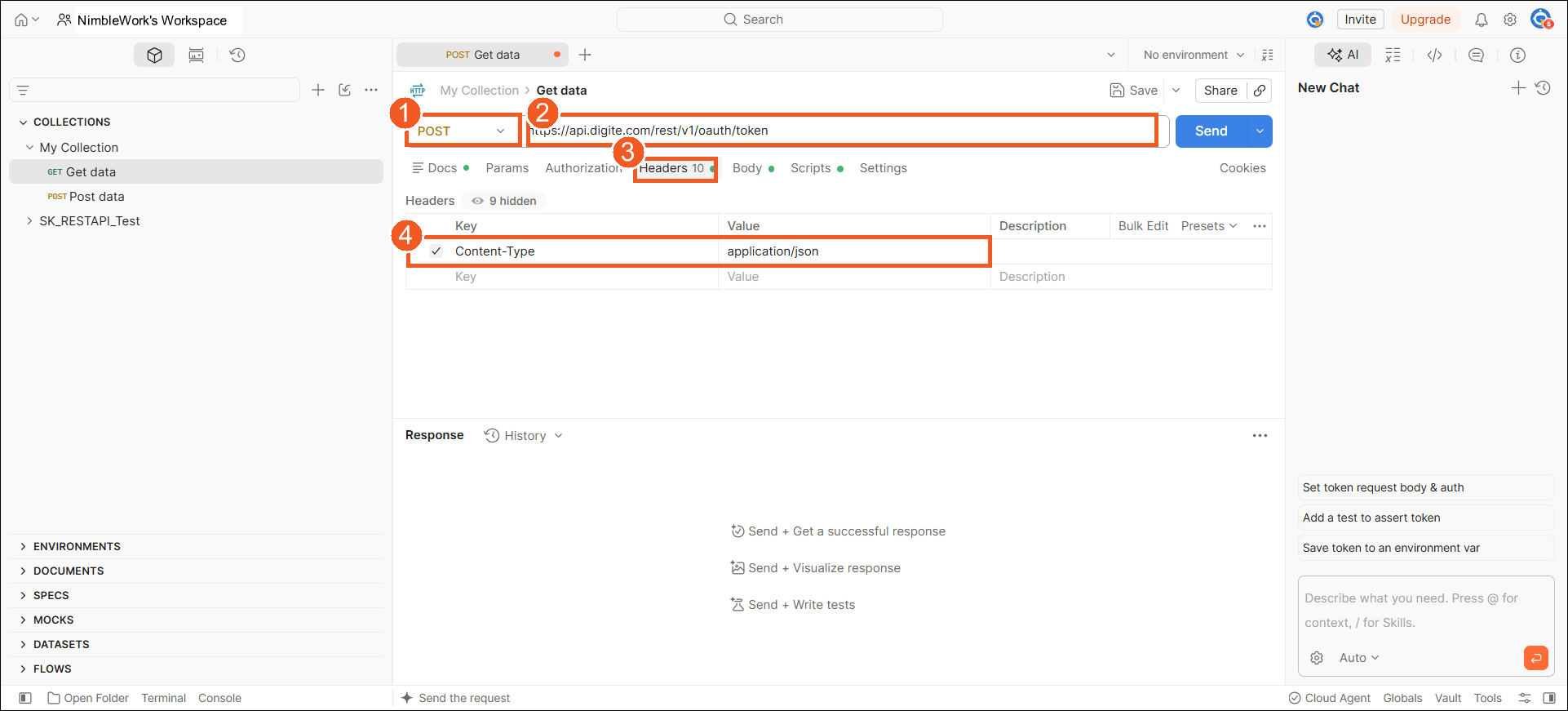
In this screen: 1 set the method to POST · 2 paste the token URL · 3 open the Headers tab · 4 add
Content-Type=application/json. - In the KEY column, type:
- Add the body. Click the Body tab (next to Headers). Choose the raw option, then in the format dropdown on the right change Text to JSON. Paste the following into the large box, and replace the two placeholder values with your own Client ID and Client Secret (from the Register a REST API Client step):
{
  "grant_type":    "client_credentials",
  "client_id":     "nmb_cli_xxxxxxxxxxxxxxxxxxxxxxxx",
  "client_secret": "your_client_secret_here"
}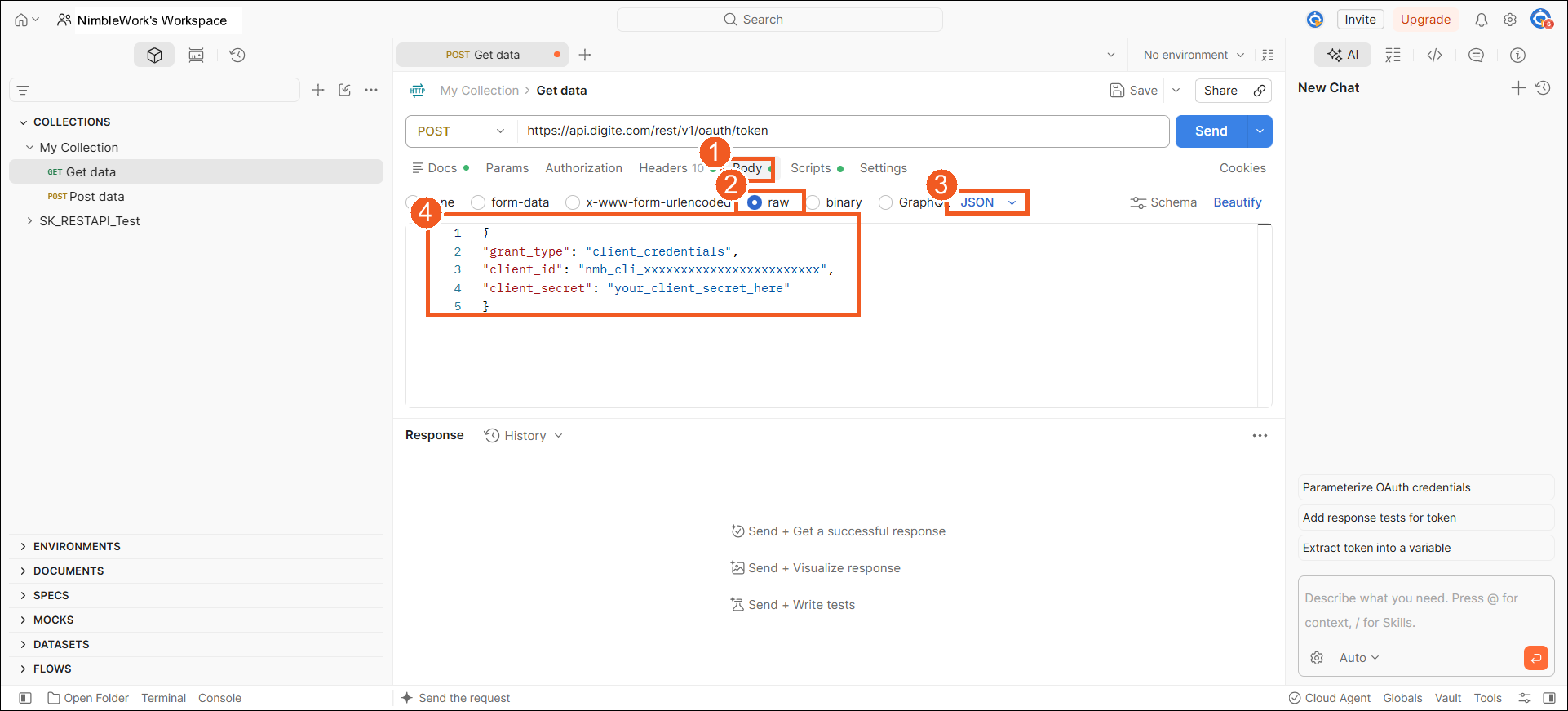
In this screen: 1 open the Body tab · 2 select raw · 3 choose JSON · 4 paste the request body (with your Client ID and Secret).
- Click Send (the button on the right of the address bar). The response appears in the panel at the bottom.
- Copy your token. In the response, find the
access_tokenvalue — a long string of letters and numbers — and copy it. That is your token.
A successful response looks like this:
{
  "access_token": "eyJhbGciOiJSUzI1NiIsInR5cCI6IkpXVCJ9...",
  "token_type":   "Bearer",
  "expires_in":   15552000
}
expires_in is how many seconds the token stays valid (15552000 = 180 days). When it expires, repeat these steps to get a fresh token.
From now on, every other API call must include this token as a header named Authorization with the value Bearer <access_token> — the word Bearer, a space, then the token you copied. The next section shows how to set this up once so you do not have to paste it every time.
Quick reference
POST https://api.digite.com/rest/v1/oauth/token
Headers
Content-Type: application/json
Body · Raw · JSON
{
  "grant_type":    "client_credentials",
  "client_id":     "nmb_cli_xxxxxxxxxxxxxxxxxxxxxxxx",
  "client_secret": "your_client_secret_here"
}
Response 200 OK
{
  "access_token": "eyJhbGciOiJSUzI1NiIsInR5cCI6IkpXVCJ9...",
  "token_type":   "Bearer",
  "expires_in":   15552000
}
Testing Your API Calls
Use Postman for manual testing. Create a Postman Environment with these variables so you set them once:
token— the access token from the “Get an Access Token” stepbaseUrl—https://api.digite.com/rest/v2workspaceId— e.g.2110769
Then add one default header on your Postman collection (right-click the collection → Edit → Headers tab):
Authorization: Bearer {{token}}
Note: workspaceId is no longer sent as a header. Pass it as a query parameter on GET requests (e.g. ?workspaceId={{workspaceId}}) or in the JSON body on POST requests (e.g. "workspaceId": "{{workspaceId}}").
Scripts & Client Libraries
The examples below use Python, Node.js, and Java. You can use any language or HTTP library that supports JSON requests and custom headers.
Python (requests)
import requests

base_url     = "https://api.digite.com/rest/v2"
token        = "eyJhbGciOiJSUzI1NiIs..."   # Bearer token from Step above
workspace_id = "2110769"

headers = {
    "Authorization": f"Bearer {token}",
    "Content-Type":  "application/json",
}

# List instances
resp = requests.get(f"{base_url}/instances", headers=headers, params={"workspaceId": workspace_id, "formId": "523440", "limit": 20})
for item in resp.json()["items"]:
    print(item["instanceId"], item.get("Name"))

# Create an instance
resp = requests.post(f"{base_url}/instances", headers=headers, json={
    "workspaceId": workspace_id, "formId": "523440", "Name": "Login page broken", "Priority": "High"
})
print("Created:", resp.json()["instanceId"])
Node.js (fetch)
const baseUrl     = "https://api.digite.com/rest/v2";
const token       = "eyJhbGciOiJSUzI1NiIs...";
const workspaceId = "2110769";
const headers = {
  "Authorization": `Bearer ${token}`,
  "Content-Type":  "application/json",
};

// List instances
const res = await fetch(`${baseUrl}/instances?workspaceId=${workspaceId}&formId=523440&limit=20`, { headers });
const data = await res.json();
data.items.forEach(item => console.log(item.instanceId, item.Name));

// Create an instance
const res2 = await fetch(`${baseUrl}/instances`, {
  method: "POST", headers,
  body: JSON.stringify({ workspaceId, formId: "523440", Name: "Login page broken", Priority: "High" }),
});
console.log("Created:", (await res2.json()).instanceId);
Java (HttpClient)
import java.net.URI;
import java.net.http.*;

String baseUrl = "https://api.digite.com/rest/v2";
String token   = "eyJhbGciOiJSUzI1NiIs...";
String wsId    = "2110769";
HttpClient client = HttpClient.newHttpClient();

HttpRequest req = HttpRequest.newBuilder()
    .uri(URI.create(baseUrl + "/instances?workspaceId=" + wsId + "&formId=523440&limit=20"))
    .header("Authorization", "Bearer " + token)
    .GET().build();
HttpResponse resp = client.send(req, HttpResponse.BodyHandlers.ofString());
System.out.println(resp.body());
A client SDK (nimblework-finch) is planned but not yet published. Until then, use the HTTP libraries above.
Getting Started
New to this API? Make these three calls in order — each gives you the ID the next one needs.
- GET
/workspaces— Lists every workspace you can access. Pick one and copy itsworkspaceId. - GET
/forms?workspaceId=<id>— Lists the forms in that workspace (Issue, User Story, Activity, Bug…). Copy theformIdof the one you need. - GET
/instances?workspaceId=<id>&formId=<id>— Lists the cards in that form using both IDs. To create a card, use POST/instanceswith the same two IDs in the request body.
Workspaces
GET — List Workspaces
GET https://api.digite.com/rest/v2/workspaces?limit=100
Headers
Authorization: Bearer <access_token>accept: application/json
Query Parameters
limit— optional — number of results per page (default 100, max 1000)pageToken— optional — cursor from a previous response for the next pagesort— optional — field to sort by:name,created_at,updated_at,workspace_id,template_idorder— optional —ascordesc
Response 200 OK
{
  "items": [
    {
      "workspaceId": "2110769",
      "name": "My First Project",
      "description": "FromProjectCreate",
      "createdBy": { "actorId": "353147453", "name": "Utkarsh Singh", "type": "USER" },
      "modifiedBy": { "actorId": "353147453", "name": "Utkarsh Singh", "type": "USER" },
      "templateId": "123456",
      "enabled": true
    },
    {
      "workspaceId": "1903997",
      "name": "Mobile Team",
      "description": "Sprint planning and bug tracking for mobile",
      "createdBy": { "actorId": "353147453", "name": "Utkarsh Singh", "type": "USER" },
      "modifiedBy": { "actorId": "353147454", "name": "Rahul Mahant", "type": "USER" },
      "enabled": true
    }
  ],
  "nextPageToken": ""
}
GET — Single Workspace
GET https://api.digite.com/rest/v2/workspaces/{workspaceId}
Headers
Authorization: Bearer <access_token>accept: application/json
Path Variable
workspaceId— required — e.g.2110769
Response 200 OK
{
  "workspaceId": "2110769",
  "name": "My First Project",
  "description": "FromProjectCreate",
  "createdBy": { "actorId": "353147453", "name": "Utkarsh Singh", "type": "USER" },
  "modifiedBy": { "actorId": "353147453", "name": "Utkarsh Singh", "type": "USER" },
  "templateId": "123456",
  "enabled": true
}
Forms
Forms are the templates that define the fields for instances. Every instance belongs to a form. Pass workspaceId as a query parameter on both form endpoints.
GET — List Forms
GET https://api.digite.com/rest/v2/forms?workspaceId=2110769
Headers
Authorization: Bearer <access_token>accept: application/json
Query Parameters
workspaceId— required — workspace to list forms from, e.g.2110769limit— optional — number of results per page (default 100, max 1000)pageToken— optional — cursor from a previous response for the next pagesort— optional — field to sort by:name,form_id,workspace_idorder— optional —ascordesc
Response 200 OK
{
  "items": [
    {
      "formId": "523440",
      "name": "Issue",
      "prefix": "ISS",
      "workspaceId": "2110769",
      "hexColorCode": "#FF5733",
      "custom": true,
      "createdBy": { "actorId": "353147453", "name": "Utkarsh Singh", "type": "USER" },
      "modifiedBy": { "actorId": "353147453", "name": "Utkarsh Singh", "type": "USER" },
      "fields": [
        { "fieldUniqueName": "Name",       "custom": false, "readOnly": false, "type": "String", "required": true  },
        { "fieldUniqueName": "Priority",   "custom": false, "readOnly": false, "type": "Link",   "required": false },
        { "fieldUniqueName": "Assignedto", "custom": false, "readOnly": false, "type": "Text",   "required": false },
        { "fieldUniqueName": "Status",     "custom": false, "readOnly": true,  "type": "String", "required": false }
      ]
    },
    {
      "formId": "523441",
      "name": "User Story",
      "prefix": "UST",
      "workspaceId": "2110769",
      "hexColorCode": "#3498DB",
      "custom": true,
      "createdBy": { "actorId": "353147453", "name": "Utkarsh Singh", "type": "USER" },
      "modifiedBy": { "actorId": "353147453", "name": "Utkarsh Singh", "type": "USER" },
      "fields": [
        { "fieldUniqueName": "Name",        "custom": false, "readOnly": false, "type": "String", "required": true  },
        { "fieldUniqueName": "Assigned To", "custom": true,  "readOnly": false, "type": "User",   "required": false },
        { "fieldUniqueName": "Sprint",      "custom": true,  "readOnly": false, "type": "Link",   "required": false },
        { "fieldUniqueName": "Status",      "custom": false, "readOnly": true,  "type": "String", "required": false }
      ]
    }
  ],
  "nextPageToken": "eyJsYXN0SWQiOiI1MjM0NDEifQ=="
}
GET — Single Form (with full field schema)
GET https://api.digite.com/rest/v2/forms/{formId}?workspaceId=2110769
Headers
Authorization: Bearer <access_token>accept: application/json
Path Variable
formId— required — numeric form ID, e.g.523440
Query Parameters
workspaceId— required — workspace that owns the form, e.g.2110769
Response 200 OK
{
  "formId": "523440",
  "name": "Issue",
  "prefix": "ISS",
  "workspaceId": "2110769",
  "hexColorCode": "#FF5733",
  "custom": true,
  "fields": [
    { "fieldUniqueName": "Name",       "custom": false, "readOnly": false, "type": "String", "required": true  },
    { "fieldUniqueName": "Priority",   "custom": false, "readOnly": false, "type": "Link",   "required": false },
    { "fieldUniqueName": "Assignedto", "custom": false, "readOnly": false, "type": "Text",   "required": false },
    { "fieldUniqueName": "Status",     "custom": false, "readOnly": true,  "type": "String", "required": false }
  ]
}
Instances
An instance is a single card. Custom field values are sent and received at the root level alongside system fields.
GET — List Instances
GET https://api.digite.com/rest/v2/instances?workspaceId=2110769&formId=523440&limit=20
Headers
Authorization: Bearer <access_token>accept: application/json
Query Parameters
workspaceId— required — workspace to list instances from, e.g.2110769formId— optional — filter by form, e.g.523440expand— optional —trueinlines lookup field valueslimit— optional — max results per pagepageToken— optional — cursor for the next pagesort— optional — field to sort by (applicable only forformId,instanceId)order— optional —ascordescboardLane— optional — filter by board lane nameboardColumn— optional — filter by board column nameparentCard— optional — filter by parent card; must be the fullID: Namestring (e.g.ACTY1: mhhhat), not the ID aloneid— optional — filter by card ID (e.g.SWB9,ISS42)status— optional — filter by status valuecreatedBy— optional — filter by creator user IDmodifiedBy— optional — filter by last modifier user IDblockingReason— optional — filter by blocking reason IDdateCreated_after/dateCreated_before— optional — ISO 8601 timestamp, e.g.2026-01-01T00:00:00.000ZmodifiedDate_after/modifiedDate_before— optional — ISO 8601 timestampdateClosed_after/dateClosed_before— optional — ISO 8601 timestampestimatedHours_gt/estimatedHours_lt— optional — estimated hours greater/less than (must be > 0)actualHours_gt/actualHours_lt— optional — actual hours greater/less than (must be > 0)remainingHours_gt/remainingHours_lt— optional — remaining hours greater/less than (must be > 0)childPercentComplete_gt/childPercentComplete_lt— optional — child percent complete greater/less than (must be > 0)votes_gt/votes_lt— optional — vote count greater/less than (must be > 0)
Response 200 OK
{
  "items": [
    {
      "instanceId": "523440-42",
      "id": "ISS-42",
      "formId": "523440",
      "workspaceId": "2110769",
      "Name": "Login page broken",
      "Priority": "107010",
      "Status": "Open",
      "createdBy": { "actorId": "353136425", "name": "Utkarsh Singh", "type": "USER" },
      "modifiedBy": { "actorId": "353136425", "name": "Utkarsh Singh", "type": "USER" }
    }
  ],
  "nextPageToken": ""
}
GET — Single Instance
GET https://api.digite.com/rest/v2/instances/{instanceId}?expand=true
Headers
Authorization: Bearer <access_token>accept: application/json
Path Variable
instanceId— required — use theinstanceIdreturned by POST /instances (e.g.523440-42), not the business key (ISS-42)
Response 200 OK
{
  "instanceId": "523440-42",
  "id": "ISS-42",
  "formId": "523440",
  "workspaceId": "2110769",
  "Name": "Login page broken",
  "Priority": "107010",
  "Status": "Blocked",
  "flags": { "actionIds": ["820890"] },
  "blocks": { "actionIds": ["821210"] },
  "createdBy": { "actorId": "353136425", "name": "Utkarsh Singh", "type": "USER" },
  "modifiedBy": { "actorId": "353136425", "name": "Utkarsh Singh", "type": "USER" }
}
flags / blocks: present only when active flags or blocks exist. Each contains an actionIds array — one entry per active flag or block. Pass each actionId to DELETE /instances/{instanceId}/flags/{actionId} or DELETE /instances/{instanceId}/blocks/{actionId} to clear it. If none are active, the key is absent from the response.
Actor Object — createdBy / modifiedBy
The shape of createdBy and modifiedBy depends on type:
"USER"—actorId,name,type"CLIENT"—actorId(innmb_cli_…format),type
// When type = "CLIENT"
"createdBy": {
  "actorId": "nmb_cli_eb871278c317e54d83c41a73",
  "type": "CLIENT"
}
Response Example — Created by an API Client (200 OK)
{
  "instanceId": "823666",
  "id": "ACTY1",
  "formId": "412162",
  "workspaceId": "412160",
  "Name": "Testing Activity card",
  "Status": "Open",
  "createdBy": {
    "actorId": "nmb_cli_eb871278c317e54d83c41a73",
    "type": "CLIENT"
  },
  "modifiedBy": {
    "actorId": "nmb_cli_eb871278c317e54d83c41a73",
    "type": "CLIENT"
  }
}
Response Example — Created via MCP, e.g. Claude AI (200 OK)
{
  "instanceId": "823666",
  "id": "ACTY1",
  "formId": "412162",
  "workspaceId": "412160",
  "Name": "Testing Activity card",
  "Status": "Open",
  "createdBy": {
    "actorId": "nmb_cli_b1c0def41481a874498be77d",
    "name": "Claude AI",
    "type": "CLIENT",
    "onBehalfOf": {
      "name": "Simple Workflow",
      "type": "USER",
      "userId": "353135992"
    }
  },
  "modifiedBy": {
    "actorId": "nmb_cli_b1c0def41481a874498be77d",
    "name": "Claude AI",
    "type": "CLIENT",
    "onBehalfOf": {
      "name": "Simple Workflow",
      "type": "USER",
      "userId": "353135992"
    }
  }
}
GET — Subblocks (child instances)
GET https://api.digite.com/rest/v2/instances/{instanceId}/subblocks?depth=-1
Headers
Authorization: Bearer <access_token>accept: application/json
Query Parameters
depth— required —0= direct children only ·-1= full tree ·n= n levels
Response 200 OK
{
  "subblocks": [
    {
      "instanceId": "1900018",
      "formId": "1899997",
      "workspaceId": "1865093",
      "data": { "customizingl": "1900017", "s1mID": "s1m1" },
      "subblocks": [
        {
          "instanceId": "1900020",
          "formId": "1900004",
          "workspaceId": "1865093",
          "data": { "s1": "1900018", "s2lID": "s2l1" },
          "subblocks": [
            { "instanceId": "1900022", "formId": "1900011", "workspaceId": "1865093", "data": { "s23": "1900020", "s3moID": "s3mo1" }, "subblocks": [] },
            { "instanceId": "1900023", "formId": "1900011", "workspaceId": "1865093", "data": { "s23": "1900020", "s3moID": "s3mo2" }, "subblocks": [] }
          ]
        }
      ]
    },
    {
      "instanceId": "1900019",
      "formId": "1899997",
      "workspaceId": "1865093",
      "data": { "customizingl": "1900017", "s1mID": "s1m2" },
      "subblocks": [
        { "instanceId": "1900021", "formId": "1900004", "workspaceId": "1865093", "data": { "s1": "1900019", "s2lID": "s2l2" }, "subblocks": [] }
      ]
    }
  ]
}
POST — Create Instance
POST https://api.digite.com/rest/v2/instances
Headers
Authorization: Bearer <access_token>Content-Type: application/jsonaccept: application/json
Body · Raw · JSON
{
  "workspaceId": "1855197",
  "formId": "1856514",
  "FieldName25": "Option1",
  "FieldName26": 432,
  "Name": "pri",
  "Priority": "107010",
  "Tags": ["sample", "tested"]
}
Note: workspaceId and formId are compulsory — the request fails without either. Custom field names must match exactly what GET /forms/{formId} returns.
Response 201 Created
{
  "FieldName25": "Option1",
  "FieldName26": 432,
  "Name": "pri",
  "Priority": "107010",
  "SWBID": "SWB9",
  "Tags": ["sample", "tested"],
  "formId": "1856514",
  "id": "SWB9",
  "instanceId": "1858628",
  "workspaceId": "1855197"
}
PUT — Full Replace (all custom fields replaced)
PUT https://api.digite.com/rest/v2/instances/{instanceId}
Headers
Authorization: Bearer <access_token>Content-Type: application/jsonaccept: application/json
Body · Raw · JSON
{
  "Name": "Login page broken — updated",
  "Description": "Full replacement via PUT.",
  "EstimateHours": 8,
  "PercentComplete": 0,
  "DueDate": "2026-09-15T00:00:00.000Z"
}
Important: this is a full replacement — any custom field not included in the body is cleared on the record. System fields (Status, flags, blocks) are never cleared by PUT. Cleared fields do not appear in the response.
Response 200 OK
Empty body on success.
PATCH — Partial Update (only sent fields change)
PATCH https://api.digite.com/rest/v2/instances/{instanceId}
Headers
Authorization: Bearer <access_token>Content-Type: application/jsonaccept: application/json
Body · Raw · JSON
{
  "Name": "test 1",
  "Assignedto": ["353168951"]
}
Note: only the fields you send are updated — all other fields remain untouched. Do not send flag or block keys here — use the dedicated sub-resource endpoints.
Response 200 OK
Empty body on success.
DELETE — Delete Instance
DELETE https://api.digite.com/rest/v2/instances/{instanceId}
Headers
Authorization: Bearer <access_token>
Response 200 OK
{ "success": true }
Returns 404 if the instance has already been deleted.
Flags
Only available on instances of STANDALONE form types. Returns 400 for sub-block instances.
POST — Flag an Instance
POST https://api.digite.com/rest/v2/instances/{instanceId}/flags
Headers
Authorization: Bearer <access_token>Content-Type: application/jsonaccept: */*
Body · Raw · JSON
{
  "comment": "Needs immediate attention"
}
comment is required. Max 5,000 characters.
Response 200 OK
{
  "instanceId": "308785",
  "formId": "524430",
  "workspaceId": "524321",
  "Name": "MSSQL Jar Upgrade",
  "createdBy": { "actorId": "353136425", "name": "Utkarsh Singh", "type": "USER" },
  "modifiedBy": { "actorId": "353136425", "name": "Utkarsh Singh", "type": "USER" }
}
Returns the full updated instance object. To get the actionId for a subsequent unflag call, do GET /instances/{instanceId} and look at the flags system field.
DELETE — Unflag an Instance
DELETE https://api.digite.com/rest/v2/instances/{instanceId}/flags/{actionId}
Headers
Authorization: Bearer <access_token>Content-Type: application/json
Path Variable
actionId— required — theactionIdfrom the flag entry, e.g.flag_001
Body · Raw · JSON
{
  "comment": "Resolved"
}
comment is required. Returns 400 (not 409) for error cases: no flag history, actionId mismatch, already unflagged.
Response 200 OK
{
  "instanceId": "308785",
  "formId": "524430",
  "workspaceId": "524321",
  "Name": "MSSQL Jar Upgrade",
  "createdBy": { "actorId": "353136425", "name": "Utkarsh Singh", "type": "USER" },
  "modifiedBy": { "actorId": "353136425", "name": "Utkarsh Singh", "type": "USER" }
}
Blocks
POST — Block an Instance
POST https://api.digite.com/rest/v2/instances/{instanceId}/blocks
Headers
Authorization: Bearer <access_token>Content-Type: application/jsonaccept: */*
Body · Raw · JSON
{
  "reason": "Waiting for design approval",
  "comment": "Blocked until design sign-off is received"
}
Both reason and comment are required. Returns 400 if either is absent or blank. Use GET /forms/{formId} to discover valid blocking reasons for the form.
Response 200 OK
{
  "instanceId": "308785",
  "formId": "524430",
  "workspaceId": "524321",
  "Name": "MSSQL Jar Upgrade",
  "createdBy": { "actorId": "353136425", "name": "Utkarsh Singh", "type": "USER" },
  "modifiedBy": { "actorId": "353136425", "name": "Utkarsh Singh", "type": "USER" }
}
Returns the full updated instance object. To get the actionId for a subsequent unblock call, do GET /instances/{instanceId} and look at the blocks system field.
DELETE — Unblock an Instance
DELETE https://api.digite.com/rest/v2/instances/{instanceId}/blocks/{actionId}
Headers
Authorization: Bearer <access_token>Content-Type: application/json
Body · Raw · JSON
{
  "comment": "Design approved, unblocking"
}
comment is required — returns 400 if absent or blank.
Response 200 OK
{
  "instanceId": "308785",
  "formId": "524430",
  "workspaceId": "524321",
  "Name": "MSSQL Jar Upgrade",
  "createdBy": { "actorId": "353136425", "name": "Utkarsh Singh", "type": "USER" },
  "modifiedBy": { "actorId": "353136425", "name": "Utkarsh Singh", "type": "USER" }
}
Votes
POST — Vote on an Instance
POST https://api.digite.com/rest/v2/instances/{instanceId}/votes
Headers
Authorization: Bearer <access_token>accept: application/json
Body
No body required.
Response 200 OK
{
  "instanceId": "308785",
  "formId": "524430",
  "workspaceId": "524321",
  "Name": "MSSQL Jar Upgrade",
  "createdBy": { "actorId": "353136425", "name": "Utkarsh Singh", "type": "USER" },
  "modifiedBy": { "actorId": "353136425", "name": "Utkarsh Singh", "type": "USER" }
}
Returns the full updated instance object. Returns 409 if you have already voted on this instance.
DELETE — Remove Vote
DELETE https://api.digite.com/rest/v2/instances/{instanceId}/votes
Headers
Authorization: Bearer <access_token>
Response 200 OK
{
  "instanceId": "308785",
  "formId": "524430",
  "workspaceId": "524321",
  "Name": "MSSQL Jar Upgrade",
  "createdBy": { "actorId": "353136425", "name": "Utkarsh Singh", "type": "USER" },
  "modifiedBy": { "actorId": "353136425", "name": "Utkarsh Singh", "type": "USER" }
}
Returns the full updated instance object. Returns 409 if you have not voted on this instance.
Links
Creates or removes a typed directional link between two instances. HIERARCHY links also set parentCard on the source instance.
PUT — Create a Link
PUT https://api.digite.com/rest/v2/instances/{instanceId}/link
Headers
Authorization: Bearer <access_token>Content-Type: application/json
Body · Raw · JSON
{
  "to": {
    "instanceId": "ISS-50",
    "formId": "523440",
    "workSpaceId": "2110769"
  },
  "relationInverse": "fulfills",
  "metaType": "DEPENDENCY"
}
metaType is required. Values: HIERARCHY, DEPENDENCY, TRACEBAILITY, CONTAINMENT, ASSOCIATION.
Response 200 OK
{
  "id": "6a99a8b5ace11b1c9084af4a",
  "from": { "instanceId": "523440-42", "formId": "523440", "workSpaceId": "2110769" },
  "to":   { "instanceId": "523440-50", "formId": "523440", "workSpaceId": "2110769" },
  "metaType": "DEPENDENCY",
  "type": "MANYTOMANY",
  "relation": "fulfills",
  "relationInverse": "fulfills",
  "workSpaceId": "2110769"
}
DELETE — Remove a Link
DELETE https://api.digite.com/rest/v2/instances/{instanceId}/link/{targetId}?metaType=DEPENDENCY
Path Parameters
instanceId— the source (parent) instance — the one from which the link originatestargetId— the destination (child) instance — the one to which the link points
Headers
Authorization: Bearer <access_token>
Query Parameter
metaType— required — must match the value used when the link was created
Response 200 OK
{
  "id": "6a99a8b5ace11b1c9084af4a",
  "from": { "instanceId": "523440-42", "formId": "523440", "workSpaceId": "2110769" },
  "to":   { "instanceId": "523440-50", "formId": "523440", "workSpaceId": "2110769" },
  "metaType": "DEPENDENCY",
  "type": "MANYTOMANY",
  "relation": "fulfills",
  "relationInverse": "fulfills",
  "workSpaceId": "2110769"
}
Comments
Limitations: user mentions (@user), emoji, and inline attachments are not supported in comment text. Use POST /attachments to attach files to an instance.
POST — Add a Comment
POST https://api.digite.com/rest/v2/instances/{instanceId}/comments
Headers
Authorization: Bearer <access_token>Content-Type: application/json
Body · Raw · JSON
{
  "content": "Reproduced on Chrome 126. Stack trace attached.",
  "type": "COMMENT"
}
content is required (min 1 char). type is optional, defaults to COMMENT.
Response 201 Created
{ "commentId": "cmt_abc123" }
GET — List Comments
GET https://api.digite.com/rest/v2/instances/{instanceId}/comments
Headers
Authorization: Bearer <access_token>accept: application/json
Response 200 OK
{
  "content": [
    {
      "commentId": "cmt_abc123",
      "content": "Reproduced on Chrome 126.",
      "type": "COMMENT",
      "authorId": "353136425",
      "actor": { "actorId": "353136425", "name": "Utkarsh Singh", "type": "USER" },
      "instanceId": "523440-42",
      "workspaceId": "2110769"
    }
  ]
}
The response key is content, not comments.
GET — Single Comment
GET https://api.digite.com/rest/v2/instances/{instanceId}/comments/{commentId}
Headers
Authorization: Bearer <access_token>accept: application/json
Response 200 OK
{
  "commentId": "cmt_abc123",
  "content": "Reproduced on Chrome 126.",
  "authorId": "353136425",
  "actor": { "actorId": "353136425", "name": "Utkarsh Singh", "type": "USER" },
  "instanceId": "523440-42",
  "type": "COMMENT",
  "replies": []
}
The replies array is always empty here — replies are stored as independent comments, not nested under the parent. Use GET /comments (list) to retrieve all comments including replies.
PUT — Add a Reply
PUT https://api.digite.com/rest/v2/instances/{instanceId}/comments/{commentId}/replies
Headers
Authorization: Bearer <access_token>Content-Type: application/json
Body · Raw · JSON
{ "content": "Also reproduced on Safari 17." }
Response 201 Created
No response body. The reply is stored as a separate independent comment (same level as the parent in the list).
PUT — Edit Comment Text
PUT https://api.digite.com/rest/v2/instances/{instanceId}/comments/{commentId}/content
Headers
Authorization: Bearer <access_token>Content-Type: application/json
Body · Raw · JSON
{ "content": "Reproduced on Chrome 126 and Edge 124. Stack trace attached." }
Response 200 OK
{ "commentId": "cmt_abc123", "updated": true }
DELETE — Delete Comment
DELETE https://api.digite.com/rest/v2/instances/{instanceId}/comments/{commentId}
Headers
Authorization: Bearer <access_token>
Response 200 OK
Empty body on success.
Attachments
POST — Upload a File
POST https://api.digite.com/rest/v2/instances/{instanceId}/attachments
Headers
Authorization: Bearer <access_token>Content-Type— do NOT set manually — Postman sets this automatically for form-data
Body · form-data
file— type File — select a file from your computer (max 32 MB)
In Postman: Body tab → select form-data → set the key to file → hover the key and change its type from Text to File → click Select Files.
Response 201 Created
{ "attachmentId": "att_789012" }
POST — Link an External Resource
POST https://api.digite.com/rest/v2/instances/{instanceId}/attachments/link
Headers
Authorization: Bearer <access_token>Content-Type: application/json
Body · Raw · JSON
{
  "attachmentName": "Design Mockup",
  "content": "https://images.unsplash.com/photo-1789758385644-4faa0dda0cfa",
  "linkedUsing": "Figma"
}
Response 201 Created
{ "attachmentId": "att_link_001" }
GET — List Attachments
GET https://api.digite.com/rest/v2/instances/{instanceId}/attachments
Headers
Authorization: Bearer <access_token>accept: application/json
Response 200 OK
{
  "content": [
    {
      "attachmentId": "att_789012",
      "name": "screenshot.png",
      "mimeType": "image/png",
      "fileSize": 204800,
      "instanceId": "523440-42",
      "workspaceId": "2110769",
      "isLink": false,
      "uploaderId": "353136425",
      "actor": { "actorId": "353136425", "name": "Utkarsh Singh", "type": "USER" }
    }
  ]
}
The response key is content, not attachments.
DELETE — Delete Attachment
DELETE https://api.digite.com/rest/v2/instances/{instanceId}/attachments/{attachmentId}
Headers
Authorization: Bearer <access_token>
Response 200 OK
Empty body on success.
Todos
GET — List Todos
GET https://api.digite.com/rest/v2/instances/{instanceId}/todos
Headers
Authorization: Bearer <access_token>accept: application/json
Query Parameters
assigneeId— optional — filter by assignee user IDlimit— optional — max results per pagepageToken— optional — cursor for the next page
Response 200 OK
{
  "items": [
    {
      "todoId": "TODO1",
      "workspaceId": "2110769",
      "formId": "523440",
      "instanceId": "523440-42",
      "name": "Write unit tests",
      "status": "Open",
      "isTimeLogged": false,
      "assigneeId": { "actorId": "353136425", "name": "Utkarsh Singh", "type": "USER" },
      "createdBy": { "actorId": "353136425", "name": "Utkarsh Singh", "type": "USER" },
      "updatedBy": { "actorId": "353136425", "name": "Utkarsh Singh", "type": "USER" },
      "estimate": 4,
      "remaining": 4,
      "position": 1
    }
  ]
}
GET — Single Todo
GET https://api.digite.com/rest/v2/instances/{instanceId}/todos/{todoId}
Headers
Authorization: Bearer <access_token>accept: application/json
Path Variables
instanceId— required — parent instance IDtodoId— required — e.g.TODO1
Response 200 OK
{
  "todoId": "TODO1",
  "workspaceId": "2110769",
  "formId": "523440",
  "instanceId": "523440-42",
  "name": "Write unit tests",
  "status": "Open",
  "isTimeLogged": false,
  "assigneeId": { "actorId": "353136425", "name": "Utkarsh Singh", "type": "USER" },
  "createdBy": { "actorId": "353136425", "name": "Utkarsh Singh", "type": "USER" },
  "updatedBy": { "actorId": "353136425", "name": "Utkarsh Singh", "type": "USER" },
  "estimate": 4,
  "remaining": 4,
  "position": 1
}
POST — Create a Todo
POST https://api.digite.com/rest/v2/instances/{instanceId}/todos
Headers
Authorization: Bearer <access_token>Content-Type: application/json
Body · Raw · JSON
{
  "name": "Write unit tests",
  "assigneeId": "353136425",
  "estimate": 4,
  "position": 1
}
name is required. assigneeId, estimate (≥ 0), and position (≥ 1) are optional.
Response 201 Created
{ "todoId": "TODO1" }
Returns 404 if the parent instance (instanceId) does not exist.
PATCH — Update a Todo
PATCH https://api.digite.com/rest/v2/instances/{instanceId}/todos/{todoId}
Headers
Authorization: Bearer <access_token>Content-Type: application/json
Body · Raw · JSON
{
  "estimate": 6
}
All fields optional: name, assigneeId, estimate. Only sent fields are updated.
Response 200 OK
{ "todoId": "TODO1" }
POST — Close a Todo
POST https://api.digite.com/rest/v2/instances/{instanceId}/todos/{todoId}/close
Headers
Authorization: Bearer <access_token>
Body
No body required.
Response 200 OK
{ "todoId": "TODO1", "status": "closed", "actualFinish": "2026-08-19T12:00:00Z" }
POST — Reopen a Todo
POST https://api.digite.com/rest/v2/instances/{instanceId}/todos/{todoId}/reopen
Headers
Authorization: Bearer <access_token>
Response 200 OK
{ "todoId": "TODO1", "status": "open" }
DELETE — Delete a Todo
DELETE https://api.digite.com/rest/v2/instances/{instanceId}/todos/{todoId}
Headers
Authorization: Bearer <access_token>
Response 200 OK
{ "message": "deleted" }
Time Entries
Time entries are keyed by todoId + date. Submitting the same pair again overwrites the existing entry. Date format: YYYY-MM-DD.
POST — Log Time
POST https://api.digite.com/rest/v2/instances/{instanceId}/todos/{todoId}/timeentries/{date}
Headers
Authorization: Bearer <access_token>Content-Type: application/json
Path Parameters
instanceId— required — instance IDtodoId— required — todo IDdate— required — formatYYYY-MM-DD, e.g.2026-08-19. Cannot be a future date.
Body · Raw · JSON
{
  "actual": 3.5,
  "remaining": 0.5,
  "estimate": 8,
  "userId": "353136425"
}
actual and userId are required. remaining and estimate are optional.
Response 201 Created
{
  "actual": 3.5,
  "remaining": 0.5,
  "latestRemaining": 0.5,
  "totalActual": 7.0,
  "timesheetDate": "2026-08-19T00:00:00.000Z"
}
GET — Get Time Entry for a Date
GET https://api.digite.com/rest/v2/instances/{instanceId}/todos/{todoId}/timeentries/{date}
Path Parameters
instanceId— required — instance IDtodoId— required — todo ID (e.g.TODO01)date— required — date inYYYY-MM-DDformat
Query Parameters
userId— required — ID of the user whose time entry to retrieve
Headers
Authorization: Bearer <access_token>accept: application/json
Response 200 OK
{
  "workspaceId": "417982",
  "instanceId": "103244",
  "todoId": "2",
  "timesheetUserId": "353136425",
  "actual": 3.5,
  "remaining": 0.5,
  "isRemainingUpdated": false,
  "timesheetDate": "2026-08-19T00:00:00.000Z",
  "updatedAt": "2026-08-19T10:30:00.000Z"
}
Returns 404 if no entry exists for that todo + date combination.
GET — List Time Entries by Date Range
GET https://api.digite.com/rest/v2/timeentries?timesheetStartDate=2026-08-01×heetEndDate=2026-08-19&userId=353136425&limit=50
Headers
Authorization: Bearer <access_token>accept: application/json
Query Parameters
timesheetStartDate— required —YYYY-MM-DDtimesheetEndDate— required —YYYY-MM-DDuserId— required — ID of the user whose time entries to listworkspaceIds[]— optional — repeatable — filter by workspacelimit— optional — 1–100, default 50pageToken— optional — cursor for the next page
Response 200 OK
{
  "items": [
    {
      "workspaceId": "417982",
      "instanceId": "103244",
      "todoId": "2",
      "timesheetUserId": "353136425",
      "actual": 3.5,
      "remaining": 0.5,
      "isRemainingUpdated": false,
      "timesheetDate": "2026-08-19T00:00:00.000Z",
      "updatedAt": "2026-08-19T10:30:00.000Z"
    }
  ],
  "nextPageToken": "eyJsYXN0SWQiOiI2NjlmYWRkYzQ3NWYwNzVjYWEwM2Y4ZTYifQ=="
}
nextPageToken is omitted when there are no further pages. Pass it as the pageToken query param to fetch the next page.
Boards
Returns the board structure for a workspace — swim lanes and their queues. Queues include the cards currently positioned in them. Use swimlanes=true to include swim lanes; add queues=true to also include queues.
GET — List Boards (with swim lanes and queues)
GET https://api.digite.com/rest/v2/workspaces/{workspaceId}/boards?swimlanes=true&queues=true
Headers
Authorization: Bearer <access_token>
Path Parameters
workspaceId— required — workspace ID (e.g.798619). Returns404if the workspace does not exist or is deleted.
Query Parameters
swimlanes— optional —trueincludes swim lanes. Omit for board metadata only.queues— optional —trueincludes queues inside each swim lane. Requiresswimlanes=true; returns400if used alone.swimId— optional — filter to a single swim lane by ID. Impliesswimlanes=trueand always includes that lane’s queues.
Response 200 OK
{
  "items": [
    {
      "boardId": "2008",
      "workspaceId": "798619",
      "createdBy": { "actorId": "353135521", "name": "Rahul Mahant", "type": "USER" },
      "modifiedBy": { "actorId": "353137842", "name": "System Administrator", "type": "USER" },
      "swimLanes": [
        {
          "swimId": "3022",
          "boardId": "2008",
          "name": "Execution",
          "description": "Execution",
          "position": 1,
          "agingRules": [],
          "updatedAt": "2026-09-11T01:16:17.198+00:00",
          "createdBy": { "actorId": "353135521", "name": "Rahul Mahant", "type": "USER" },
          "modifiedBy": null,
          "queues": [
            {
              "queueId": "5106",
              "swimId": "3022",
              "name": "Backlog",
              "displayName": "Backlog",
              "queueType": "Ready",
              "position": 1,
              "wipLimit": 0,
              "splitType": "Vertical",
              "percentColumn": false,
              "percentDone": false,
              "percentGenerated": false,
              "scaleInterval": 0,
              "agingRules": [],
              "cards": [],
              "updatedAt": "2026-09-11T01:16:17.234+00:00",
              "createdBy": { "actorId": "353135521", "name": "Rahul Mahant", "type": "USER" },
              "modifiedBy": null
            },
            {
              "queueId": "5108",
              "swimId": "3022",
              "name": "Queued",
              "displayName": "Backlog#Queued",
              "parentQueueId": "5106",
              "queueType": "Ready",
              "position": 1,
              "wipLimit": 0,
              "splitType": "Vertical",
              "percentColumn": false,
              "percentDone": false,
              "percentGenerated": false,
              "scaleInterval": 0,
              "agingRules": [],
              "cards": [
                { "position": "0", "instanceId": "798630" },
                { "position": "0", "instanceId": "798629" }
              ],
              "updatedAt": "2026-09-11T01:16:17.255+00:00",
              "createdBy": { "actorId": "353135521", "name": "Rahul Mahant", "type": "USER" },
              "modifiedBy": null
            }
          ]
        }
      ]
    }
  ],
  "nextPageToken": ""
}
- items — array of board objects; one per board in the workspace.
- swimLanes — present only when
swimlanes=true; ordered byposition. - queues — present only when
queues=trueorswimIdis set; ordered byposition. - parentQueueId — present on sub-queues (split queues); absent on top-level queues.
- displayName — for sub-queues this is
ParentName#ChildName(e.g.Backlog#Queued). - cards — instance IDs currently in that queue, with their board position.
- nextPageToken — always
""(pagination not yet supported).
GET — List Boards (boards only, no swim lanes)
GET https://api.digite.com/rest/v2/workspaces/{workspaceId}/boards
Headers
Authorization: Bearer <access_token>
Response 200 OK
{
  "items": [
    {
      "boardId": "2008",
      "workspaceId": "798619",
      "createdBy": { "actorId": "353135521", "name": "Rahul Mahant", "type": "USER" },
      "modifiedBy": { "actorId": "353137842", "name": "System Administrator", "type": "USER" }
    }
  ],
  "nextPageToken": ""
}
Omitting swimlanes returns board metadata only — no swimLanes key in the response.
GET — Single Swim Lane with Queues (swimId filter)
GET https://api.digite.com/rest/v2/workspaces/{workspaceId}/boards?swimId=3022
Headers
Authorization: Bearer <access_token>
Query Parameters
swimId— required — swim lane ID to filter on. Impliesswimlanes=trueand always includes the lane’s queues.
Response 200 OK
{
  "items": [
    {
      "boardId": "2008",
      "workspaceId": "798619",
      "createdBy": { "actorId": "353135521", "name": "Rahul Mahant", "type": "USER" },
      "modifiedBy": { "actorId": "353137842", "name": "System Administrator", "type": "USER" },
      "swimLanes": [
        {
          "swimId": "3022",
          "boardId": "2008",
          "name": "Execution",
          "description": "Execution",
          "position": 1,
          "queues": [ "..." ]
        }
      ]
    }
  ],
  "nextPageToken": ""
}
Only the matching swim lane is returned inside swimLanes. Its queues are always included.
Important Points
- A REST API Client operates as its own independent identity — actions are attributed to the client, not to the user who registered it.
- The Client Secret is displayed only once at registration. If you lose it, regenerate it from the listing.
- Grant each client only the workspace permissions it needs.
- Tokens expire after approximately 180 days. Cache and reuse; request a new one only when expired.
workspaceIdis passed as a query parameter on GET requests (e.g.?workspaceId=…) and in the JSON request body on POST requests — it is no longer sent as a header.formIdis required in every instance write request (POST, PUT, PATCH).- Custom field names must match exactly what
GET /forms/{formId}returns. - PUT is a full replacement — any custom field not included is cleared. Use PATCH for partial updates.
- Flag and block
actionIdvalues are obtained by callingGET /instances/{instanceId}and reading theflagsorblocksfield. - Always use HTTPS.