
Overview
The OKR template helps translate organizational strategy into measurable execution by enabling you to create aligned objectives, define measurable key results, and track progress across multiple levels within a project.
This article explains how to create an OKR project, define objectives and key results using a practical example, establish alignment through linking, and understand how progress flows across levels.
Example Scenario
Assume a mid-sized SaaS company, AcmeCloud, wants to reduce customer churn and strengthen long‑term retention. The organization creates an OKR project named Customer Retention Improvement – Q1 to manage this initiative. This project will include aligned objectives across company, department, team, and individual levels, along with measurable Key Results, Sub‑Key Results, and supporting work items that contribute to achieving the retention goal.
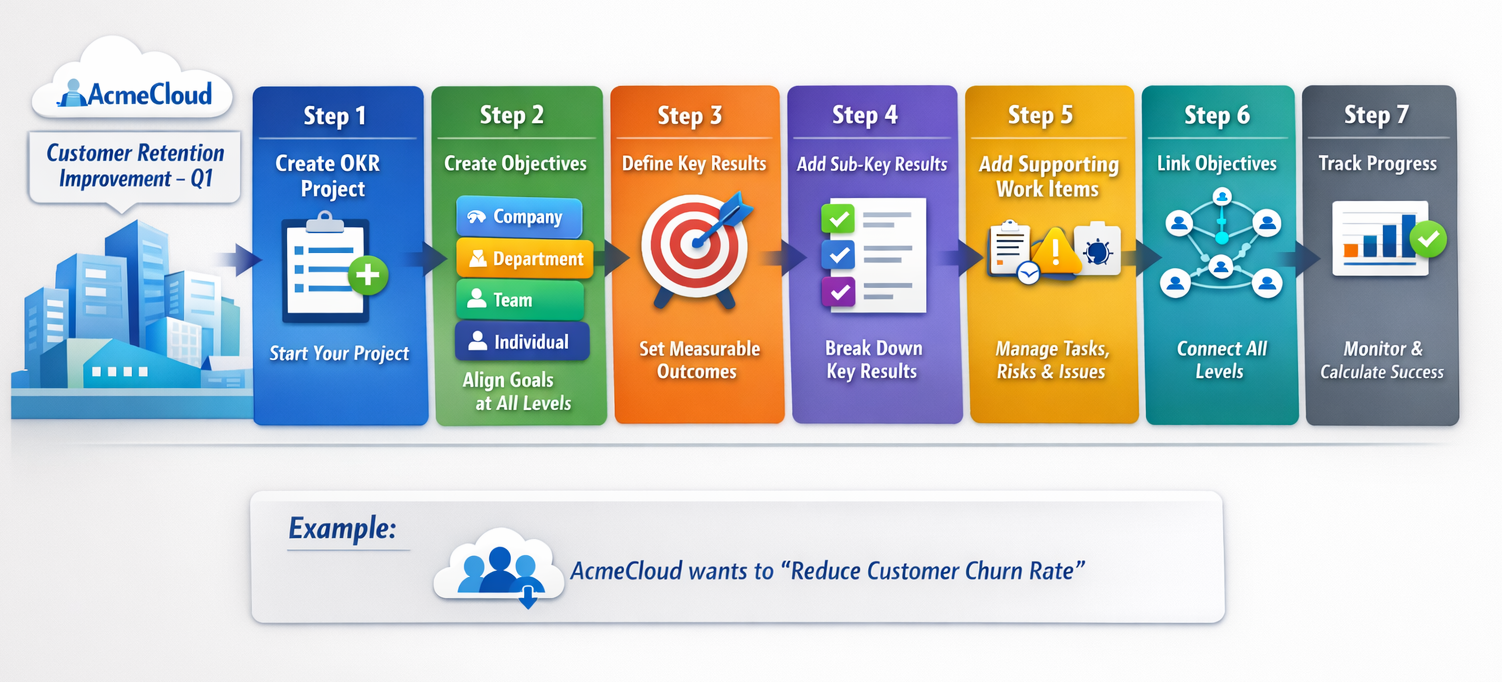
Step 1: Create a Project Using the OKR Template
- You can create a project using the following navigation:
-
- Click the ADD button in the left navigation panel and select the Project option. OR
- In the left navigation panel, expand the My Projects menu and select All Projects. From the All Projects screen, you can click the ADD button to add a project. Learn more from here.
-
- Or, navigate to an existing project that has already been created.
The project is created with predefined OKR workitem types and Work Hub views.
If you want to generate project structure quickly, you can use Intelligent Planning by uploading a planning document. Refer to the Intelligent Planning article for more details.
Step 2: Create Objectives Across All Levels
Note: Creating objectives at every level is optional. You can create only the levels or workitem cards that align with your organizational structure and OKR strategy.
Company Objective
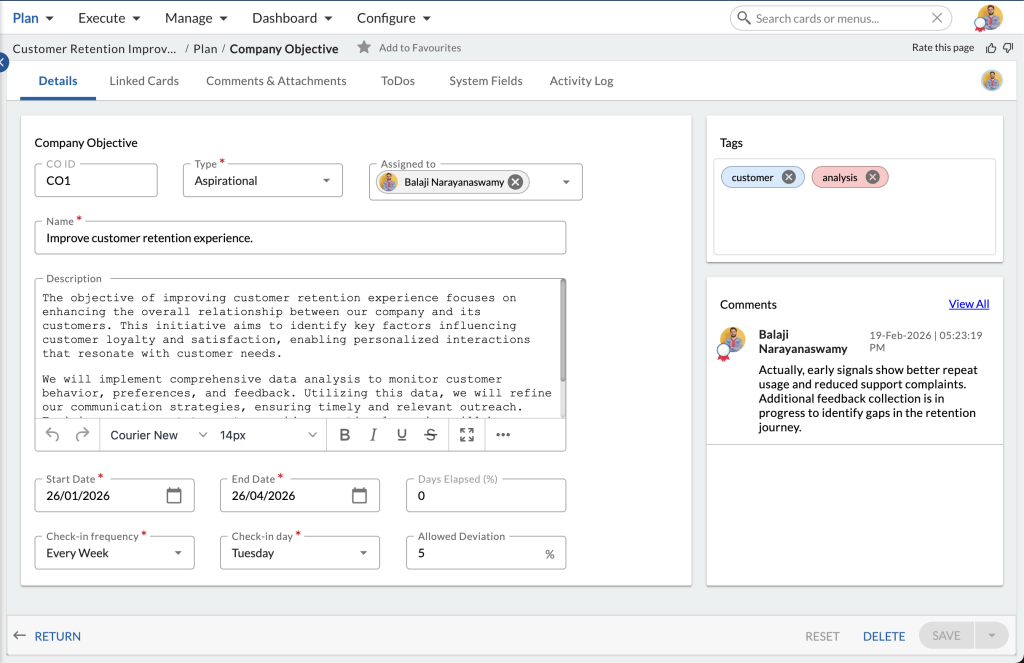
- First, create a Company Objective from Project > Plan > Company Objective. To learn more, click here.
- Company Objectives define the organization’s strategic direction and establish the outcomes that aims to achieve over a defined period of time. These objectives guide all lower-level planning and ensure departments and teams work toward shared priorities.
Example: Improve customer retention experience.
Department Objective
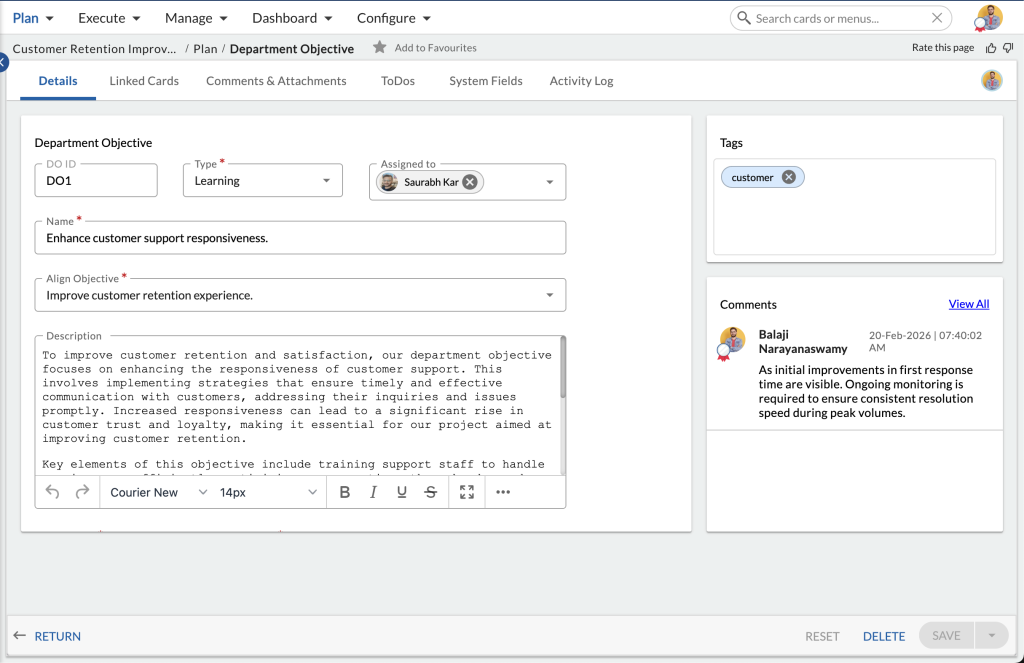
- Create a Department Objective from Project > Plan > Department Objective. To learn more, click here.
- Department Objectives translate company strategy into functional goals that reflect how each department contributes to organizational success. They help focus departmental initiatives and align operational priorities with company outcomes.
Example: Enhance customer support responsiveness.
Team Objective
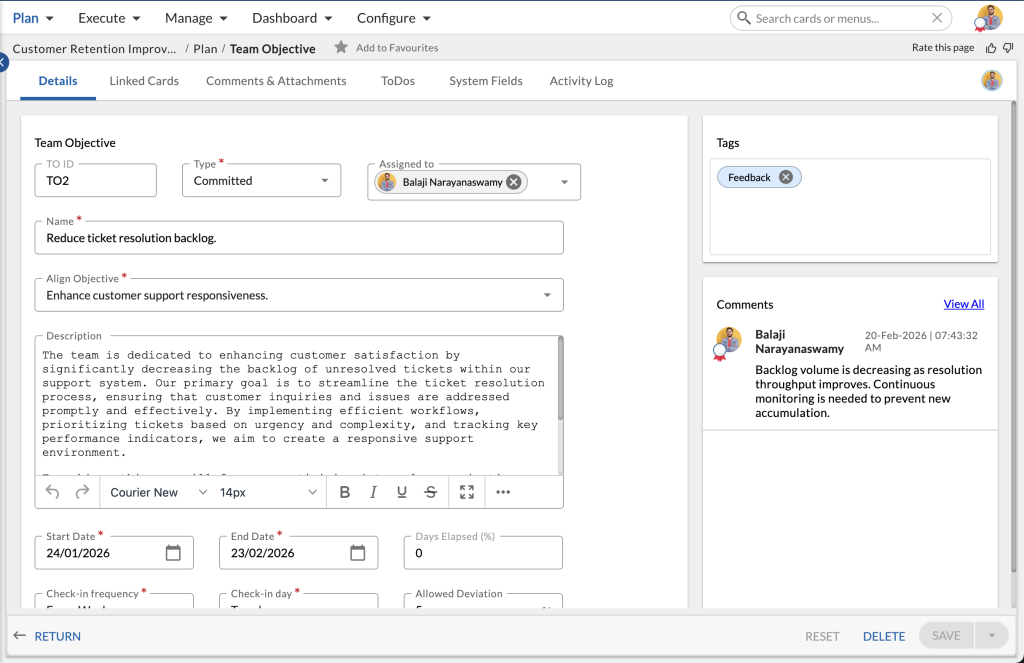
- Create a Team Objective from Project > Plan > Team Objective. To learn more, click here.
- Team Objectives define how a specific team contributes to departmental goals by outlining measurable operational outcomes. They provide clarity on execution responsibilities and enable coordination across team members.
Example: Reduce ticket resolution backlog.
Individual Objective
- Create a Individual Objective from Project > Plan > Individual Objective. To learn more, click here.
- Individual Objectives represent personal accountability by defining measurable contributions from team members. They ensure that daily activities and performance directly support team and departmental goals.Example: Increase daily ticket closure efficiency.
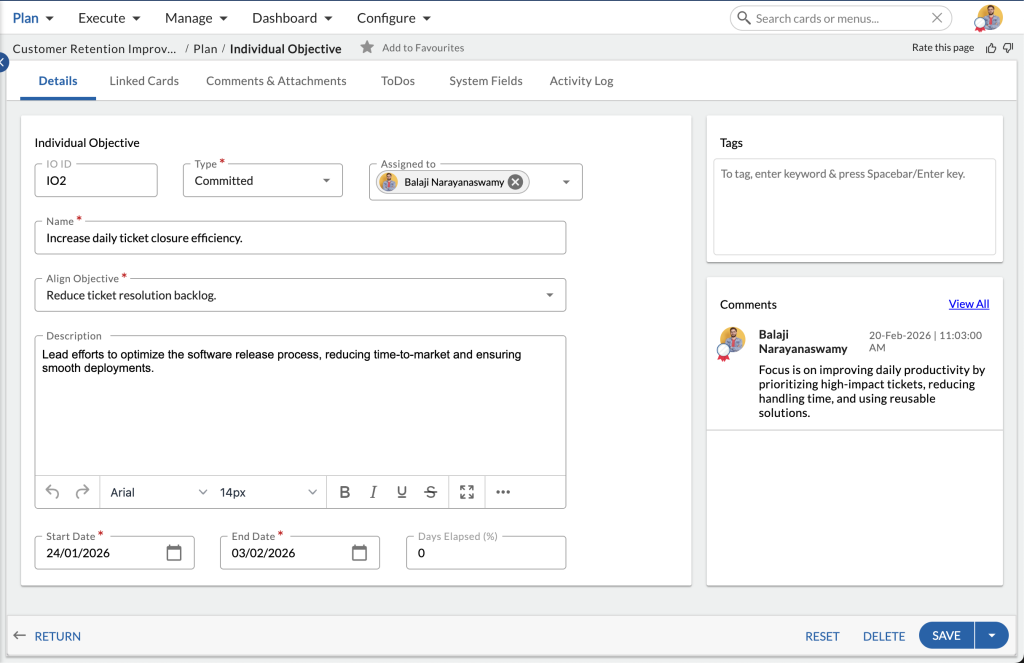
For step-by-step instructions on creating and managing these objectives, refer to Working with Objectives.
Step 3: Create Objectives Key Results
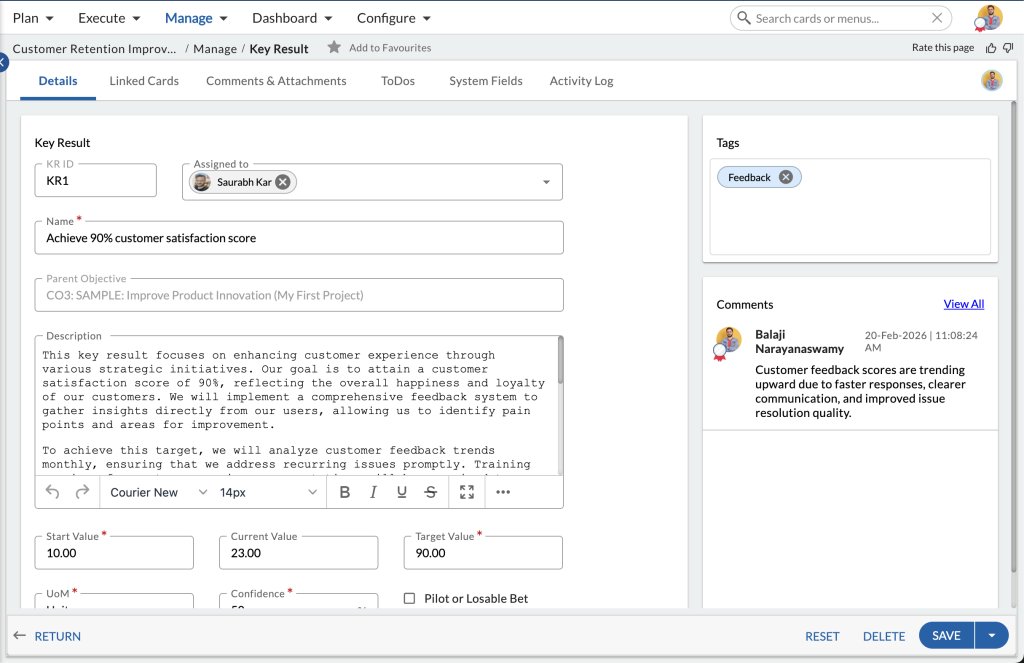
Key Results
- Create a Individual Objective from Project > Manage > Key Result. To learn more, click here.
- Key Results define how objective success is measured using quantifiable outcomes. They convert high-level goals into measurable targets that can be tracked over time and evaluated during review cycles.
- For example, if the objective is to improve customer retention, Key Results may include measurable indicators such as customer satisfaction score, churn rate, or resolution time.Examples:
- Achieve 90% customer satisfaction score
- Reduce resolution time to 24 hours
To learn how to create and configure Key Results, including start, current, and target values, refer to Working with Key Results.
Sub-Key Results
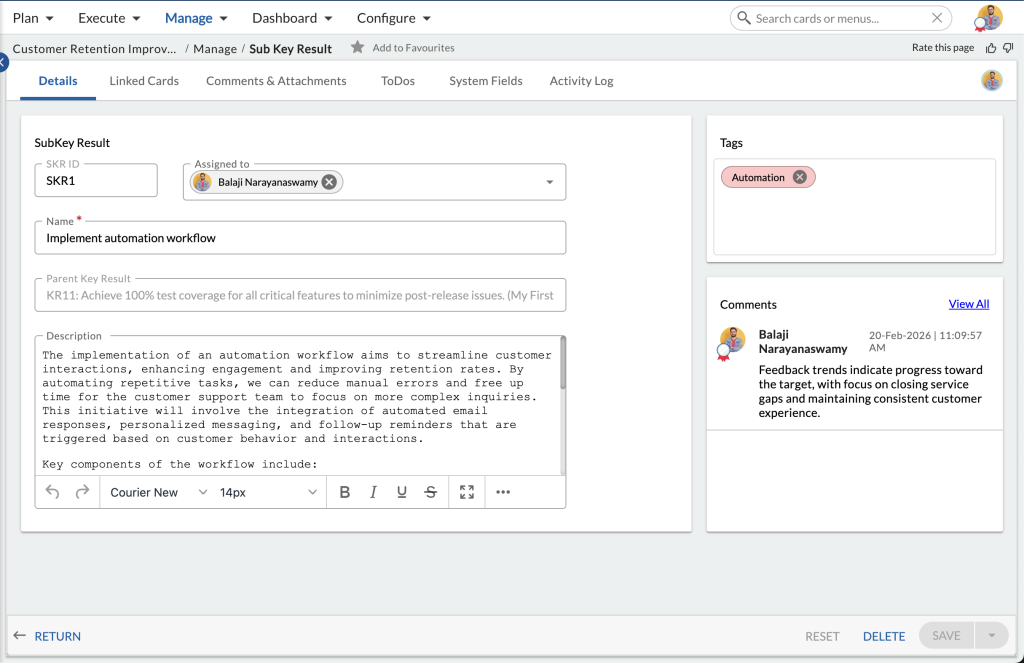
- Create a Individual Objective from Project > Manage > Sub-Key Result. To learn more, click here.
- Sub-Key Results break Key Results into smaller measurable milestones that help track incremental progress. They provide visibility into execution activities and improve accuracy of progress measurement for complex Key Results.Examples:
- Implement automation workflow
- Reduce pending tickets by 30%
To learn how to create Sub-Key Results and link them to Key Results, refer to Working with Sub-Key Results.
Step 4: Add Supporting WorkItems
Supporting work items provide execution context and help monitor activities that influence OKR progress. These work items capture operational tasks, risks, and issues that may impact measurable outcomes.
Examples:
- Action Item — Configure automation workflow
- Risk — Staffing shortage during peak hours
- Issue — CRM integration delay
Supporting work items can be linked to Key Results or Sub-Key Results to provide visibility into execution and potential blockers.
Step 5: Link Objectives and Key Results
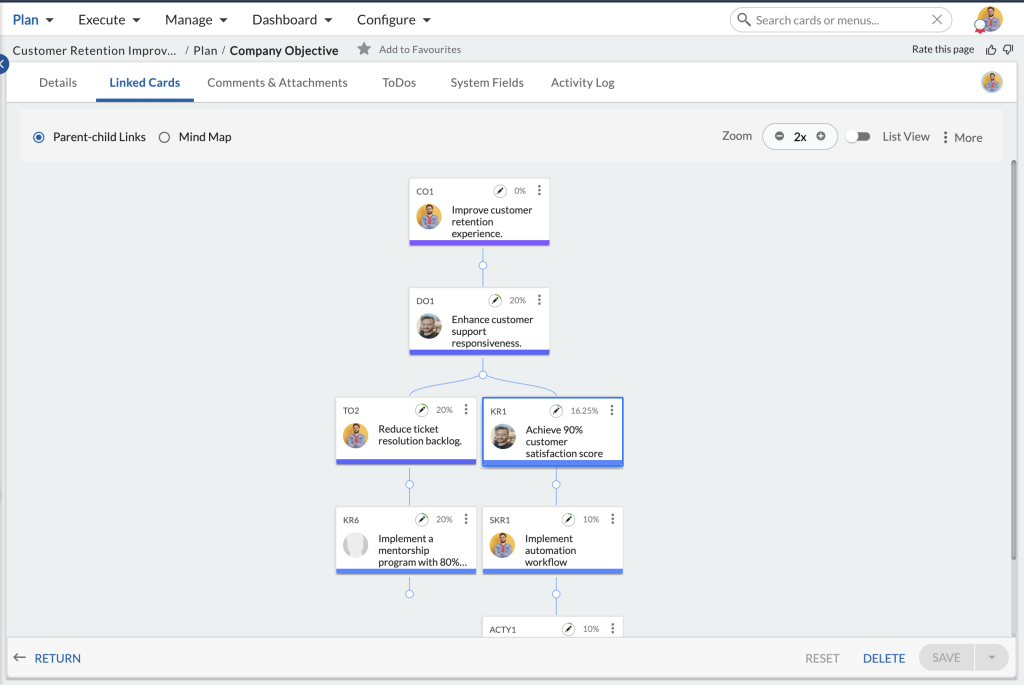
Use the Linked Cards section/tab to establish hierarchy and alignment between work items. Linking ensures that execution activities contribute to measurable outcomes and that measurable outcomes support higher-level objectives. Proper linking enables progress roll-up and ensures visibility into how lower-level execution contributes to strategic goals.
Recommended linking structure:
Company Objective
→ Department Objective
→ Team Objective
→ Individual Objective
→ Key Result
→ Sub-Key Result
→ Supporting work items (Action Items, Risks, Issues)
How Progress Is Calculated
Progress calculation ensures that measurable execution reflects objective achievement and provides visibility into performance across levels.
Key Result Progress
Each Key Result includes Start Value, Current Value, and Target Value fields. Progress is calculated based on how far the current value has moved toward the target value. This approach ensures objective achievement can be evaluated using data rather than assumptions.
Example: Start value = 1, Target value = 10, Current value = 4, & Key Result progress = 40%
Objective Progress
Objective progress is calculated as the average progress of all its Key Results. This approach ensures that objectives reflect aggregated performance across measurable outcomes.
Example: If an objective has Key Results with progress values of 20%, 60%, 40%, and 80%, the objective progress is 50%.
Objective Risk Status
Objective status compares actual progress with expected progress based on elapsed time. If actual progress is more than 10% below expected progress, the objective is flagged as at risk. This helps you to identify delays early and supports corrective action.
Time Elapsed Indicator
The Time Elapsed field shows how much of the defined objective duration has passed. It helps you to evaluate whether progress aligns with planned timelines.
Related Articles
- Overview of the OKR Template – Provides an introduction to the OKR template, including its structure and how it helps create aligned objectives and measurable key results.
-
Working with Objectives in OKR – Explore how to manage objectives, update progress, align goals, and perform common actions.
-
Overview of Objective and Key Results (OKR) – Get a basic understanding of the OKR framework and how objectives and key results support goal tracking.